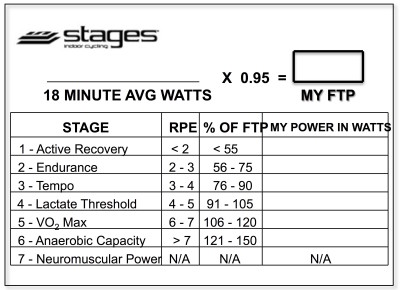
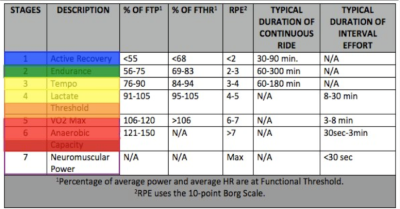
Below, Premium Members can follow links to download all the above media, view and download a printable Class Profile that can be used in class, read a detailed description of the Power Based Training Zones and download a printable Power Postcard.
[wlm_private ‘PRO-Platinum|PRO-Monthly|PRO-Gratis|PRO-Seasonal|Platinum-trial|Monthly-trial|PRO-Military|30-Days-of-PRO|90 Day PRO|Stages-Instructor|Schwinn-Instructor|Instructor-Bonus|28 Day Challenge']
I grew up in a small town about 50 miles north of New York city on the banks of the Hudson River named Highland Falls. One of the unique aspects of my hometown, besides the unparalleled beauty of the Hudson Valley, is the fact that it borders the United States Military Academy at West Point.
For as long as I can remember I have admired and respected those who have committed their lives to the service of our amazing country. My father is a Vietnam veteran and due to the proximity of my hometown to West Point, many of my teachers and coaches were active or retired military. The children of the families stationed at the academy went to my high school, James I. O'Neill. I believe that O'Neill has more graduates go to West Point than any other, non-military, high school in the country. I have also had classmates make the ultimate sacrifice in the defense of our nation during recent wars in the middle east.
I have been lucky enough to be taught, coached, mentored by and friends with some of the finest leaders in our country. I respect their commitment and appreciate their sacrifices to keep my family safe and free.
Every Memorial and Veteran's Day I do my best to honor them with themed indoor cycling class. Below is a recording of the class I taught in honor of the military this past Friday as well as many of the videos I used.
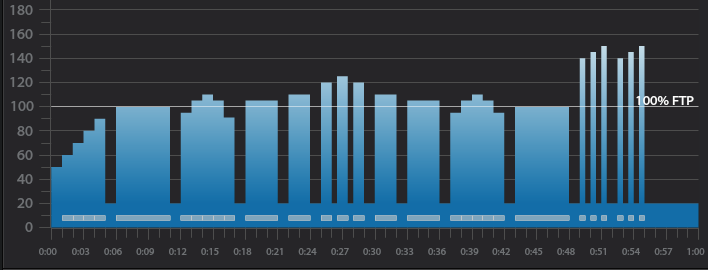
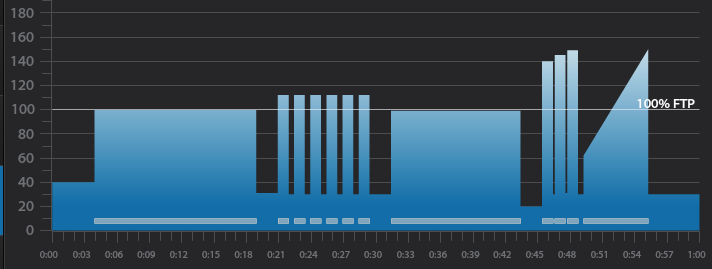
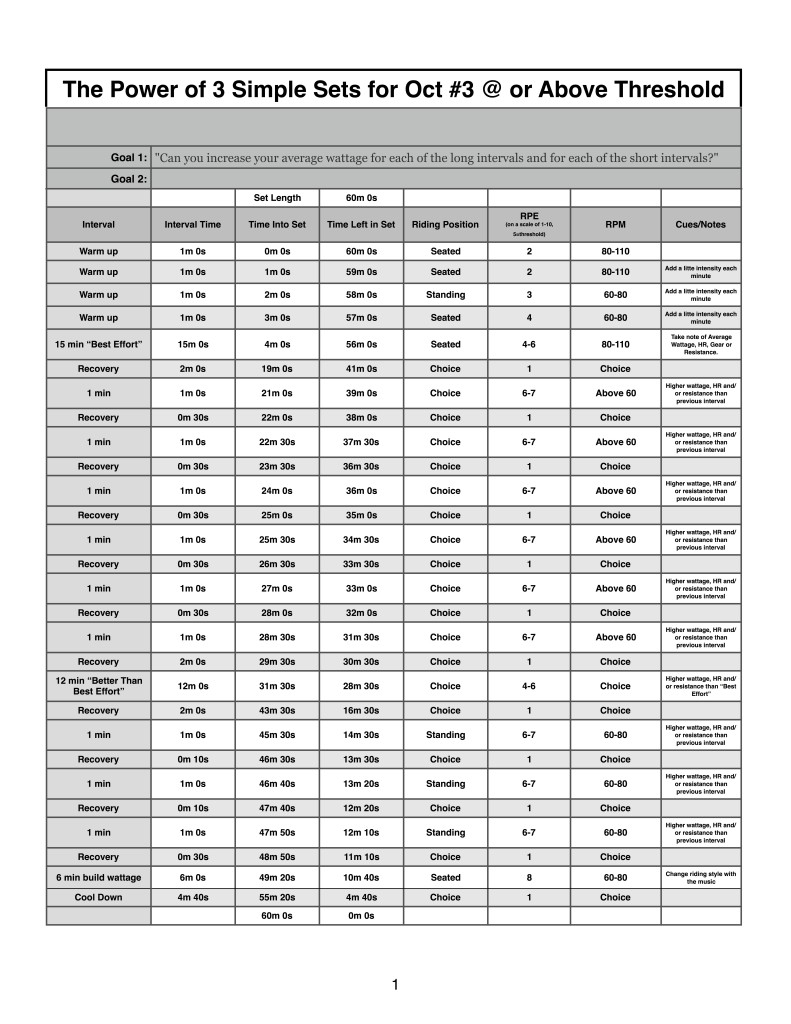
Below you'll find Week 3 of October's @ or Above Threshold Keep it Simple and Progress indoor cycling profile.
Workout Basics:
4 minute warmup
15 minute benchmark ride to find “Maximum Sustainable Wattage”
2 minute recovery
6 x 1 minute interval w/30 sec recovery after each
2 minute recovery
12 minte interval at higher wattage than the 15 minute benchmark
2 minute recovery
3 x 1 minute interval w/10 seconds recovery after each
6 minute interval increasing intensity throughout
4 minute 40 second cool down
Workout Goal:
“Can you increase your average wattage for each of the long intervals and for each of the short intervals?”
4 minute warm up
Slowly and steadily elevate the HR or Wattage to above threshold
No recovery, roll right into the next interval
15 minute “Maximum Sustainable Wattage” Test
Settle into a sustainable intensity, HR or Wattage
Ride for 15 minutes and let the songs dictate the terrain
2 minute recovery
6 x 1 minute w/30 seconds recovery after each interval goals and specifics:
Ride for 1 minute in any position and with an RPM above 60
Complete the every interval with a higher average wattage than the previous interval
30 second recovery or reset
12 minute @ Threshold Ride
Settle into a sustainable intensity, HR or Wattage
Ride for 12 minutes and let the songs dictate the terrain
Try to finish with a higher average wattage than the 15 minute interval
2 minute recovery
3 x 1 minute w/10 second recovery after each goals and specifics:
Ride for 1 minute in any position and with an RPM above 60
Complete the every interval with a higher average wattage than the previous interval
10 second recovery or reset
5 minute interval goals and specifics:
Increase intensity every minute until end of song
Cool Down
[wlm_private ‘PRO-Platinum|PRO-Monthly|PRO-Gratis|PRO-Seasonal|Platinum-trial|Monthly-trial|PRO-Military|30-Days-of-PRO|90 Day PRO|Stages-Instructor|Schwinn-Instructor|Instructor-Bonus|28 Day Challenge'].
Trainer Road Profile (If you're Trainer Road Member join my Team to get this and all profiles)
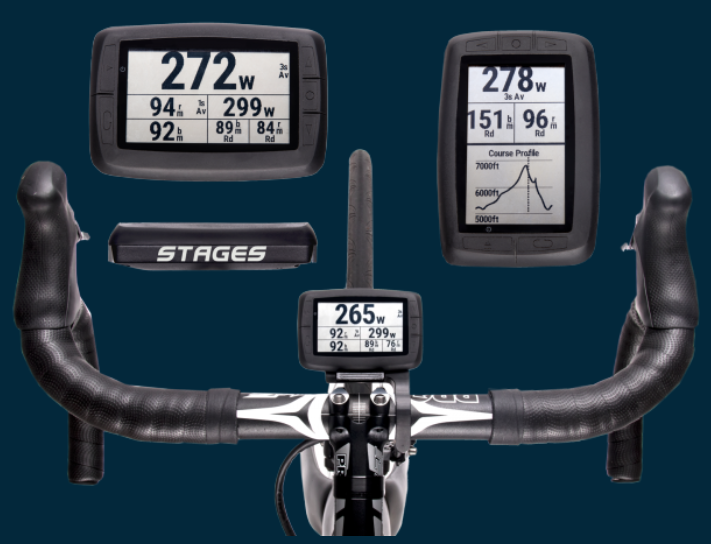
Stages Dash is a power-training-optimized GPS head unit that seamlessly integrates with Stages Link, a new cloud-based training and analytic system that includes custom-tailored coaching and education for cyclists of any ability. Stages Link will be in beta release fall 2016 and Stages Dash will be available early 2017, with a MSRP/RRP of US$399/€399.
“When a rider buys a power meter, they’re looking for something more than a number–they have a goal,” said Pat Warner, SVP of Stages Cycling. “After three years providing power to Team Sky, we’ve realized that athletes from professional to recreational have similar aims: they all want to meet their goals and they need simple guidance and immediate feedback to succeed. This new Stages ecosystem enables all riders to maximize their performance and meet their goals, with a simple and intuitive interface featuring unrivaled customization, and training programs that learn and adapt from each rider’s unique characteristics and achievements. “
Stages Dash
The Stages Dash performance training GPS head unit is specifically designed to coach a rider to his or her best performance. In the five years since launching the Stages Power meter, Stages Cycling has optimized its use with 3rd party cycling computers, but discovered a need for a highly-focused, customizable, training device. Stages Dash answers this unmet need with the delivery of robust Bluetooth and ANT+ connectivity to Stages Power and 3rd party devices, plus GPS capabilities, while introducing new features including the ability to offer guided workout coaching and specific provisions to manage critical training metrics across all devices.
Stages Link
Stages Link is a hub of cloud-based coaching, education, training analysis and equipment management tools, which were developed collaboratively with the analytics experts at Today’s Plan. The system is backed by the industry’s most advanced analysis capabilities currently being used in the professional peloton. Stages Link custom tailors training plans and daily workouts to benefit rider performance and enable performance goals, whether the goal is to simply improve fitness or target specific races over multiple seasons.
Stages Link will also help you quickly set up your Stages Dash and keep tabs on your Stages Power meter, all while being open and compatible with 3rd party devices. Stages Link plan pricing is TBD, however, riders who purchase Stages Power or Stages Dash will receive complementary access for two months.
“We’ve developed a complete experience that will personally guide a rider through the process of living with and meeting their performance goals with power,” said Warner. “This system we’ve developed is an easy and fast way for a rider to achieve their best performance.”
This video gives me goosebumps every time I watch it!
Premium Members can download this Video for free by following the links below:
[wlm_private ‘PRO-Platinum|PRO-Monthly|PRO-Gratis|PRO-Seasonal|Platinum-trial|Monthly-trial|PRO-Military|30-Days-of-PRO|90 Day PRO|Stages-Instructor|Schwinn-Instructor|Instructor-Bonus|28 Day Challenge']
Right Click on the blue underlined link
Select “Download Linked File As”
Select a download location
Once file is completely downloaded, find it in the location you selected
Drag the file into your iTunes or Spotify library OR
Right Click on the file and Select “Open With”
From the drop down menu select “iTunes” or “Spotify”
File should begin playing and is now part of your iTunes or Spotify library
To download the above media on a PC:
Right Click on the blue underlined link
Select “Save Link As”
Select a download location
Once file is completely downloaded, find it in the location you selected
Drag the file into your iTunes or Spotify library OR
Right Click on the file and Select “Open With”
From the drop down menu select “iTunes” or “Spotify”
File should begin playing and is now part of your iTunes or Spotify library
Click here to watch a video on how to download media files from ICI/Pro.