I did get the link to download onto my iPod…..and the damn thing downloaded all my songs on my computer, so I now have all my playlists on the iPod, which is now totally maxed. It seems like whenever I plug in, I automatically hook up to both itunes and Spotify, so there is no room for the nice new ICPRO playlists…
I see a number of questions here so let me start with what I found initially confusing about Spotify:
1) There is a distinct difference, as it relates to Spotify, between an iPod and an iPhone / iPod Touch / iPad. Spotify's service is only available on devices with wireless Internet access. Conventional iPods do not offer wireless so they will not work with Spotify. Here is a list of supported devices.
Where I got confused is if you click on the devices tab in Spotify it shows an option to connect your iPod.
I wish they didn't even show this option. This function will only replicate what iTunes does and will only transfer the existing music you have on your computer. It cannot transfer PRO/Playlists or other music from Spotify to your iPod.
2) The second part of this question goes to a setting in Spotify that decides what music is synced to your wireless device.
Connected your device to the same wireless network as your computer.
Open Spotify on your computer.
Open the Spotify App on your device – it took me two days to figure out I needed to do this 🙁
You should see your device listed like this:
Click on your devises listing and you will see the option to select Sync all music or Manually Sync. You want to select Manual (there isn't any Save button)
Now you can select which tracks or playlists you would like to copy to your device.
I'm here to help you 🙂
Simply send me an email or feel free to call me with questions 612-868-0064 or Skype john.macgowan1
One last thing so I'm clear; Spotify music & PRO/Playlists will only transfer between your computer and device through a wireless connection. There is no other option to connect your device – the USB cord will not work – you must be connected to a wireless network.
Crowdsourcing is the act of outsourcing tasks, traditionally performed by an employee or contractor, to an undefined, large group of people or community (a “crowd”), through an open call. From Wikipedia.
The ICI/PRO Top 210 Indoor Cycling Songs list is an excellent example of crowdsourcing. Over 150 Instructors contributed their favorite songs. We compiled them into one big list that's been enjoyed by thousands* of Indoor Cycling Instructors around the world. *The pdf has been downloaded over 4,000 times. In this instance of crowdsourcing, we all benefited from learning (hearing) different music tastes from other Instructors.
We also benefited in a different way; each song that was submitted had been sampled/reviewed/tested by someone who shares a common expertise with the rest of us. We benefited [saved time] from the efforts of others. I feel very confident that I could take 12-15 random songs from the Top 210 Songs list, spend 10 minutes rearranging them to fit a profile, and have a usable playlist I could play in class. Why? Because the people who suggested each track are passionate Instructors just like me and you. I can believe in each song because I understand who had suggested it.
Music services like iTunes, emusic and Spotify boast of having millions of songs. Do you have time to sample even a tiny fraction of them? Of course not… but what if I combined my efforts with yours? And then we combined our efforts with hundreds of other ICI/PRO members?
This could be the beginning of something very cool 🙂
Enter Collaborative Playlists in Spotify
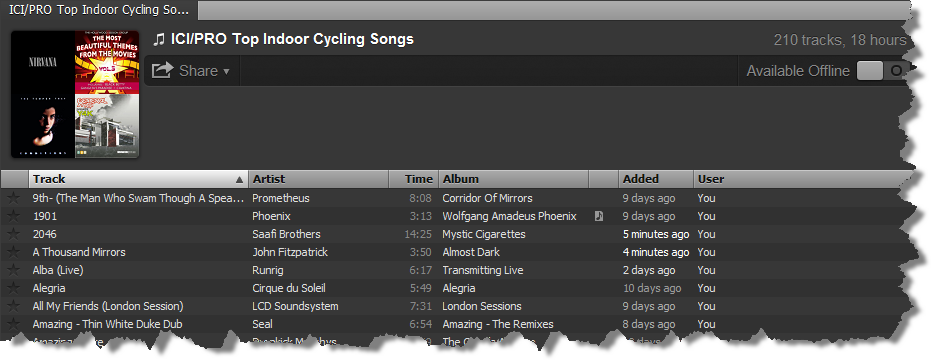
As simple as Right Clicking and Select Collaborative Playlist
You already need to have Spotify installed on your computer or smart phone to open this link. Once you see it on your computer you can add some of your own favorites from when you were in high school.
And like magic, the songs you added will show on here on my computer… and everyone elses 🙂
This week’s FF is nice and long. I love to use it as my opening song. It gives my class members plenty of time to warm up and allows us time to discover both our T1 (and sometimes T2) without a music change. Having a consistent rpm to work with is very helpful, even for those of you lucky enough to work with power/cadence meters on a daily basis! (John and I are still anxiously waiting for that day at our gym).
This singer/songwriter is well known for the “Theme from Shaft”, if you are old enough to remember that movie and song. BUT, that is not the FF….because today’s FF is 9:42 and the rpm is 89. It is “Hyperbolicsyllabicsesquedalymistic”, by Isaac Hayes, off his Hot Buttered Soul vinyl, vintage 1969…CD now of course!
As a side note, I am “playing” with the terminology “threshold discovery” vs. “threshold assessment”. It sounds a bit less clinical and more user friendly.
What do you think??
Here is Isaac Hayes (RIP) and “Hyperbolicsyllabicsesquedalymistic”:
And here's a re-mix of “Hyperbolicsyllabicsesquedalymistic”. Wouldn't that make a great Spelling-Bee word?
I'm excited to hear from all the new and existing ICI/PRO members taking advantage of our new PRO/Playlists by opening premium Spotify accounts.
With anything new there is always a bit of a learning curve. A number of you have submitted some great questions. Many I had myself when I first began using Spotify. I thought it would be helpful if I posted them, along with the answers, here for others to learn from.
Basic questions:
How do I get an invite to the free version of Spotify? I'm all out. You can submit your email and they will send you one in a few days or so.
Do I need to wait if I'm willing to become a Premium subscriber? No – you get in instantly.
What do I need in order to use the PRO/Playlists on my iPhone 0r Android? You need a Premium Spotify account ($9.99pm) and the free Spotify app for your hand held device. Access m.spotify.com with your phone’s browser to download the app… or go here.
Can I get the Podcast and Audio PROfiles on Spotify? No – you will still use iTunes for now.
Can I burn a CD of the PRO/Playlists? No, like any of the other streaming services the music will only play from your computer or device.
So no MixMeister seamless playlists? Correct. I do recommend that you use Spotify to explore and sample music because it's so fast. You can create and experiment with your new playlist before actually purchasing the MP3s.
Accessing the PRO/Playlists
I can't find the PRO/Playlists in Spotify, where are they? PRO/Playlists are only available to ICI/PRO Platinum – Yearly members. Every Audio PROfile includes a link to download that specific PRO/Playlist.
I clicked the link, but I don't see the PRO/Playlist… where did it go? Open Spotify first. Then click the link and go back to Spotify where you will see the PRO/Playlist.
I'm currently a Monthly member, how do I upgrade? You can save money by upgrading here. Then send me an email so we can cancel your monthly subscription.
Using Spotify
I have a Premium Spotify account but my device (iPhone – Android) isn't showing on my Desk Top. Spotify is designed to be used with your wireless network (no wires – very cool) and here is all you need to do:
If you haven't yet, install the appropriate app for your device.
Open the app and log in. If your device and computer are on the same wireless network your devise will show in the sidebar on your desktop. The app must be open on your device before it will show on your computer.
I can't open the Spotify playlists in iTunes? Spotify does not use iTunes. Spotify is completely separate and uses the app on your iPhone or Android phone to play the music.
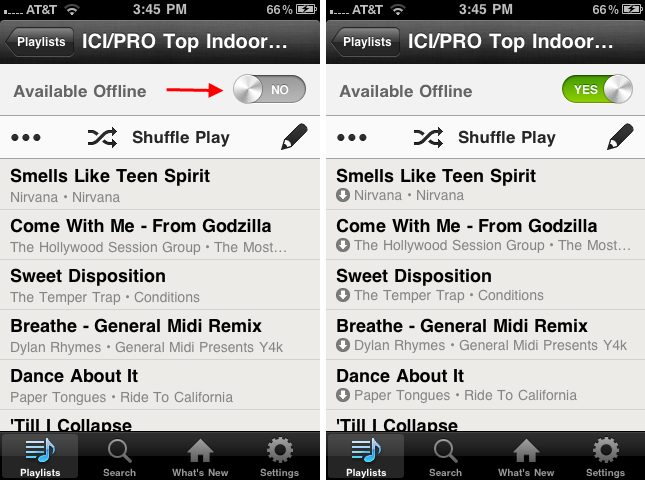
I have my iPhone on Airplane mode when I teach. How do I use the Off-Line mode? You can set any Spotify playlist to Off-Line so all the music files will be on your device. Simply open the playlist you want available Off-Line and change this setting. You will need to wait for everything to download. Spotify displays a green badge showing which playlists you have set to Off-Line.
Leave a comment with any other questions you have.
Our Top Indoor Cycling Class Music lists was a dream of Barbara Hoots and they have become the most popular free items we have ever offered. Now instead of wading through iTunes you can have this list as soon as you join Spotify.
Important note: Spotify only works with a wireless enabled device (iPhone, iPod Touch or Droid phone) using the Spotify App. It is completely separate from iTunes.
Spotify music can not be transferred to a conventional iPod. The iPod function offered in Spotify will only transfer the music you already have on your computer – replacing the normal iTunes function – and in the process it will replace everything you currently have on your iPod.
There are three ways to join Spotify;
Receive an invitation link from a friend – I have a bunch – email me and I will send you one.
Visit this page, submit your email and wait for them to send you an invitation.
No, I don't benefit from you becoming a Spotify Premium Subscriber. I simply see Spotify as the perfect compliment to your ICI/PRO membership. The amount of time you save using PRO/Playlists should easily off-set the $10 a month cost.
One Click – PRO/Playlists – a new feature for ICI/PRO Platinum Yearly Members!
Now 25 Audio PROfiles (and growing) include a link for you to add the complete PRO/Playlists to your computer with just one click! If you choose to join Spotify Premium you can have the complete playlist on your portable devise, ready for class, in less than 5 minutes!
Last month I posted requests for an “Expert” with Spotify, the subscription music service that's now available here in the US. ICI/PRO member Marc Schlosberg contacted me and while not an expert, Marc's an experienced Instructor who's passionate about music. He was as fascinated with Spotify as I was. We traded a bunch of emails as we independently explored Spotify. We both saw the potential for leveraging this service to save busy Instructors a massive amount of time every month.
If you are not yet an ICI/PRO Yearly Member this is a good time to join or upgrade.
Mark and I realized that we had additional questions that only a true expert could answer and we found one in Jer White. Jer runs Pansentient League which is a UK based Blog all about Spotify. Jer joins Marc and me on this Podcast. We discuss many questions you may have about this service and how it can help you become an even better instructor.
NOTE: PRO/Playlists will not be for everyone. Spotify plays from your computer or iPhone/iPod/Droid the same way a playlist from iTunes plays; with gaps between the songs. So if you are someone who prefers to mix their music with MixMeister this may not work for you… except I would suggest you give the free service a try 🙂
Spotify needs a wireless or 3g connection, so it doesn’t work with regular iPods — but it does on an iPod Touch + most smart phones. Here’s the list http://www.spotify.com/us/mobile/overview/
PRO/Playlists will work anywhere Spotify is available; the UK, Finland, France, Netherlands, Norway, Spain and Sweden.
NOTE: The PRO/Playlists are private and can't be found in Spotify. Visit each Audio PROfile post for the link to download each PRO/Playlist.
Listen to the Podcast below for more understanding of PRO/Playlists and Spotify. Let me know your questions and I will do my best to find answers for you 🙂