Amy had already submitted this Friday Favorite before we got our deal to provide you with a FREE track every Friday. I hated to see it go to waste so I thought why not a Hers and Mine this week?
From her: You probably have deducted by now that I like to include entire CD’s for my Friday Favorites, and this FF is no exception. Of course our class members like recognizable tunes, but mine have told me they enjoy hearing the “B” side songs from the bands as well. This Canadian band started playing together in high school and released the Them vs. You vs. Me CD in 2007. The hit single “Paralyzer” will be recognized by most and makes for a great climb at 60 bpm. See the “Paralyzer” video by the band Finger Eleven here:
“Talking to the Walls” (80 bpm), “Gather & Give”(84 bpm), “I’ll Keep Your Memory Vague”(88bpm), “Falling On” (90bpm), “Lost My Way”(90bpm), and “Them vs. You vs. Me”(100bpm) all make for great flat road work. Two very interesting songs to use at 6/8 tempo are: “Change the World”, and “Window Song”. One of these days I'll have to tell you how I use 6/8 tempo music (commonly known as a waltz) to teach the rhythmically challenged in my class ride to the tempo of the song. Have a fabulous week everyone!
And now for something FREE from me 🙂
Am I the only one who's taste in music tends to ebb and flow with the seasons? One minute I'm digging out my old 70's favorites when I have something very intense planned, then endurance season comes around and I find I like to use interesting electronic music for the long steady efforts I have everyone suffering through.
I found this track from a band called Moleman and it fits right into a steady Zone 3 climb. 86 RPM and I can already here myself describing how the road starts upward at the 1:00 mark. Get their cadence locked in and then add the load (friction bikes) or start-em slow with a big gear and accelerate to 86 RPM (magnetic resistance bikes)
Click the orange square for your free download. The buy links are for purchasing additional tracks from this artist Moleman “Escapism” (mp3)
from “Moleman EP” (Velcro City Records)
I did it! My application to the IODA Promonet promotional music distribution network was accepted and now we can provide you with Free Music Downloads every Friday!
This week it's all about the drums with a powerful track from Cult of Youth. If you are looking for a track to take your class (if they're ready for it) to 124 RPM like Tom Scotto shows in the Cadence Builder video, this may be the one you are looking for. It will also work well as a steady climb at 62 RPM.
To download the song click the orange square or “Right Click” and select “Save Link As” to decide where on your computer it saves. If your settings in iTunes are correct, click the song link after its downloaded and it should open and be saved in your iTunes library.
Do you have a specific computer related question? Please let me know and I will try to answer it for you. If you are having a problem, rest assured that you are not alone and I'm here to help 🙂
Music is such an important part of our classes and yet I can find very little information available about what can be done to improve the quality of the sound in the studios where we teach.
That scarcity of info ends starting today with this article, which is cross posted over at www.cyclingstudio.org
As an indoor cycling studio designer, I’m often asked how to prevent class music from pumping through the walls and disturbing businesses next door. After interviewing many reputable sound control companies, Ryan Gibbons with Auralex wowed me with his brilliance and agreed to submit an article that would outline acoustical treatment options that studio owners can implement to ensure a happy environment for all. If you’re considering opening a studio, read this first!
Total Sound Control
By Ryan Gibbons, Sound Applications Specialist
As we all know, indoor cycling classrooms can present an array of acoustical issues for both studio owners and customers alike. Loud music levels and equipment noise can translate to a harsh acoustical environment inside the studio and can disturb neighboring businesses which ultimately leads to lower profits. Obviously, having happy customers and neighbors is essential to a successful business.
A question we often hear at Auralex is, “If I put some of your foam on the walls, will it keep my neighbors from hearing my music?” The answer is unfortunately a qualified “No.” We refer to the limiting of transmission of sound between structures as “isolation.” Properly isolating a space requires construction materials and would likely require a remodel of an existing space. This can be a time-consuming and sometimes expensive process; however, if done correctly it can be well worth the effort.
From our experience, the most efficient way to eliminate room-to-room sound transmission is to build what we call a “room within a room.” This involves two steps. First, decoupling (acoustically separating) the new structure from the existing structure is important to eliminate structure-borne vibrations. Generally these vibrations are caused by low-frequencies travelling through the walls, ceiling, and floor. This can translate to your attached neighbors as “boomy.” Decoupling the structure can help control those vibrations, thus reducing the amount of noise people in the other structures hear. Next, we suggest placing mass (drywall/sheetrock and insulation) between the existing structures to help control higher frequencies from travelling through the existing walls. Accomplishing these two steps should help improve your relationship with your neighbors considerably.
Auralex has a publication on the web called “Acoustics 101.” This is a great resource that can help guide you or your general contractor through the proper construction to isolate your space. It provides detailed drawings on the topics discussed, and is easy to read and understand. You can find this publication on the web at www.acoustics101.com. Also see our page, Bothering Your Neighbors?for helpful diagrams and audio clips.
When it comes to interior acoustics, there are many solutions for these dilemmas and a wide array of products designed to help you reach a comfortable acoustic environment. The two most commonly-used sound absorption materials are high-quality acoustic foam and specialized acoustic fiberglass (no, not the stuff you buy at the hardware store). For brevity, at times we’ll generically call acoustic foam just plain “foam,” although there are very dramatic differences in cell structure and density between acoustic foam and the thousands of other types we could manufacture. (This is why you can’t just run down to the local SuperMart and buy mattress pads with which to acoustically treat your studio.)
In addition to the two most popular types of acoustic absorption materials, a Class A, fire resistant, natural fiber panel called SonoFiber. SonoFiber acoustic panels are the perfect solution for those budget-conscious projects requiring a Class A fire rating without the aesthetic demands of designer treatments such as fabric-covered panels.
Acoustic sound absorption foam is well-suited to alleviate slap and flutter echo, the two most common problems in rooms not specifically designed for music recording and performance. In fact, foam can turn even the most cavernous warehouse or gymnasium into a suitable acoustic environment.
Feel free to contact me if you have any specific questions about your studio, and I’ll be happy to provide any assistance, suggestions, or solutions. You can contact me at Aurale via email at auralexinfo@auralex.com or by calling 1.800.959.3343.
I have an interview scheduled with Ryan on Thursday March 24th. If you have a question you would like me to ask him send it to john@indoorcycleinstructor.com by the end of Wednesday the 23rd.
Honestly, pretty much anything that came across my headphones today would be enjoyable because it is 50 degrees and sunny here in Minneapolis on St. Patrick’s Day. But, I love this Italian American instrumental rock guitarist and multi-instrumentalist with multiple Grammy Award nominations. Tom Scotto and Gene Nacey from Cycling Fusion like to use an instrumental track in the warm up. I think this is a great idea. It gives us an opportunity to coach through the necessary introductory information without having to compete with lyrics. Joe Satriani ‘s, “Is There Love In Space?” CD, released in 2004, has 10 not only usable, but really great songs on it. “Up In Flames”, with a cadence of 90 will get your class in the mood to kick some butt if you have anaerobic threshold intervals planned for them. “Is There Love In Space?” is a bit more mellow, but still has a cadence of 90 and I use it to start one of my aerobic base building classes. “Just Look Up”, cadence 88 is a nice last flat. It is nice and mellow. “Searching” is 10 minutes long and has a cadence of 80. I love it for load building. I have my class really focus on holding their cadence and add a bit of load each minute and watch their heart rate climb from mid zone two up to threshold by the time the song ends. Check out this video of Joe live in Tokyo doing “Searching”
“I Like The Rain” cadence 64, has some funky vocals in it. “Souls of Distortion”, cadence 64, “If I Could Fly”, cadence 68, “Lifestyle”, cadence 68, “Hands In The Air”, cadence 80 and “Gnaahh”, cadence 64 are all good, with different flavors for different approaches to climbing. Watch the vocals on “Ghaahh” though. A bit racy… Enjoy!
I was rear ended this past January and my beloved Acura TL was totaled. I only had one problem with this car….the CD player didn’t work. Plus my oldest daughter had blown out the stereo speakers, so any volume above 2 put out a very annoying buzzing sound. You get the picture. And, if you are anything like me, music is on your mind a lot as we are always looking for new, cool ,different, hip exciting music for our classes.
Well, I got a new (used) Acura TL. Very cool…6 speed manual transmission, faster than a speeding bullet, etc., etc., BUT the coolest thing is the XM radio that the previous owner was nice enough to extend for me. OMG!!!!! If you do not have it, but can activate it in your vehicle, DO IT! I am discovering new bands, new genres, new tunes by bands I had forgotten about, old tunes from bands I had never heard of and artists I didn’t even know existed. All while just JDA – Just Driving Around. Rock stations, current stations, country, drum, Christian, dance, R&B, big band, electronica, blues stations…you name it, and no commercials. Best of all, if you have a smart phone and hear something you like, just “Shazam” it and all the song information is saved so you can download it later when you are safely not behind the wheel. XM Radios Starting at $29.99
I am so excited because my music library is growing like crazy and just tickled to be sharing my new finds with you in the “Friday Favorites” so stay tuned!
I believe in giving credit where credit is due and I first heard of this group from Tom Scotto. We were together in Colorado in December for the Cycling Fusion Summit Conference. Tom was graciously showing us how he put together his play lists and I was furiously jotting down his bands of choice!
With play times between 4:26 and 7:25 and BPM ranging from 64 to 92, every single track is usable and wonderful for class. I especially like this CD because there are three great flat road selections. The group is The Crystal Method and this week’s CD is Vegas. The flat road tracks are: “Bad Stone” 5:10, BPM 90, “High Roller” 5:30 BPM 90 (my favorite) and “Trip Like I Do” 7:34, BPM 92. “Comin’ Back” at 5:39 and a cadence of 72 is my favorite climb tune on this CD with a cool vocals and a nice out of the saddle feeling at 1:30.
Check out the YouTube video of the re-release of the 1997 “Comin” Back” with Trixie Reiss on vocals:
iTunes Quick Tip – Sharing iTunes Music Between Computers
Amy has a bunch of music on her computer and I do as well. In the past to move music from her computer to mine I needed to burn a CD or use an external hard drive to transfer music. But not any more.
If you have multiple computers, on the same network (connected via wireless or Lan hard-wired), iTunes will let you share music between them in two ways;
You can play music from another computer.
You can transfer music from another computer.
The difference is whether or not the computers share the same Apple ID.
Computers on the same network, but with different Apple IDs, can listen to each others music.
Computers on the same network with the same Apple ID can listen and transfer music between them.
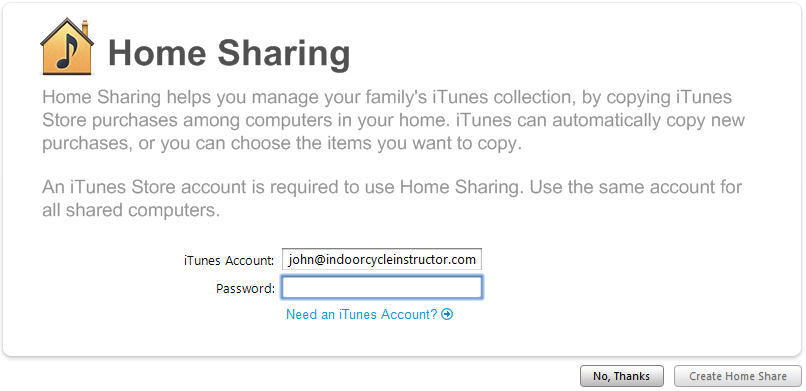
There's a good chance you already have an Apple ID – that's what you (or your kids) use when you purchase music from the iTunes store. To turn on Home Sharing go to the Advanced Tab > click on Turn on home sharing. You will see a page that looks like this where you need to enter your User Name and Password and then click Create Home Share:
With both computers on and connected to the Internet you will see a new listing for the Shared Library:
Click on the Shared Library to see all the music. Clicking on a track listing will only play it. To transfer and save the song to your computer you can highlight one or more songs and drag it to your Library or highlight and click the Import button in the lower right hand corner. I prefer to create a separate playlist and drag selected tracks into it.
P. S. Don't tell Amy that I have been stealing her music 🙂



 Moleman
 “Escapism” (mp3)
 Buy at iTunes Music Store
 Buy at eMusic Delivery
 More On This Album