
by John | Jan 19, 2013 | Instructor Tech Help
If you're a frustrated iPad/iPhone user, tired of seeing this notice, help is on the way!
September 2013 Update: This is now fixed… but you may have already discovered that 🙂

… but Safari doesn't support Flash… so now what?
You may have tried to download the latest version of Flash only to see…

Word is that you can thank the late Steve Jobs for why you can't listen to the Podcast, using the embedded player on page, with an Apple portable device. Right or wrong, Apple Jobs decided not to include support for what's called Flash in the Safari internet browser that was included with your iPad/iPhone.
Without getting super technical, up until recently most media content (audio & video) worked using software called Flash. Those little YouTube videos on the right of this article are Flash players. But like everything else, things improve and change. The latest and greatest new media player uses HTML5. It's thought that HTML5 will replace Flash at some point, but there's a modern day BETA vs. VHS debate going on that involves multiple players who don't have history of playing nice with each other; Apple, Google and Microsoft.
Understanding that VHS won the day over BETA due to mass-market acceptance, Apple Jobs choose to force the issue by removing Flash support from software that runs your Apple portable devise – but kept Flash enabled on Apple computers. That's why you can still listen using the Podcast player, when you're using your Mac Laptop.
Potential solutions for you.
- Install the Apple Podcast App if you haven't already. Non members can use it to subscribe to the free podcast and ICI/PRO members can use it to subscribe to their Super Secret iTunes Feed to access everything we publish. You can find a short tutorial here.
- Switch to a different Internet Browser – The Puffin Browser which supports Flash – NOTE: the free version only supports Flash for 14 days. The paid version is $2.99

My iPhone running Puffin plays the Podcast just fine 🙂
I've been steadily growing more and more frustrated with Apple. It seems they are getting a little too big for their britches – like the Microsoft of old. The new iTunes is a joke (it doesn't even size itself properly to fit my computer screen = I can't see the scroll bar) and don't get me started on Apple's pathetic maps app – dump it and install the Google Maps app so you're not completely lost tomorrow.
All of us PC users learned long ago that Internet Explorer is the worst browser on the planet and have switched to either Chrome or FireFox. Explorer is the root of a common problem opening Spotify playlists on PCs. This article explains that the solution is switching to chrome or FireFox.
I have a few iPad owners trying Puffin and will report in with their experiences ASAP.
by John | Nov 11, 2012 | Best Practices, Instructor Tech Help

I've been a loyal Carbonite customer since 2008 and see having a system for regular, daily backups of your computer as a Best Practice. They've saved me from multiple Hard Drive failures where I would have lost everything. All my music, all my files and thousands of pictures remain safe and recovering every single file, after you drop your laptop on the kitchen floor, takes just a few clicks 🙂
And I mean every thing. Carbonite runs every evening, backing up every new or changed file, so when you're a little blurry at 5:00am and you hear a very loud crash, followed by a strange grinding noise, you don't have to freak out. You've got a secure backup that you can access from another computer until your's is fixed.
I just got an email from them with what has to be the best deal they've ever offered. Carbonite is running a refer a friend program. Sign up today ($59.00 a year) and you and your friend (that's me) receive a $20.00 gift card from Amazon.com
Once you are a customer you can become the “friend” and get a $20.00 gift card for everyone you refer. Play it right and you could actually make money on the deal!
Options for Mac and PC – Signup here.
by John | Oct 23, 2012 | Instructor Tech Help, Instructor Training, Spotify
Why isn't there a low cost handheld device just for Spotify? There isn't – I checked. But why not? OK, that's a dumb question. With about a Gazillion iPhones/iPads/iPod Touches and Android devices in the market already, why would a company create a device that's specifically designed for Spotify? But not every Indoor Cycling Instructor owns a Smartphone. Those that don't may not because of the costly data plan, they have a company issued phone with use restrictions or they just have no interest in becoming addicted to 24/7 technology like the rest of us 🙁
I get emails from these Instructors frequently and see posts on Pedal-On.com asking the same question; I'd love to use Spotify to deliver my class music… does it work on my iPod Nano? The answer is no by the way. So I'm thinking there's a potential market for a low cost, portable device that runs the Spotify App, without the added cost of a $40.00 a month data plan. Not finding one… I made one. I'm calling it the SpotiPhone and you can have your own for about $75.00 + $9.95 a month for Spotify Premium.

Ebay has thousands of these Spotiphones for sale.
Well I didn't actually make one… I went to Ebay and found that there are thousands of used iPhone 3G's for sale. A number of sellers with high ratings offer returns (so you can be sure the thing works) and I started placing bids on auctions that were ending soon. I had watched a few and saw that most were selling for around $75.00 so I set my maximum at so the total with shipping wouldn't exceed $80.00. I lost a few by a dollar or two, but won the third. Three days later I had my 8 GB Spotiphone. I logged in with my Apple ID and downloaded Spotify from the App store – be sure to select the older version (4.x) of Spotify. Once I entered my Facebook ID everything appeared; all my music and playlists 🙂 A couple of things to watch out for that I learned through the process:
- I limited my bidding to the smallest capacity – 8GB because I was only going to use Spotify so there was no reason for anything larger = more expensive.
- iPhone 3G's have a removeable SIM card that needs to be present for anything to work. As it turned out, the person I bought from had been using the iPhone as an iPod Touch so it was good to go. I'd contact the seller to see if it's included before bidding on it.
- If you end up without a SIM card they are available on Ebay for about $5 and look pretty easy to install.
- The iPhone 3G will not run the latest version of Spotify (5.x) – which includes the Gapless Playback and Crossfade options.
- A new iPod Touch will run Spotify (5.x) and of course you could easily run down to your local Apple store and purchase one or order one on line. It would do the same thing, but it would cost you another $130.00 or so + shipping.
I'm not sure if I'm actually going to use my SpotiPhone. It was more an experiment to see if I could find a low cost player for Spotify. I may hang on to it as a spare… or through it back on Ebay. If you'd be interested in buying it from me let me know.
by John | Sep 26, 2012 | Instructor Tech Help, Instructor Training, Spotify

Image from houstonpress.com – click to learn 5 reasons not to use IE… beyond that it simply sucks.
After receiving and answering what seems like hundreds of questions that are similar to Kristi's below, I'm offering a radical solution that I feel will dramatically improve your experience using Spotify.
Hi John! Thank you for your quick response…I’m just now finding time to get back to my “spotify training” 🙂
When I click on the first link in your email below, an Internet Explorer dialog box opens and asks if I want to allow the application to open, to which I click on Allow (I’ve also tried clicking on Cancel, and have the same result). Then an error dialog box opens that says : “spotify: user:johnmac11:playlist: {followed by lots of letters and numbers}. Unspecified error” and then another error dialog box opens that says: “Unable to open this helper application for spotify: user:johnmac11:playlist: {followed by lots of letters and numbers}. The protocol specified in this address is not valid. Make sure the address is correct, and try again.”
When I clicked on the second link in your email, the playlist actually opened in spotify!
I’ve never been able to open the link from the ICI/PRO website. I thought it wouldn’t work because I didn’t have the premium spotify account, but now I have a premium account so I know that’s not the issue.
Thank you for your help!!
Kristi
Dump IE (Internet Explorer)
That's it. That's my radical solution.
IMO: IE is vastly inferior to Google's Chrome or Mozilla's Firefox Internet browsers for PC users and the root of many of the problems Kristi describes above. Those links take you to where you can download either (or both) on to your machine.
I primarily use Chrome and never experience any problems opening the links to Spotify playlists. Amy has used Firefox for years (before Chrome existed) and there's no reason for her to switch.
IE comes with any new PC and I've talked with a number of Instructors who were under the impression that they needed to use IE – not true!
BUT WHAT ABOUT ALL MY FAVORITES AND SAVED PASSWORDS JOHN?
Not to worry. Once either has been installed, both will ask you if you want to import all of your IE settings > you'll say yes and that should end your relationship with IE > which will bring a big smile to my face 🙂
Sure it may take you a little while to get used to a new browser, but it will be worth it.
DO IT NOW! If not for yourself… then do it for me. Download and install Google's Chrome or Mozilla's Firefox today.
If you are a Mac user I would encourage you to try either browser as an alternative to Safari – although Mac users report that they are very satisfied with Safari. One advantage to using Chrome – If you are a big user of Google's suite of products like Gmail, Google Docs or Google+, Chrome ties very tightly together with their other software.
by John | Jun 5, 2012 | Instructor Tech Help, Instructor Training
At times I'm greeted by some very foul music. Foul to the point where I find myself ejecting the CD from my car's stereo. Next I lightly “sand” the offensive CD against the garage floor (ensuring it becomes unusable) before returning the CD to it's jacket. Then I'll leave a little note, expressing my displeasure and disappointment over my daughter's choice of music 🙁
But this morning, as I drove to my 5:45 class, was very different! “I really like this… I wonder who it is?” Ejecting the CD provided no clue as there wasn't anything written on it. A quick text to daughter Carly returned; “IDK – marley left it Shazam it.”

Answered my question in 10 seconds
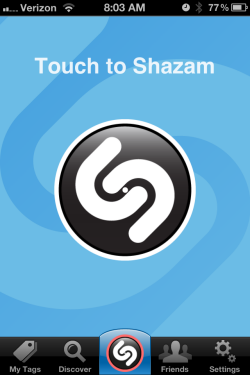
Shazam is a free smart phone App (iPhone and Droids) that will listen to a song playing and tell you the name, artist and give you the option to purchase the song from iTunes. There's also a little play button that you can use to listen to the iTunes sample to confirm Shazam correctly identified the song – which by my estimation is always correct.
With your device connected to a wireless system go to the App store and download Shazam. It's free and the basic functionality is all most people will need; turn it on, hit the center button, Shazam listens and gives you the song info.
Spotify Premium subscribers, may want to upgrade to Encore for $3.99 a year. Encore give you the option to Tag tracks you've identified and play them or create Artist Stations, using Spotify or Pandora on your device. I tried to purchase the upgrade. After correctly entering my Apple ID a half dozen times and reconfirming my payment details, everything failed… I didn't try again 🙁
As with many other Apps, they will try and take over your life… if you let them. When you first install the App you'll be asked to approve “Push Notifications” which allow Shazam to alert you to something they feel is really important. My personal choice is to turn these OFF.

Minimize distractions by turning all these off!

Tell your friends on Facebook
[plulz_social_like width=”350″ send=”false” font=”arial” action=”like” layout=”standard” faces=”false” ]
by John | May 3, 2012 | Instructor Tech Help, Instructor Training

One of 9 hacked emails I received today.
If you are using any free email service; Gmail, Hotmail, Yahoo, AOL, etc… please go in and change the password NOW!
I've posted about all the SPAM emails, from hacked email accounts, I receive in past posts. I get so many because my email address is in the contact lists of thousands of Instructors receiving our email newsletter.
My request isn't about me… although I am getting tired of responding to dozens of these every week. I feel it's my responsibility to “Reply to All”, alerting the owner of the email address and everyone who was contacted with the hacked email.
This is about protecting you! If your email is hacked they know everything about you 🙁 Where you work, where you bank, what stores you have accounts, everything.
And about protecting your friends who, seeing what looks like an innocent email from you, click the link and install some malicious software on their computer.
That software could potentially lead to the theft of your friend's identity or worse, the stealing of their bank passwords which will allow a hacker to withdraw all their money.
It's also about protecting the future deliverability of emails sent by you. All the big email providers work to prevent SPAM. Having your email address identified as one connected with SPAM is a quick path to email purgatory (SPAM folder) and your important message never getting read.
OK John, but what should I change it to?
There has been lots discussions around what makes the perfect password. But I'm going to guess that the passwords of the nine hacked emails I saw today were simply one word… so even a small change will make a huge improvement in preventing it's discovery.
I realize that the frustration of remembering your passwords are in large part the reason why people use simple, easy to remember words.
A suggestion is to take your existing password (if it has 8 or more letters) and add one capital letter and two special characters.
So “password” would be greatly improved by changing it to “@Password!”
Another option would be to combine three easy to remember words, separated by special characters. The three girls in my life are Amy, Abby and Carly so a reasonably secure password could be Amy&Abby&Carly. You can use your first name, your dog's name and your city or any other three words and special character combination.
One more suggestion – You may have heard you should have a different password for every website – unrealistic. But I personally use a few different passwords, depending on the type of website where I have a user name.
- One simple password for sites that don't matter (No email or financial data) Here's where you can use “password” 🙂
- One password for important sites (No financial data)
- A complex password for each website that has financial, medical or credit data. Create a prefix password and add the name of the institution at the end like; @Password!=visa or @Password!=bank or @Password!=401k
The objective is to prevent a hacker, who's gained access to your hotmail account from cleaning out your checking account because you used the same password in both places.
It's really a big deal so stop everything and change your email password NOW – before you get an email from me saying it's too late, followed by an overdraft (email) notice from your bank.
