I'm covered for another year of daily automatic file backup.
Did your computer backup automatically last night?
How about yesterday?
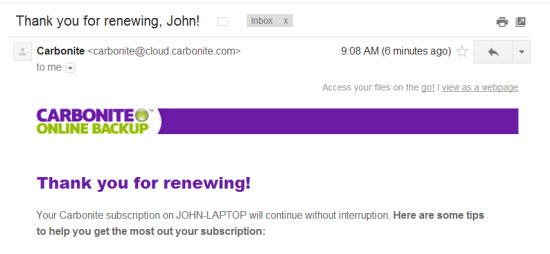
As a Best Practice mine does every day. I need to do absolutely nothing. Every night Carbonite looks at my computer and makes a backup copy of any new files + any revised/changed files – I don't even have to remember to renew… Carbonite does that automatically as well. I grabbed the screenshot above, from the email confirmation I received this morning from Carbonite. After multiple failures of my hard drive (where I would have lost EVERYTHING) I consider this is the best $5.00 I spend each and every month.
With all of the valuable files you have on your computer, I can't believe how anyone would risk losing everything, if your computer was lost, stolen or you drop it on the floor like I tend to do 🙁
Just for fun, take a few moments and look through all of the files you have stored on your hard drive; all your local iTunes music files, years of digital pictures, home movies and tax/financial files. Much of my life is stored below this keyboard – I can't afford to lose any of it.
It's super easy to setup and there are options for Mac's and PC's.
P.S. You've no doubt heard about the CRYPTOLOCKER and how it can hijack all of your computer files and hold them for ransom. The only possible solution when this occurs, is to completely reformat your hard drive – wiping out everything and then restoring from a clean backup… if you have one.
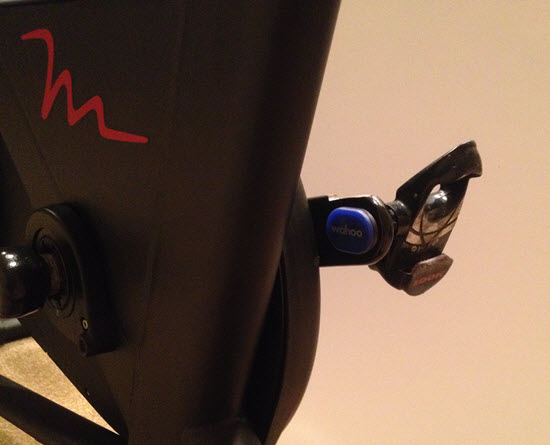
Wahoo BLE & ANT+ cadence sensor easily attaches to either crank arm and doesn't require any magnet or second sensor.
We talk a lot about the new Indoor Cycles with consoles that display a rider's performance data; Power /watts, RPM, distance, calories. Training with Power is fabulous if your club or studio as invested bikes recently. It's even more fabulous when all of that data is connected to a display training system like what's offered from Performance IQ or Spivi. Either system really adds to the fun factor, while delivering true performance data directly into each participant's email box – an awesome convergence of Keeping It Fun & Indoor Cycling 2.0 🙂
But is there an option to bringing big screen display training to your club or studio using conventional Indoor Cycles?
Absolutely and around 90% of the investment you'll make today will carry over to when you do finally upgrade to Power bikes – assuming you do of course.
My assumption is based on the fact that if you are riding a conventional Indoor Cycle, with no computer/console, there's a good chance you're on Star Trac Spinner® NXT's and Spinner® Pro's. Star Trac owned the market for indoor cycles back in the 2000's and sold thousands of both models. To my knowledge, back then nearly all of the Big Box clubs were riding Star Trac's – the one exception being LA Fitness.
So if your NXT's or Pro's are in relatively good nick and you would like to add technology so everyone knows how fast they're pedalling, you have a couple of options.
NOTE: I haven't seen a studio adapt a bicycle computer successfully and don't recommend wasting your time trying.
The most common solution is to install a Spinning® computer. These consoles will display cadence, distance (wildly inaccurate) time and HR if you're wearing an analog HR strap. A few words of caution:
The Spinning computer has no option for connection (BLE or ANT+) to a display training system = they won't connect with Performance IQ or Spivi.
These computers are designed to fit multiple models of Spinners®. There is a setting (you use a magnet to get into the option screen) you need to make to adjust the computer to your model of bike – to have RPM displayed correctly.
They're pricey at $167.00 each and I'm not aware of any bulk discounts.
The alternative for studios not ready to replace their bikes, but do want to begin offering performance metrics (even RPM & HR can make a huge impression on clients) and possibly a bike reservation system, I recommend the new Wahoo RPM cadence sensor.
The $39.99 Wahoo sensor is about the size of a quarter and attaches easily to one of the crank arms. That's it. There's no second magnet or parts needed. The package comes with a number of attachment methods – I'm showing it simply stuck on using some incredibly sticky double sided tape.
Battery life (replaceable coin cell) is supposed to be a year or more with it's auto-on feature. The sensor transmits in both BLE and ANT+ with great range so you could have a large studio with 40 or more NXT's wirelessly connected to Performance IQ or Spivi. Let the fun begin 🙂
The other option would be for participants to bring in their personal portable device; iPhone, iPad or Android phone. There are multiple Apps that will receive the sensor's BLE signal (all phones have BLE) and the free Wahoo Fitness App would be my choice. It's super easy to use and paring is very intuitive.
Yes this sensor will work with the Spinning App – only after you purchase additional sensor options.
Congratulations! You have decided to take the leap and open an Indoor Cycling studio…you're not alone.
Dedicated Indoor Cycling studios are growing in popularity and numbers. Owning an Indoor Cycling studio is FUN and like any other new small business adventure, not without obstacles.
Let’s assume that you've done all your research, found the perfect location, pulled permits, hired an architect, created a logo, chosen your bikes, learned new software, stayed true to your vision and spend 3X your budget. You are fully prepared to greet the new generation of Indoor Cyclists armed with state of the art equipment, and a team of instructors eager to show it all off.
Are you really ready?
Do you have what it takes to navigate “old school” customer service firedrills like a clogged toilet with a smile, as well as modern day stereo/microphone issues, also with a smile?
Are you prepared for the technology based firedrills of tomorrow that accompany power measurement, real time leader-boards, data tracking, and wireless internet? Indoor Cycling Technology(ICT) issues are common in a brand new studio. It's not a matter of if they are going to pop up. It's a matter of when.
My name is Karen and I am the self proclaimed spokesperson for Keeping It FUN Indoor Cycling. I'm excited to share my Keeping It FUN approach to ICT firefighting while never losing sight of the customer and of course, always having FUN.
1. View every issue as a challenge … never a problem.
Each issue that crosses your path is nothing more than a “First World Problem,” for which you are grateful. and therefore, not a real problem at all. challenge is an opportunity for you to learn and grow. You have the power, as a studio owner, to turn any negative into a positive by how you choose to fight the fire. You also have the ability to turn a frustrated, perhaps angry customer into a lifetime customer.
2. Never let them see you sweat in a world of sweat…
In the event of a fire, customers are more likely to remember how you handled the situation and how you made them feel rather than the problem itself. View every customer complaint as an opportunity to EARN a rider's business. Upset customers need to be listened to and often become your most loyal clients.
3. In the event of a customer complaint, stick with… Keeping It FUN's 10 Commandments Of Customer Care…
Apologize
Say “Thank You” for bringing up the concern
Ask the customer to explain the issue in their own words
Listen to the customer through their eyes
Empathize…”I completely understand why you feel this way.”
Acknowledge the concern (big or small) as a legitimate concern
Explain how the issue will be resolved/handled
Assume full responsibility for the issue
Apologize (again) with sincerity
Thank the customer (again)
4. Recognize that the power may be in the palm of someone else's hand…
Be prepared for ICT issues, software glitches, and unsolved mysteries that you have no control over. Accept the fact that you are at the mercy of someone else's schedule.
5. Document, document, document…
When something breaks…document it every time.
6. Treat your ICT PowerPartners as part of your team…because they are…
It is what it is. ICT issues are likely to require third party involvement. In order to find the quickest resolution, you must be allies with your ICT PowerPartners. Provide the team with as much detailed information as possible regarding your issue. Be prepared to help them troubleshoot and provide them with well documented information. Show them respect and gratitude.
7. Adopt the Keeping it FUN Worry Scale of 1-10
Starting with 10 rate all real or hypothetical issues/problems on a scale of 1-10.
Below is an example:
10. Catastrophic loss of multiple family members
9. Loss of a child
8. Loss of spouse/family member
7. A life altering accident
6. Fill In
5. Your
4. Own
3. Blanks
2. ICT Firedrills
1. Which lululemon Pace Setter skirt will I wear, today?
The Keeping It FUN Worry Scale is fool proof and guaranteed to help you catch any ICT curveball that gets thrown your way!
I had the honor and privilege of working for, training under, and calling friend Mad Dogg Master Instructor_____________. In 2002, she taught me the power of words.
SB, from my heart to yours,
Thank you for sometimes telling me I had to do it your
way and supporting when I wanted to do things my way.
But, most of all, Thank You for teaching me to choose the
Word “resistance” over tension. Because of you, I may
Cue a Steep hill something like this…
“I invite you to let all your tension go.
Tension, weighs us down, holds us back, and makes it harder to breathe.
Resistance, both in life and on this hill makes us stronger. Close your eyes.
Relax your shoulders. Heart center forward and climb. Without changing
cadence, add reistance that makes you push back and fight harder.”
Today, 12 years later and 1500 miles away, her voice is heard in the words I choose when I teach. It’s a powerful lesson that extends beyond Indoor Cycling. The words we choose are more powerful than any ICT malfunction.
There will always be resistance, but you don’t have to have tension. Your customer’s response mirrors your response. If you smile and have FUN going over new studio speed bumps, they will too.
I realize that not everyone has access to (or interest in) Spotify. And I'm guessing that the majority of successful Instructors are using the combination of iTunes and an iPhone to deliver their class music. If the later category includes you, this new My Cycle Class iPhone App maybe of interest.
Paul Surette developed myCycleClass to simplify creating a class profile using his iPhone and then guiding him with movements & cues that corrispond to each song.
Not sure if it's just me, but there is often things not obvious (read frustrating) when I first use any App. In the case of myCycleClass it took me a long time to figure out how to actually start the class 🙁 You click the + in the top right corner. Once I figured that part out it seemed to work well, but I'll admit that I didn't try it in an actual class.
You start by adding your typical movements > use the + button to add new.
Then common cues
Using the setting tab you can import iTunes Playlists. Select a playlist and you can add movements and cues.
When you're ready to start class you hit the + sign and are given an option to adjust the class length countdown timer.
One handy feature is you can easily email your playlist / profile to others.
If you are into techie stuff like this and appreciate the structure myCycleClass would bring to your teaching give it a try and let me know your results.
An alternative iPhone App is ClassBuilder from Cycling Fusion. Yes there are considerable differences between the two. The primary difference is myCycleClass is designed for a Movement based class where ClassBuilder is geared toward Intensity based classes.
Chrispins sent me a note earlier this week about how the iPhone/iPad Class Builder App will now work with Spotify playlists. Fantastic! I've been waiting for someone to create an Instructor App that uses Spotify.
I have a sort of love-hate relationship with the Spotify App… I love the huge selection of music available for $10 a month, sharing playlists and especially the cross fade – it has my playlists sounding like a near professional mix, with no extra effort. But I hate the tiny numbers they use for the track length timers. If you're a 30 something year old Instructor, with youthful eyes, those itty bitty numbers are probably not a problem. I (and there's a good chance you) on the other hand, have reached the start of my Golden Years where everything looks a little fuzzy without my readers.
Class Builder has BIG NUMBERS – which is awesome and that feature alone is enough for me to look past the $19.95 cost of the App. The options to add cues, tied to each specific track, could really simplify teaching a well crafted profile. Projecting the class profile's training zones on a screen would be cool if your studio's system will accept the video signal from your device.
Class Builder does have a few limitations…
Class Builder requires a premium Spotify account
No off-line mode… only streaming using WiFi.
But before you purchase Class Builder, with the plan that you'll be using music from Spotify, there's something important that you should be aware of – Class Builder doesn't offer a play music off line, option. To use Spotify in a class, where you're using the Class Builder App as the music player, you'll need to be connected to a reliable wireless internet connection. Which is fine if you've got one. In the studio where I teach, the WiFi is weak and when I've tried to use it in the past I was repeatedly asked to sign in to the WiFi multiple times. So I'm doing some testing to find if I can feel comfortable using Class Builder.
No option for Local tracks
Spotify will only stream Spotify tracks. Because Class Builder can only stream music, it can not play your local iTunes music tracks.
I realize this is can be confusing. Let me try to explain: Let's say you want to include a fun remix or mashup MP3 that you have in iTunes, in a playlist on your iPhone/iPad. The only option is to sync your device with your computer, using the same WiFi to connect between them and then set the playlist on your device to Make Available Off Line or my iPad now says Download Playlist.
Because Class Builder has no ability to download, or make tracks available off line, there is no option to include your local files (iTunes) in a playlist used with Class Builder.
No cross fade or EQ either
There was some early discussions about Class Builder on one of the Instructor Facebook groups. People were having a hard time understanding why, for example, Class Builder wouldn't follow the settings they've made in the Spotify App or play in an off line mode. It took me a while before I understood where the confusion was coming from; Instructors were rightly thinking that “I have everything set correctly on the Spotify App… why isn't this working?”
Class Builder doesn't use the Spotify App on your iPhone – Class Builder is a completely separate App that can access your premium Spotify account. I haven't tried it, but I'm guessing you could delete the Spotify App off your phone and Class Builder would continue to steam music from Spotify.
Realizing that much of what I've written here is conjecture, I've scheduled an interview with the App's developer Gene Nacey, from Cycling Fusion, for early AM Friday. We'll explore this latest version of Class Builder. If you have any questions you'd like me to ask him – please leave a comment below. Friday 8/8 update: scheduling issues have moved this out until next week – stay tuned.
P.S. If you already own Class Builder, the Spotify option was included with the latest update. From the Home Screen go to Settings > tap the Spotify logo > enter your Spotify User and Password. If you've been playing with this please let us know your experiences.
Meet Spinning® Instructor/Personal Trainer and Fitness blogger Darcy Knoblich!
Darcy is doing a fabulous job connecting with participants and other instructors, while promoting herself online through her websitedarcyknoblich.com.
I really enjoyed interviewing Darcy and I hope you enjoy listening to her passion for helping others 🙂
Our goal for this Podcast was to help motivate Instructors (that could be you) to get active online. There are multiple online tools available that are free and easy to use, like the blogging platform WordPress.com or Blogger.com.
UPDATE: A great promotional tool you could should leverage is creating your Instructor profile on indoorcyclinginstructorjobs.com where you can post your resume. Wouldn't it be awesome to get a call from an interested studio owner?
Your website may just include some info about you, your class format and your scheduled classes. Or you could really get into it and post your playlists, training information, feature some of your favorite participants or one of the Instructors on your team!
During our conversation I mentioned that I had started a blog back in 2008 – it was actually Spring of 2007. I checked and it's still there indoorcycletraining.blogspot.com/
Listen to Darcy's interview below or and never miss an episode.


 magnet or parts needed. The package comes with a number of attachment methods – I'm showing it simply stuck on using some incredibly sticky double sided tape.