How many of you have sung along to a favorite tune for years, in the safety of your car/shower or (God forbid) over the Instructor Mic, only to learn that you have some of the lyrics completely wrong?
Or looked at from the other direction; how many of you have felt a sense of contentment – once you've discovered the correct lyrics for a song – and your brain no longer needs to create sounds to fill the space where the newly discovered word fits?
I'll bet nearly every person in your class has a similar experience. That's why I'm thinking what follows could be something they would enjoy 🙂
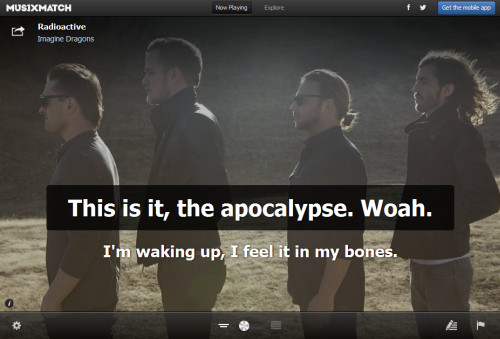
If you're using Spotify, you may have seen all of the different desk top Apps that are available. Most of them are designed around discovering new music. When I fired up Spotify this morning I saw this new musiXmatch App that displays the lyrics Karaoke style for tracks playing on Spotify, along with rotating cover art.
This could be something cool you could add to your class if you have video and a method of connecting your computer or device.
WARNING – Many songs you may search for may have the lyrics, but haven't been timed to the actual song. MUSIXMATCH will then ask if you would like to be the first to sync the lyrics to the song, as you listen along. THIS IS VERY ADDICTIVE! I burned an hour this morning working my way through the whole David Bowie — The Rise and Fall of Ziggy Stardust and the Spiders from Mars (40th Anniversary Edition) [Remastered] both to see if my 40 year memory was correct and to add the sync if needed.
I'm going to experiment with this next week. I'm starting a new 6:00 AM class on Thursdays and my experience is that these early AM “A” types appreciate being mentally stimulated early in the morning.
Here's a fun video about MUSIXMATCH.
I had Shazam working overtime as I moved from one manufacture's booth to the other this week. During one of Chuck Cali's MyRide+ demo rides, I caught this epic finale of his last climb.
It's an interesting track. The “Big Finish” of E.S. Posthumus — Ushas comes with about 25 seconds of the track left. Chuck explained that with the emotional “help” of the music gone, it was up to the riders to summit the climb using their own internal motivation – and by the looks of the participants they did 🙂
This week's track has a somewhat split personality, a Dr Jekyll and Mr Hyde if you will… with you in complete control of the personality through the volume you play it.
I found Passenger — Let Her Go while listening to ICI/PRO Member Soigneur Jennifer Lintz's ( j8lintz in Spotify) playlists. I commented about it to her and she explained that she had used this track as a cold down during her last class. Easy to understand – Dr Jekyll.
OK. So I woke up this morning thinking this could make a great Friday track, if I could find a free version to share. I like to play music (especially in the morning) a bit louder than other people. Possibly a throwback from growing up in the 70's and the “Turn it up to 11!” mentality 🙂
Listening to Let Her Go this morning at my normal setting had me thinking; this could be an awesome climb during an endurance class. The speed is perfect at 75 rpm and the simple, repeating lyrics are very powerful when they fill the room. Turn it up Mr Hyde!
Let me know what you think after listening.
Sorry but the free version is no longer available.
Do you know about Spotify's Collaborative Playlist feature? It's a great way to share playlists with friends, fellow instructors and even members at your gym or club. When you use this Spotify feature, others can share, edit and add to your original playlist.
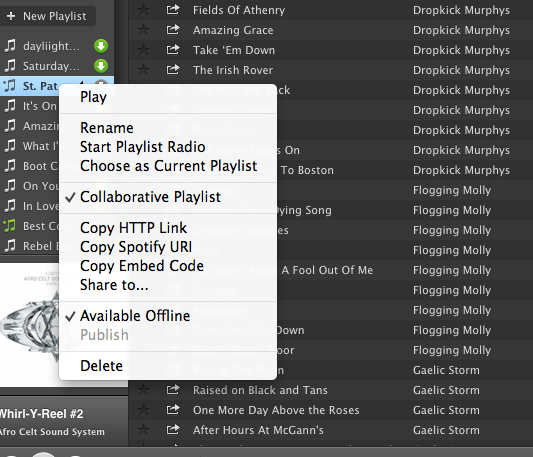
Sound interesting? It's really pretty simple. Just create a playlist in Spotify as you normally would. Then, right click (control+click if you're a Mac user like me) and you'll see a drop down box like this:
Choose Collaborative Playlist.
You can now find your collaborative playlist on the left sidebar of your profile screen with a green music note next to it. The playlist will not, however appear on your Spotify profile page. As far as I can see, there is no way to add a collaborative playlist to your profile. I believe this is because these playlists are always changing and therefore never really complete. If you figure out a way to publish them and still allow them to be collaborative, please share with us! Because the playlist does not appear on your profile, you need to invite others to see it.
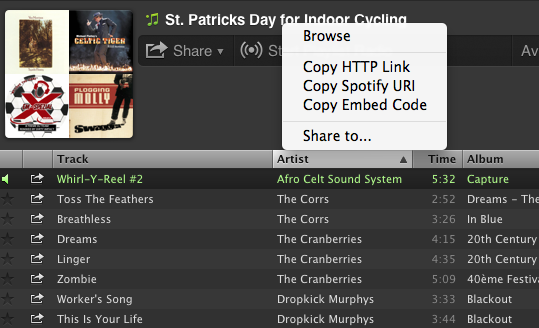
Inviting others to join your collaborative playlist is as simple as sharing the link. You can do this by right clicking (control+click on a Mac) and choosing any of the options shown here:
Now you can share your playlists by email or social media sites. Here are a few things to keep in mind when creating collaborative playlists in Spotify:
Anyone that subscribes to your playlist can add songs, delete songs and change the order of the songs in the playlist.
Everyone that subscribes to your playlist will see these changes.
You can turn off the collaborativity of the playlist the same way you turned it on.
Anyone that gets the link to your playlist can share the link with friends.
ICI/PRO has several collaborative playlists that you can access here.
I've recently created my own collaborative Spotify playlist: St. Patrick's Day for Indoor Cycling. I hope you find some inspiration here for your St. Patrick's Day ride this week! Please subscribe and share your favorites!!
Rule #1 when you're stuck in a music rut – look for someone to help pull you out! And I followed this rule today in my search for inspiration for this weeks track – ICG Master Trainer Vanessa Wilkins is providing our song and she doesn't even know it 🙂
That's the beauty of Spotify. Once we're connected, and I need a fresh perspective, I can check out what music you're using and grab a few tracks for myself.
If you're young you might not be familiar with the Brothers Johnson – they were pretty popular back in the Disco days. Vanessa is using Brothers Johnson — Strawberry Letter 23 in this playlist of her's Memories.
Once I heard it I remembered how I used to think the band Yes had crashed the recording session – give a listen at the complete change of genre at the 2:25 mark. This is a nice 90rpm flat that many of your more “seasoned” participants will enjoy.
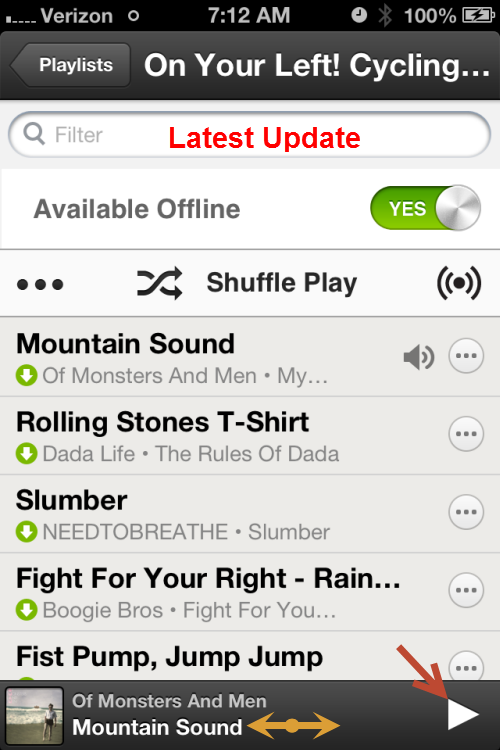
No idea why it took them so long, but the Spotify App for iPhones has finally added an Instructor friendly feature that Android users have had (it seems) forever.
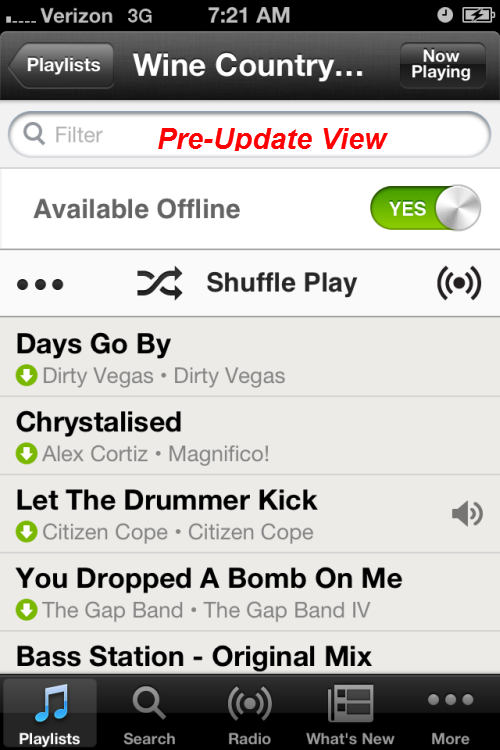
If you are running your class on an iPhone you will recognise this frustration right away > the need to go back and forth between the Now Playing screen and the Playlist screen if you want to see what's coming next. Where you can get in trouble is there were too many places where your sweaty fingers could touch and mess everything up.
The Spotify Android App shows the Now Playing track at the bottom of the Playlistscreen along with stop/start button and the option to Swipe > advance to the next track. The latest update to the Spotify iPhone App includes this feature now as well 🙂
See your playlist and swipe to advance.
Now it's still not perfect – if Spotify would add the track timer to this slider, all us iPhone users could work off of this one screen and stay focused on our classes.
In case you're wondering, those circles with the *** don't bring you to an option to change the order of songs. You still need to do that on your computer.
I don't (yet) have an iPad. If you do and see anything new/cool added recently, please let us know below.