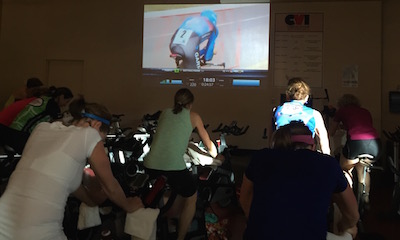
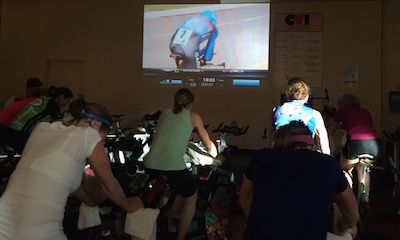
This is an exciting time in the world of indoor cycling! Bikes with power meters are becoming more common place, big box studios are getting a makeover and are more than just echoey converted racquetball courts, small private studios are carving out their own niche and giving riders an “experience”, not just a workout. Many facilities are also using video to help motivate their class participants.
I've been using video in my classes for about 5 years and have put together an extensive video library the includes music videos, concert footage, mountain and road biking videos, extreme sports videos and just about anything I think will motivate my riders. I've decided to start sharing this library with the members of ICI/Pro. Each Thursday I'll post a new video that will be available for download. Over time I hope build an extensive video library that will help ease ICI/Pro members through the transition of using video in their classes.
[wlm_private ‘PRO-Platinum|PRO-Monthly|PRO-Gratis|PRO-Seasonal|Platinum-trial|Monthly-trial|PRO-Military|30-Days-of-PRO|90 Day PRO|Stages-Instructor|Schwinn-Instructor|Instructor-Bonus|28 Day Challenge'].
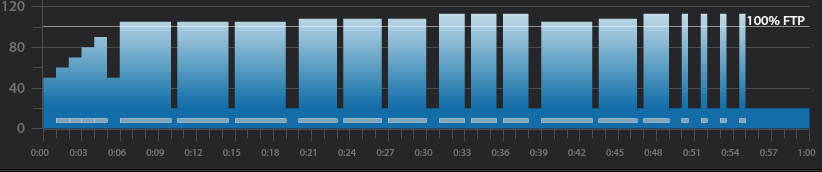
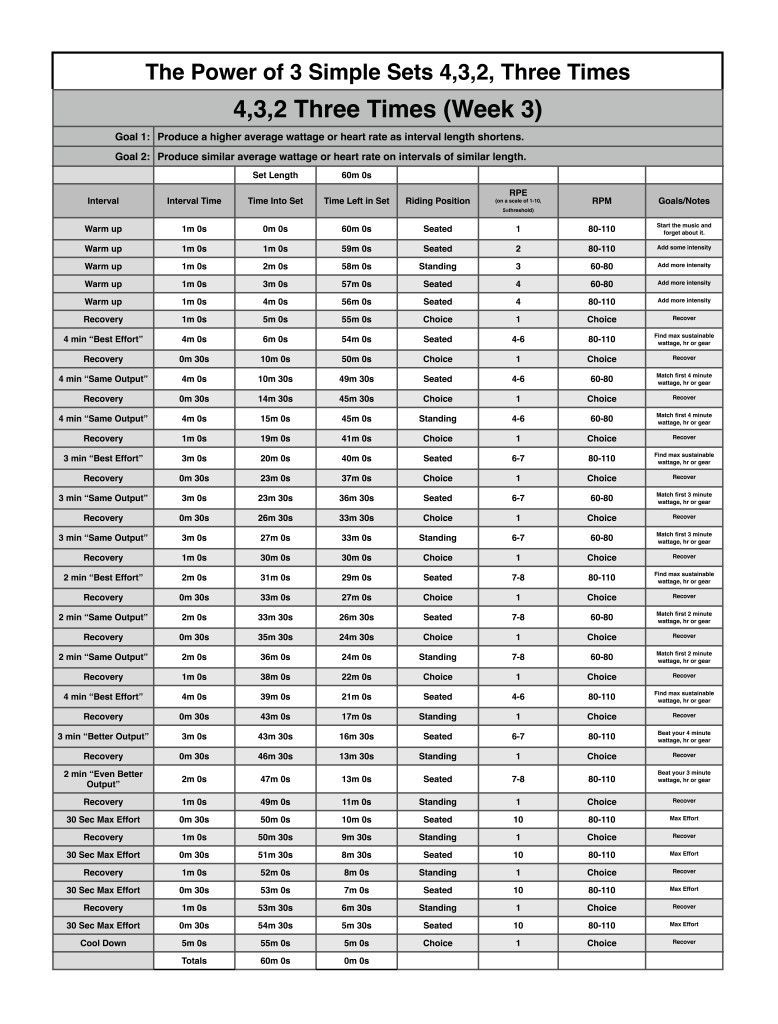
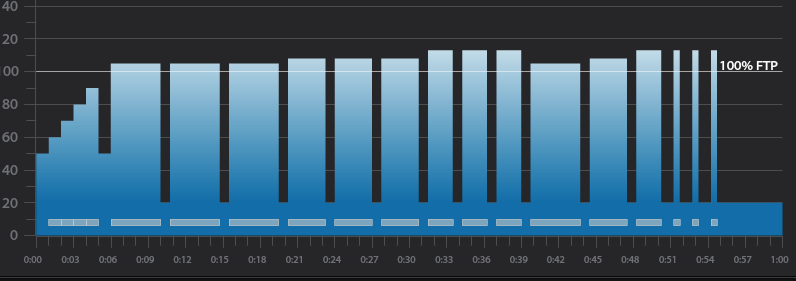
Below you'll find Week 3 of July's Keep it Simple and Progress indoor cycling profile.
Workout Basics:
5 minute warmup
3 x 4 minute intervals with 30 seconds recovery after each
1 minute recovery after the third 4 minute interval
3 x 3 minute intervals with 30 seconds recovery after each
1 minute recovery after the third 3 minute interval
3 x 2 minute intervals with 30 seconds recovery after each
1 minute recovery after the third 2 minute interval
4,3,2 minute intervals with 30 seconds recovery after each
1 minute recovery after the 2 minute interval
4 x 30 second intervals with 1 minute recovery after each
5 minute cool down
3 x 4 minute interval goals and specifics:
1st 4 minute intervals should be ridden seated at 80-110 rpm at Threshold wattage, HR or RPE
30 second recovery or reset
2nd 4 minute interval should be ridden seated at 60-80 rpm at the same wattage, HR or RPE as the 1st.
30 second recovery or reset
3rd 4 minute interval should ridden standing at 60-70 rpm at the same wattage, HR or RPE as 2nd.
1 minute recovery or reset
3 x 3 minute interval goals and specifics:
1st 3 minute intervals should be ridden seated at 80-110 rpm a wattage, HR or RPE that is higher than the last 4 minute interval
30 second recovery or reset
2nd 3 minute interval should be ridden seated at 60-80 rpm at the same wattage, HR or RPE as the 1st 3 minute interval
30 second recovery or reset
3rd 3 minute interval should ridden standing at 60-70 rpm at the same wattage, HR or RPE as 2nd 3 minute interval
1 minute recovery or reset
3 x 2 minute interval goals and specifics:
1st 2 minute intervals should be ridden seated at 80-110 rpm a wattage, HR or RPE that is higher than the last 3 minute interval
30 second recovery or reset
2nd 2 minute interval should be ridden seated at 60-80 rpm at the same wattage, HR or RPE as the 1st 2 minute interval
30 second recovery or reset
3rd 2 minute interval should ridden standing at 60-70 rpm at the same wattage, HR or RPE as 2nd 2 minute interval
1 minute recovery or reset
4,3,2 minute interval goals and specifics:
4 minute intervals should be ridden seated at 80-110 rpm at Threshold wattage, HR or RPE
30 second recovery or reset
3 minute intervals should be ridden seated at 60-80 rpm at a wattage, HR or RPE that is higher than the last 4 minute interval
30 second recovery or reset
2 minute interval should ridden standing at 60-70 rpm at a wattage, HR or RPE that is higher than the last 3 minute interval
1 minute recovery or reset
3 x 30 second interval goals and specifics:
The 4 x 30 second intervals should be ridden at the riders choice RPM or position and should be ridden at maximum effort followed by a 1 minute recovery.
[wlm_private ‘PRO-Platinum|PRO-Monthly|PRO-Gratis|PRO-Seasonal|Platinum-trial|Monthly-trial|PRO-Military|30-Days-of-PRO|90 Day PRO|Stages-Instructor|Schwinn-Instructor|Instructor-Bonus|28 Day Challenge'].
Trainer Road Profile (If you're Trainer Road Member join my Team to get this and all profiles)
I'm a big fan of controlling the energy of a class or set through music. I often look for high energy fast beats per minute songs to help push my riders to higher and higher intensities, but sometimes I like to use lower energy, yet powerful, slower beats per minute songs to force participants to slow down, focus on pedaling technique and power production at slower revolutions per minute.
I live in Denver Colorado and there are some long climbs here, it's not uncommon for a climb to last over an hour. When on these climbs it's important to maintain a “doable” intensity and find a sustainable rhythm. In the great INDOORS we often climb to max effort then recover a few times per class, but in the great OUTDOORS it's important to control the intensity so riders can make it to the top of the climb. I like to bring this controlled rhythmic type of hill simulation indoors from time to time.
This 3 song mix can be used to simulate a slow and steady climb. During the first song I like to stay seated and find a steady rhythm around my threshold wattage or HR. For the second song I like to mix between sitting and standing, I usually sit for 45 seconds and stand for 15 seconds. The third song has a few energy spikes that I like to use as surges to the top of the hill.
Give it a try and let me know if your class likes it.
[wlm_private ‘PRO-Platinum|PRO-Monthly|PRO-Gratis|PRO-Seasonal|Platinum-trial|Monthly-trial|PRO-Military|30-Days-of-PRO|90 Day PRO|Stages-Instructor|Schwinn-Instructor|Instructor-Bonus|28 Day Challenge']
I've been a Cars fan forever – they were the soundtrack of my senior year in highschool. Yes I know that dates me, but these we cassettes – not 8 tracks 🙁
Turns out I have a bunch of Cars fans in my Thursday class (we're all of similar vintage) so I thought it would be fun to include a few tracks in my class next week.
Digging around I found that there are some very nice Mashups and remixes. Would any of these fit into your next profile?
Below you'll find Week 2 of July's Keep it Simple and Progress indoor cycling profile.
In order to keep it simple and progress I have kept the same series of intervals as last week but reduced the rest to just 45 seconds. Due to the reduced rest there's extra time, so I added three 30 second maximum effort intervals at the end of the workout.
Workout Basics:
5 minute warmup
3 x 4 minute intervals with 45 seconds recovery after each
3 x 3 minute intervals with 45 seconds recovery after each
3 x 2 minute intervals with 45 seconds recovery after each
4,3,2 minute intervals with 45 seconds recovery after each
3 x 30 second intervals with 1 minute recovery after each
5 minute cool down
3 x 4 minute interval goals and specifics:
1st 4 minute intervals should be ridden seated at 80-110 rpm at Threshold wattage, HR or RPE
45 second recovery or reset
2nd 4 minute interval should be ridden seated at 60-80 rpm at the same wattage, HR or RPE as the 1st.
45 second recovery or reset
3rd 4 minute interval should ridden standing at 60-70 rpm at the same wattage, HR or RPE as 2nd.
45 second recovery or reset
3 x 3 minute interval goals and specifics:
1st 3 minute intervals should be ridden seated at 80-110 rpm a wattage, HR or RPE that is higher than the last 4 minute interval
45 second recovery or reset
2nd 3 minute interval should be ridden seated at 60-80 rpm at the same wattage, HR or RPE as the 1st 3 minute interval
45 second recovery or reset
3rd 3 minute interval should ridden standing at 60-70 rpm at the same wattage, HR or RPE as 2nd 3 minute interval
45 second recovery or reset
3 x 2 minute interval goals and specifics:
1st 2 minute intervals should be ridden seated at 80-110 rpm a wattage, HR or RPE that is higher than the last 3 minute interval
45 second recovery or reset
2nd 2 minute interval should be ridden seated at 60-80 rpm at the same wattage, HR or RPE as the 1st 2 minute interval
45 second recovery or reset
3rd 2 minute interval should ridden standing at 60-70 rpm at the same wattage, HR or RPE as 2nd 2 minute interval
45 second recovery or reset
4,3,2 minute interval goals and specifics:
4 minute intervals should be ridden seated at 80-110 rpm at Threshold wattage, HR or RPE
45 second recovery or reset
3 minute intervals should be ridden seated at 60-80 rpm at a wattage, HR or RPE that is higher than the last 4 minute interval
45 second recovery or reset
2 minute interval should ridden standing at 60-70 rpm at a wattage, HR or RPE that is higher than the last 3 minute interval
60 second recovery or reset
3 x 30 second interval goals and specifics:
The 3 x 30 second intervals should be ridden at the riders choice RPM or position and should be ridden at maximum effort followed by a 1 minute recovery.
[wlm_private ‘PRO-Platinum|PRO-Monthly|PRO-Gratis|PRO-Seasonal|Platinum-trial|Monthly-trial|PRO-Military|30-Days-of-PRO|90 Day PRO|Stages-Instructor|Schwinn-Instructor|Instructor-Bonus|28 Day Challenge']
Trainer Road Profile (If you're Trainer Road Member join my Team to get this and all profiles)