On July 3rd my family and I were lucky enough to see the very first concert at Coors Field in Denver Colorado. The headliner was the Zac Brown Band and the warmup band was a Big Head Todd and the Monsters. Big Head Todd and the Monsters is a local band and have a huge local following, it was great to see these local boys be the first play Coors Field. Zac Brown was AWESOME! If you have not listened to their new album, Jekyll and Hyde, I would suggest you give it a listen. It really shows the bands versatility as musicians. You may think of them as a country band but this album hits many different genre, there's something for everyone!
When leading a class I feel one of my most important jobs is to control the energy of the room. Too mellow and riders get bored and never come back, too intense and riders burn out before they reach the finish line. Whenever I go to a concert I pay close attention to how the band controls the energy of the crowd. At most shows the band usually starts a few of their most popular songs to elevate the energy of the crowd then they usually transition into some of their more mellow or lesser known music and finish with their most popular tracks while whipping the crowd into a frenzy.
When using music to control the energy in an indoor cycling class I follow this same technique. Always start strong with a high energy song you know the class will enjoy, you can back off the energy or try some new music in the middle of class, but ALWAYS finish with your best stuff so everyone wants to come back.
If this approach works for Rock Stars it most certainly will work for you.
[wlm_private ‘PRO-Platinum|PRO-Monthly|PRO-Gratis|PRO-Seasonal|Platinum-trial|Monthly-trial|PRO-Military|30-Days-of-PRO|90 Day PRO|Stages-Instructor|Schwinn-Instructor|Instructor-Bonus|28 Day Challenge']If you use video I also mixed together the videos of these three songs.This week's mix includes:
Both of these questions have pretty much the same solution…
Spotify is jumping in Apple's face with this and I find it kind of funny 🙂 Turns out that if you're paying your monthly Spotify subscription through iTunes, you are paying an extra $3.00 a month. Why? Because iTunes charges an extra 30% on top of recurrent subscriptions.
Spotify is trying to raise awareness around the fact that it's cheaper to subscribe on the web instead of through Apple's App Store. The leading subscription music service plans to email iPhone customers the below note encouraging them, if they haven't already, to start paying at Spotify.com and save a few dollars. “In case you didn’t know, the normal Premium price is only $9.99, but Apple charges 30 percent on all payments made through iTunes,” the email blast reads. “You can get the exact same Spotify for only $9.99/month, and it’s super simple.”
The message is followed with a step-by-step tutorial that explains how to shut off auto-renew through iTunes (so Apple won't keep charging you the higher $12.99-per-month rate) and transfer your account to the web – something that can only be done once your current subscription lapses. “Pardon us if you can't do this immediately. Your current plan needs to end first,” Spotify says.
This will only apply if you downloaded and subscribed to Spotify using your iDevice. Most of us (me included) used our computers and subscribed directly with Spotify.
But this got me thinking; how do I cancel my free trial to Apple Music?
Turns out it's easy to cancel any monthly subscriptions.[wlm_private ‘PRO-Platinum|PRO-Monthly|PRO-Gratis|PRO-Seasonal|Platinum-trial|Monthly-trial|PRO-Military|30-Days-of-PRO|90 Day PRO|Stages-Instructor|Schwinn-Instructor|Instructor-Bonus|28 Day Challenge']
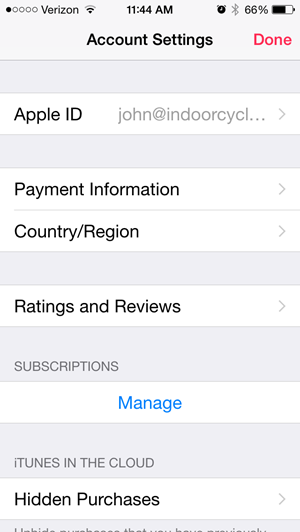
Open the Music App on your phone and click the silhouette icon in the top-left corner.
Next choose View Apple ID and Log In.
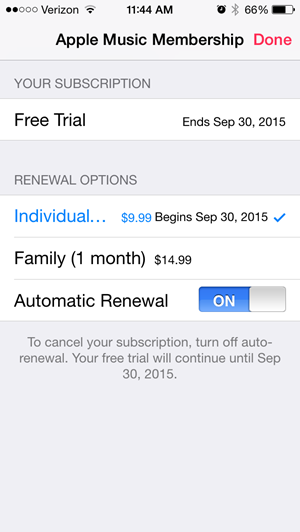
Then under Subscriptions > Manage
This screen will show your Apple Music and other auto-pay subscriptions, including Spotify if that's how you're subscribed.
NOTE: cancelling won't end your trial early.
Please let me know if you have additional questions. [/wlm_private]
It's common to have a little “chit-chat” warmup with Podcast guests. This time is for catching up with past contributors (or to calm first timers) before we record the actual Audio Profile or dive into the episode's topic. I'll occasionally have the recorder running during this time and for fun, I thought you'd enjoy hearing a segment of my conversation with Instructor Christine Hawthorne – AKA blogger Chrispins – where we discuss our initial thoughts on Apple Music and Chris shares a bit about her life beyond teaching.
I'll be publishing Chris's latest Audio Profile for our ICI/PRO members later today.
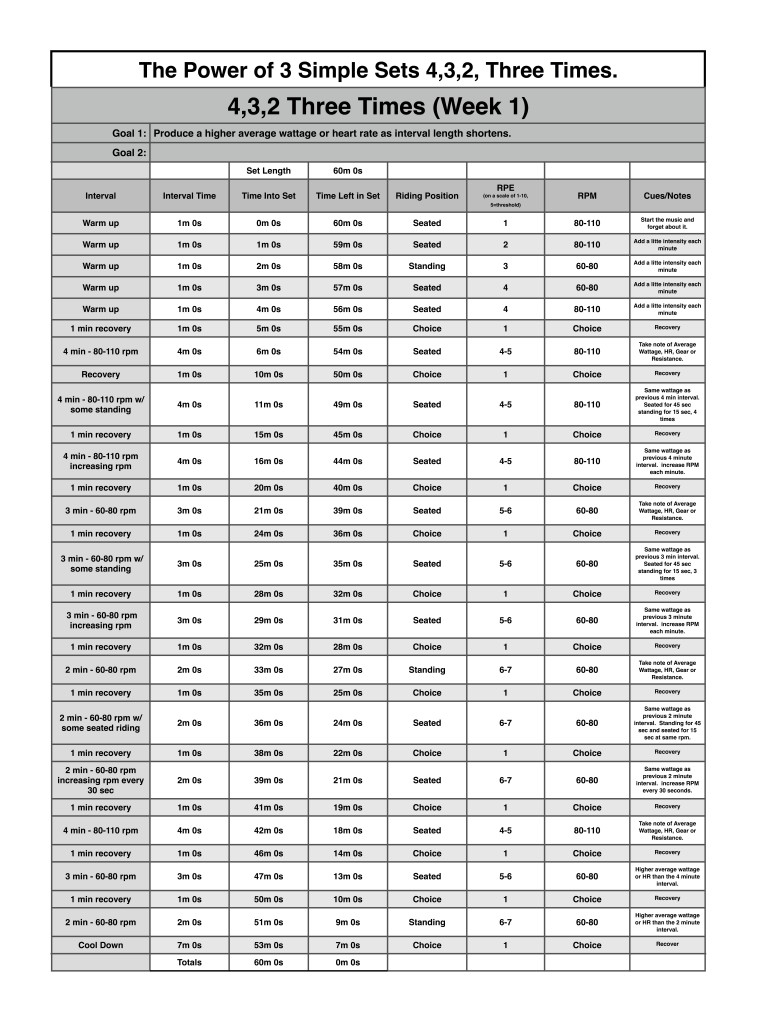
Last month I started this “Keep it Simple and Progress” profile post. In my classes this has been a huge success! Many riders have excitedly shared with me their wattage and/or resistance improvements. It's so rewarding to see and hear how we, as instructors, are changing lives through health and fitness everyday.
I've been using this 3 week progressive training technique, with great success, for many years as a coach, personal trainer, athlete and group exercise instructor. When I'm in a coaching situation I'll have my athletes work through a 3 week progression then take a week for recovery so they can “unload” all the accumulated training stress. In a group exercise setting, where you don't know the exercise consistency of your participants, a recovery week my be frowned upon. To incorporate this sound and proven training techniques in my indoor cycling world I'll set up progressive profiles for 3 weeks and on the 4th week I'll do something completely different. This 4th week is where I'll experiment with new music or video or use an old profile, maybe I'll even have my class cover their consoles and we go “Old School” and ride by perceived exertion only. I tell the riders that have been very consistent with their training the previous 3 weeks that it is time to take it easier and let the body recover and rebound from the straining stress of the previous 3 weeks. This is the time for them to enjoy their fitness level and have fun in class and not to worry about their metrics because we are going to get back to serious training very soon.
In order to provide the members of ICI/Pro with my class recordings, I'm always teaching one week ahead of these posts. This allows me time to experiment and perfect the profiles before I provide them to you. It also lets me hear the feedback and reaction of my class. I'm still amazed at the adaptive ability of the body. In week 1 of most progressions I usually hear how difficult the workout was. This makes sense because the body has not experienced these exact training stresses before. Then in week 2 after the body has had some time to adapt to week 1 the workout is not such a “shock” to the body, but I make some subtile changes to the workout so that the body still needs to adapt as we progress to week 3. Week 3 is, by far, the most difficult of the progression, but since we have taken “baby steps” from week to week this workout is doable. Progression is the only scientifically proven method to safely and effectively improve fitness. There has been a lot of talk in the media about “Muscle Confusion”. To be frank, “Muscle Confusion” is BULLSHIT and I challenge you to find one scientific study the proves it effectiveness. I'm working on another post on “The Myth of Muscle Confusion”, I'll let you all know when it's completed.
As many of you know I am a Master Educator for Stages Indoor Cycling and at our Stages University workshops one of our topics is the creation of “Simple Sets”. Next week I'm going to discuss using the technique of “Lather, Rinse and Repeat” on a micro and macro scale to help make you an even better instructor.
[wlm_private ‘PRO-Platinum|PRO-Monthly|PRO-Gratis|PRO-Seasonal|Platinum-trial|Monthly-trial|PRO-Military|30-Days-of-PRO|90 Day PRO|Stages-Instructor|Schwinn-Instructor|Instructor-Bonus|28 Day Challenge']
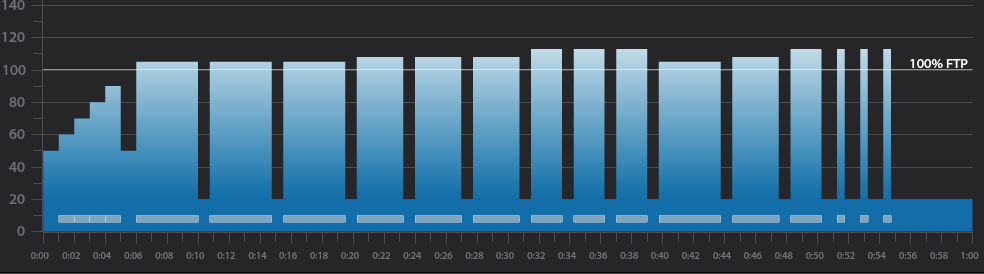
Below I have provided a snapshot of this new profile provided by Trainer Road.
Trainer Road Profile (If you're Trainer Road Member join my Team to get this and all profiles)
Do ClassBuilder and Schwinn's Class Tamer iPhone Apps work with Apple Music?
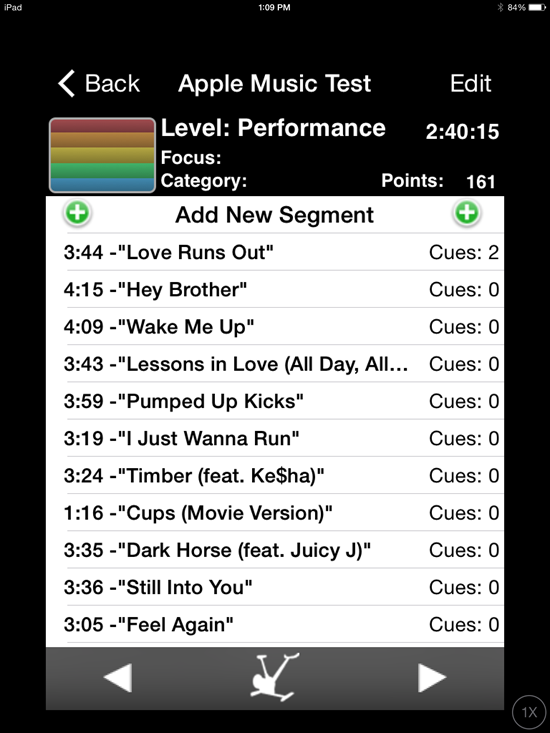
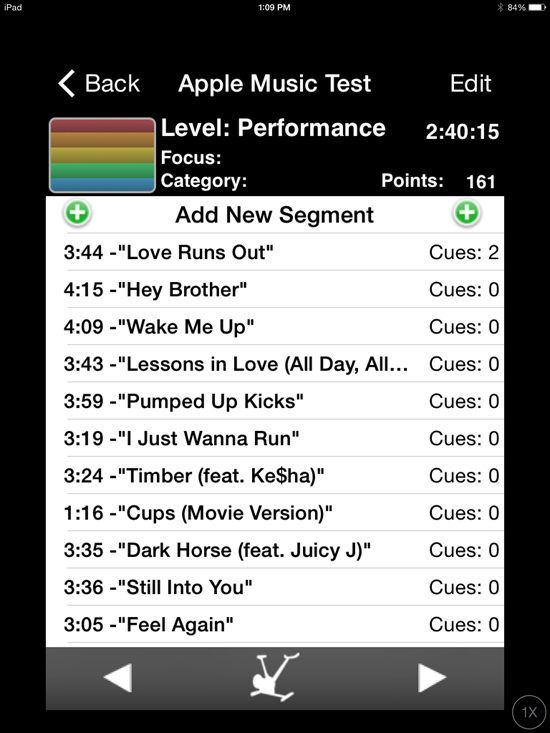
This person on Facebook said they both do… which would be very cool. So I renewed my efforts, fought through the confusion and she's right! I was able to open an Apple Music playlist that Dennis Mellon sent me, with either ClassBuilder or Class Tamer with my iPad*. I added a few cues and nearly everything worked perfectly – even in off-line mode.
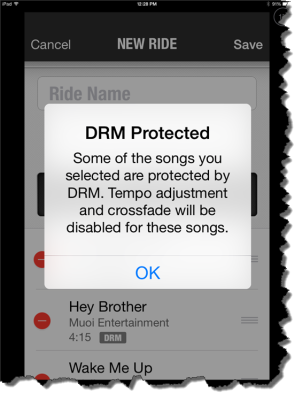
The two exceptions being the cross fade and tempo adjustment functions in Class Tamer won't work. It's because of the DRM that protects each track delivered through Apple's streaming service.
With Apple Music, that would be all of the songs you selected have DRM.
* Tempering my enthusiasm is Apple Music on my iPhone still doesn't work. It refuses to see the the Apple Music playlists in iTunes on my laptop.
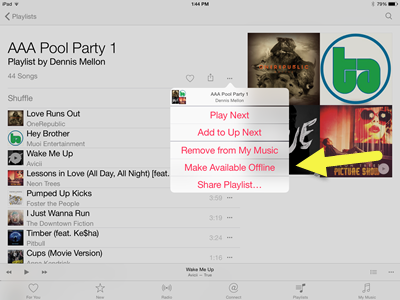
Here's that playlist from Dennis if you'd like to experiment. I'd open that link with your iPhone/iPad. Then set the playlist to Make Available Offline so ClassBuilder or Class Tamer can see the tracks. It appears to me that these downloaded tracks are normal AAC music files, except for the DRM that prevents you from copying, burning to a CD or keeping the files if you don't continue your monthly payments.
Tap the … more icon for the off-line option.
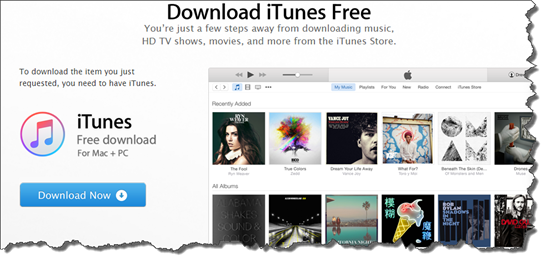
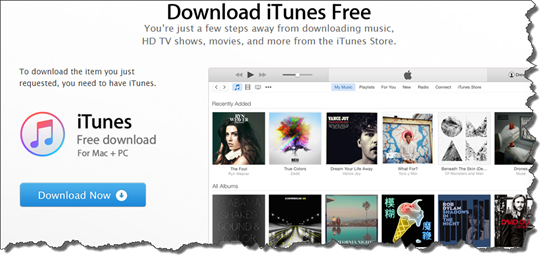
When I tried to open it on my computer it repeatedly send me to the “Download iTunes” page – even though I had iTunes open. I rebooted everything and when I re-opened iTunes I could see the new playlist… but at this point I still can't drag the playlist onto my phone and sync using wifi or the cord.
At launch, many users had trouble adding new music to their libraries, due to an apparent bug with the iCloud Music Library, which wouldn't activate for some users (myself included). This feature, which allows you to sync your collection across devices, is apparently also required to add tracks to your collection in the first place (even if you're only using Apple Music on one device). Strange. Although Apple had apparently fixed the iCloud Music Library bug within a matter of hours, the fact that the service requires this extra step for such basic functionality is a head-scratcher. Nearly 24 hours later, the songs I've been saving in the app still aren't showing up under the “My Music” tab. Presumably that will change at some point.
While it's convenient to be able to merge your existing tracks with Apple Music's library, the mechanism used to do this will madden many people: You have to use iTunes. Some of us would prefer to never see or think about iTunes ever again. And the thing is, it's totally possible to transfer music from your computer to a phone without using clunky desktop software. Spotify lets you sync your local MP3s to its mobile apps, but even that requires routing things through the Spotify desktop app.
What an interesting space streaming music has become.
Facebook has been in talks with major record labels with the intention of “getting into music”, according to reports.
Record labels including Sony Music Entertainment, Universal Music Group, and Warner Music Group have all spoken with Facebook, according to The Verge, though the exact purpose of the talks has yet to be confirmed.
Speculation around why Facebook is expressing an interest in music has centred around the possibility of a streaming service to rival the likes of Apple Music and Spotify.
Sources close to the talks claim that they are still in the early stages, but suggest that Facebook is planning something “unique”.
A separate report by Variety on 1 July detailing Facebook's intentions to test video ads could hint at the manner in which the social network plans to monetise any potential service.
Facebook's addition of listen buttons to artist's pages is as far as the firm has gone in creating its own music service and a fully developed streaming service could be seen as the next natural step.
With all the cash Facebook has, I wouldn't be surprised if they bought Spotify and/or Deezer shortly. We'll just have to wait and see.
iTunes 12.2 wasn't ready for the launch – so I have no idea how, or even if, it works 🙁
7/1 9:40am – could this be anymore confusing? Trying to save a streamed track to a playlist named 7/1 Test Playlist I created this morning. After exhausting all obvious methods, I tried first adding it to MY Music = success. Turns out that to add an Apple Music track to a playlist, it first needs to be downloaded to your computer like all of your local tracks…
BUT THEN I DISCOVERED THIS
You have got to be kidding me – really Apple? You won't allow me to transfer a playlist from my computer to my iPhone?
So it looks like the only offline usage of Apple Music is on a computer 🙁
I'm not wasting anymore time with this.
7/1 8:06am – seeing iTunes 12.2 is now available (link) and downloading it now. I will be posting my experiences shortly.
I'll be adding updates of my initial experiences above, as I have them… I'll save you some time by telling you that I already hate Apple Music.
Alright, I'm a little biased on the subject. I've developed a dislike for iTunes over the years and Apple Music hasn't done anything to change that opinion.
I was excited to try the new Apple Music Streaming Music service today. It went live at 11:00est and if you update your iPhone or iPad to the latest version of iOS 8.4 you'll see the new iTunes logo. Click it and (if you're lucky) the new Apple Music will open. I say lucky because it took 4 tries (opening and then closing the App) to get past the welcome screen.
I got kind of tired seeing this screen, and nothing more.
Once I had a functioning iPad App – I quickly realised that, like Spotify, building playlists will be easier from a desktop. Apple Music is part of iTunes 12.2… unfortunately at the time I posted this it wasn't available.
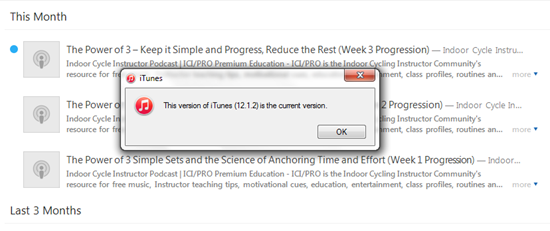
Err, no this isn't the most current version 🙁
Movingattempting to move a track into a playlist on my iPad requires a number of clicks; first click the track to play it > then click the “…” more icon for an option to move to a playlist. I prefaced this with attempted to move > after repeated tries I've yet to successfully see any tracks added to my test playlist. So I can't tell you how it works, because it doesn't.
No Cross Fade
This is a deal breaker for me. Apple Music doesn't appear to offer a crossfade > Just the EQ and volume limiter you had in iTunes.I love the crossfade feature in Spotify and can't even consider delivering class music without it. The one exception would be when I used one of Dennis Mellon's premixed class MP3s, which he's already fully mixed, so it's a non-issue.
I'm going to wait to see if Apple can sort out their issues, and release iTunes 12.2 so I can try the desktop version.
Stay tuned – but don't hold your breath. Spotify doesn't appear to have a competitor here for Indoor Cycling Instructors.