Do you have noise problems / complaints from neighboring businesses? Have you changed class times or cancelled classes to keep the peace with another class in your club? This maybe a solution…
Message from Facebook this morning:
Hi there!
My name is Naomi and I have a summer internship at N2Shape My boss has recently given me a project to implement headset use in all spinning classes as there have been noise complaints in the studio we use. She wants to have it so in addition to the instructor having a headset, all people in the class have wireless earphones or headphones as well so that they can hear the music and the instructor. I have been looking online at a couple different websites such as Iqua Products, AV Now, Amazon, etc, to get ideas but it seems that most places only sell transmitters for the instructor headset. My boss told me you guys have a lot of information regarding spinning and I thought I'd contact you for help! Thank you so much in advance!
My response was easy:
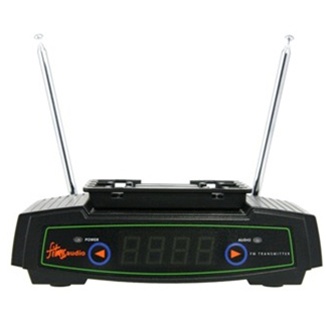
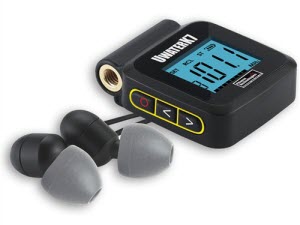
Hi Naomi – thanks for your question. We actually did this back in the late 90's when we first added Spinning classes. What you need is a FM transmitter like this http://www.avnow.com/WES_FM_Broadcast_System_p/wes-t-fm.htm and then have everyone tuned in with a FM radio receiver (old walkmans were FM) – your folks will need to dig into the back of their junk drawers.
Is that enough to get you going?
John
Back in the day (mid 1990's) when our club first introduced Spinning® classes, they employed this exact system. They had installed 24 Schwinn Johnny G Spinners (the original version) in a secluded corner of the fitness floor. A loud sound system with speakers was out of the question, so the Instructor's mic and music played through a FM transmitter. Everyone wore headphones connected to a Walkman tuned to the correct FM radio station.
This transmits both your music and voice to FM radios near by, tuned to the correct station.
Surprisingly it worked well. As long as you hadn't forgotten to turn off your Walkman the day before and were now scurrying around the club, looking for a pair of AAA batteries.
Talking between members was never a problem and there were no volume complaints with everyone having control of their own levels. The effect of having the Instructor's voice delivered directly into our heads was quite intimate as I remember. I'll never forget the classes lead by a particularly instructor (she's still an active Instructor and ICI/PRO member) who was very “breathy” in her class presentation 🙂
Working under the “everything new was once old” school of thought, could this be something you could offer in your studio? I'll bet if you asked, you'd find many of your members have an old Walkman shoved in the back of their junk drawer at home. Or you could buy a bunch to have for rental.
I'm still getting asked (and see questions on Facebook) about integrating music MP3's from multiple sources (Soundcloud's the most popular) into a Spotify or Deezer playlist.
We'll use Spotify for this tutorial as Deezer is nearly identical and Spotify is more popular right now. I'm using a PC, but the solution is the same on a MAC if you're having this problem that goes something like this:
Hi John,
I downloaded a Free Music Friday track from Soundcloud (or one of Dennis Mellon's fabulous 3 song mixes) and want to include it in a Spotify playlist. I'm pretty sure I downloaded the track and it opened and played in iTunes – but I can't find it anywhere in Spotify.
Can you help me?
Frustrated Instructor 🙁
Hidden settings in iTunes and Spotify and your Internet Browser
We'll actually they're not hidden, just hard to find without knowing where to look. There are two places that will decide what local files (music that you have in iTunes) will be displayed in Spotify's Local File Library.
iTunes settings
When you download a MP3 from any website, it will typically end up in your Download Folder. I say typically because the default location on every browser (Chrome, FireFox, Safari – please don't use IE) is your computer's Download Folder. If your downloaded MP3s don't end up in your Download Folder you can change the location in the browser's settings. Leave a comment below if you need help.
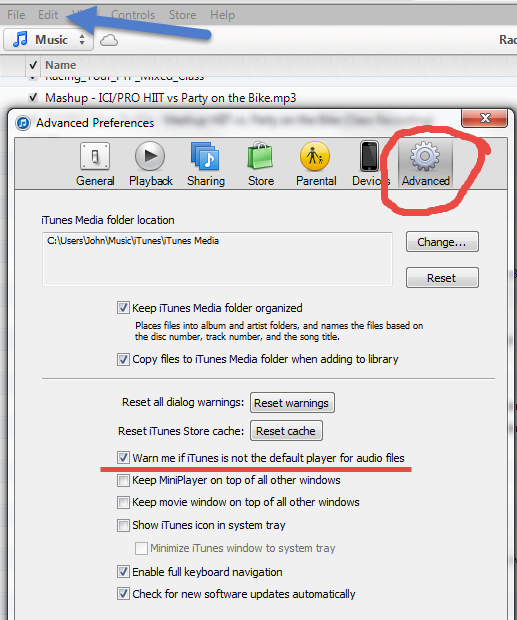
To get your new remix into iTunes you just need to click the file and it should open in iTunes. If it doesn't open iTunes and go to Edit > Preferences > Advanced and tic the box shown below and then close the Edit window. Click another MP3 in your Download Folder and you'll get a message, something like; iTunes is not the default music player… would you like it to be? You do. Select yes and that part's done.
Now just because a MP3 opens and plays in iTunes, doesn't mean it's actually in iTunes.
Go back to the Advanced settings in iTunes. Tic the two boxes shown below so when you open a track iTunes will make a copy and add it to your My iTunes Music Folder. That will solve 99% of the problems I hear 🙂
Spotify settings
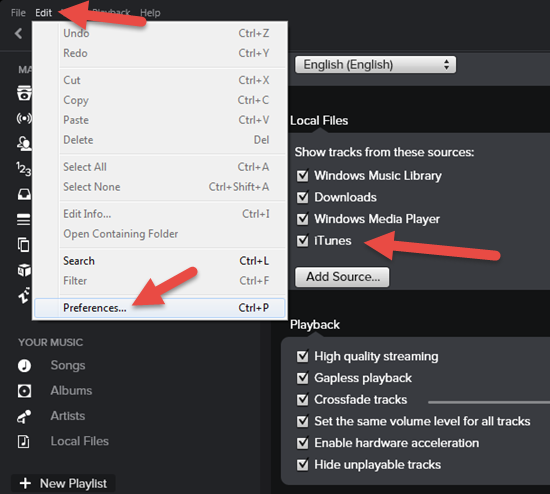
The defaults settings in Spotify should be set correctly. So once you've downloaded a track, clicked it and it opened in iTunes, it will show as a local file in Spotify. Here's where you check if it doesn't.
Yes I know Spotify is supposed to also include files from your Download Folder – I'm not sure it works for everyone. So Tic everything you see here.
Did this solve a big problem for you?Here's how you can reciprocate value with me and have access to dozens of similar tricks combined with over 1300 articles and 60+ class profiles.
This week features the 2018 Holiday ride from Joey. The ride is primarily focused towards strength, but there is a fair mix of cadence work. Good luck and have fun. Joey
Joey's “2018 Holiday Ride” Playlist
1: “Wizards in Winter (Instrumental)”, Trans-Siberian Orchestra (The Lost Christmas Eve)
2: “Mmm Yeah (feat. Pitbull)”, Austin Mahone (The Secret)
3: “Palladio”, Escala (Escala)
4: “A Mad Russian's Christmas (Instrumental)”, Trans-Siberian Orchestra (The Christmas Trilogy)
5: “Switch”, Don Diablo (Switch – Single)
6: “Drop That Low (when I Dip)”, Tujamo (Spinnin Records Best of Dance 2016, Vol. 1)
7: “Carol of the Bells”, Pentatonix (PTXmas (Deluxe Edition))
8: “Santa's Lost His Mojo”, Jeremy Lister (Gift Wrapped – 20 Songs That Keep On Giving!)
9: “Santa Claus Is Comin' to Town (Live at C.W. Post College, Greenvale, NY – December 1975)”, Bruce Springsteen (Christmas Hits)
10: “Jingle Bells (feat. Henry Rollins)”, William Shatner (Shatner Claus)
11: “In the Cold, Cold Night”, Tracey Thorn (Tinsel and Lights)
12: “Man Like That”, Gin Wigmore (Gravel & Wine)
13: “What Christmas Means To Me”, 98° (Let It Snow)
14: “You're a Mean One, Mister Grinch”, Famous for a Century (Christmas – Single)
15: “Christmas In Hollis (Bonus Track)”, Run-DMC (Tougher Than Leather)
16: “Deck the Halls”, R.E.M. (Gift Wrapped – 20 Songs That Keep On Giving!)
17: “Christmas / Sarajevo 12/24 (Instrumental)”, Trans-Siberian Orchestra (Christmas Eve and Other Stories)
18: “Feliz Navidad”, Unspoken (Christmas: Joy To the World)
19: “My Dear Acquaintance (A Happy New Year) [Non-Album Track]”, Regina Spektor (My Dear Acquaintance (A Happy New Year) – Single)
Happy Christmas! Due to the holiday I'm a bit late with the post this week, but I hope you find something here you can file away and use next Christmas season.
First of all, I couldn't be more excited about the fact the The Beatles are now streaming on nine different services including Spotify and Apple Music! John wrote about it and shared one of his favorites yesterday. This YouTube video may just give you a few more ideas for songs to use in your classes or just for your own personal listening:
With it being Christmas, I'd love to share a few of my favorite “cycle-worthy” songs of the season. This is not a cycling playlist, but rather a collection of songs that I've used in the past. It includes hills, flat roads, warm ups and cool downs.
In addition, this is a great collaborative playlist which includes over 20 hours of Christmas music added by some amazing instructors and created by Evan Reese. Show him some love by clicking on his name on the playlist page and following him there because he has some great music for cycling. And if you have any Christmas tunes to share that aren't already included on the list, be sure to follow and add it to the playlist!
Joey's “121817 Holiday 60” Playlist
1: “Linus and Lucy”, Vince Guaraldi Trio (A Charlie Brown Christmas (Expanded Edition))
2: “Right Now (feat. David Guetta) [Dyro Radio Edit]”, Rihanna (Right Now (Remixes) [feat. David Guetta])
3: “Tortuga (Radio Edit)”, DoubleV & Formal One (Tortuga – Single)
4: “Christmas In Hollis (Bonus Track)”, Run-DMC (Tougher Than Leather)
5: “Treble to the Bass (Lov3) [feat. Shimmr]”, Swanky Tunes (Treble to the Bass (Lov3) [feat. Shimmr] – Single)
6: “S&M (Remix) [feat. Britney Spears]”, Rihanna (S&M (Remix) [feat. Britney Spears] – Single)
7: “A Mad Russian's Christmas (Instrumental)”, Trans-Siberian Orchestra (The Christmas Trilogy)
8: “Pump It”, The Black Eyed Peas (Monkey Business)
9: “Get Up (Rattle) [feat. Far East Movement]”, Bingo Players (Get Up (Rattle) [feat. Far East Movement] – Single)
10: “Runaway Baby”, Bruno Mars (Doo-Wops & Hooligans)
11: “Katchi (Ofenbach vs. Nick Waterhouse)”, Ofenbach & Nick Waterhouse (Katchi (Ofenbach vs. Nick Waterhouse) – Single)
12: “The Time (Dirty Bit)”, The Black Eyed Peas (The Beginning (Deluxe))
13: “You're a Mean One, Mister Grinch”, Famous for a Century (Christmas – Single)
14: “Boom!”, Tujamo (Boom! – Single)
15: “God Rest Ye Merry Gentlemen”, Trans-Siberian Orchestra (Christmas Eve and Other Stories)
16: “Christmas / Sarajevo 12/24 (Instrumental)”, Trans-Siberian Orchestra (Christmas Eve and Other Stories)
17: “Christmas Wrapping (Single Edit)”, The Waitresses (Deluxe Special)
18: “The Chanukah Song”, Adam Sandler (What the Hell Happened to Me?)
This weeks ride is from Dave Norfleet, the creator of My Fitness DJ! – This is Dave’s first ride with us, but we hope there will be many more on the way. Good luck and have fun. Joey