It’s nice here (relatively speaking) and we can finally get outside. John and I rode the Ironman the last Sunday in April and it felt wonderful to be on real road. Don’t be too impressed- the ride is named the ‘Ironman’ because of the weather situation here in MN. We used to pre-register, but after years of giving up the registration fee because the weather was so awful on the actual day, we now register the day of!
The ride was nice and hilly and in celebration of our first outdoor ride, today’s Free Friday Favorite is a quick little climb at 3:21 and 59 rpm. (the free track is 6:20) The tune is not new, but I heard it again the other day and it felt fresh, plus there are so many cool remixes of it.
Jennifer Paige’s 1998 hit ‘Crush’ is still relevant, both in music and lyrics. I hope you enjoy it and can incorporate it into your class this week.
Are you using the SoundTracking App in Spotify? It's an awesome way to sample songs that are trending on Spotify. By trending I don't mean Top 40 / Billboard new tracks – these are popular tracks Spotify users are enjoying of all genres & time periods.
Here's a great example of an old tune from the band Queen that I can't actually remember ever hearing. The Show Must Go On is classic Queen, heavy on the use of orchestral music combined with Brian May's signature guitar solos. A powerful song at 84 rpm that I can see using as the intro to a long climb. You may want to pair it with another Queen track, with a slightly slower cadence, like Queen — Keep Yourself Alive to create an 8 minute climb with a nice flow as the road steepens and everyone's Heart Rate heads north.
Here's a powerful instrumental version of The Show Must Go On for your free track.
I'm not sure if I would use this – but if you enjoy using original recordings (I'm tempted to call this a demo) that are different from what everyone remembers – but recognizable none the less – you may enjoy this version of Keep Yourself Alive.
When I joined Spotify Premium almost a year ago, I just loved the ease of using it to create and share playlists so much that I was able to overlook some of the problems I had with it’s cluttered look and lack of social features. Now, with Spotify’s newest updates, many of those problems have been fixed, making it even easier to find and follow other people and artists.
If you haven’t already taken advantage of the update, I highly recommend it. While there is one major drawback (I’ll get to that.), I’m finding the advantages to be worth it.
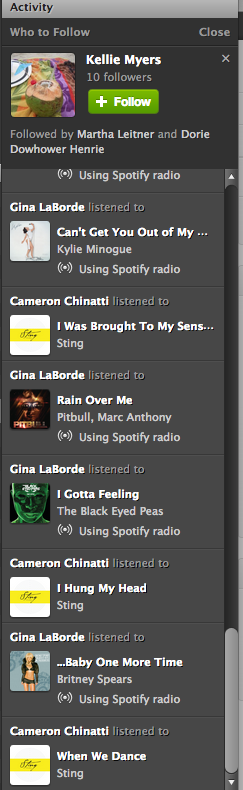
The first thing you will notice with the new update is the less cluttered look. Now it is much easier to navigate your profile page, playlists and activity sections. On the right side of your desktop screen, there is no longer a ‘favorites’ list. It has been replaced with a larger activity bar. Above the activity bar, you will find a handy ‘Who To Follow’ box. This box highlights people or artists that other people you follow are connected to-a great way to find new people to follow! Here’s a tip: If you don’t like Spotify’s current suggestion, click the ‘x’ on the top right of the box and a new suggestion will pop up.
You might also notice that the ‘Share’ and ‘Start Radio’ buttons are just above your playlist now for quick access. Tip: When you click ‘Share’, and then ‘Post To Feed’, you can add a little message that will show up on your follower’s feed. This would be a great place to share something about your playlist or a specific song in your playlist.
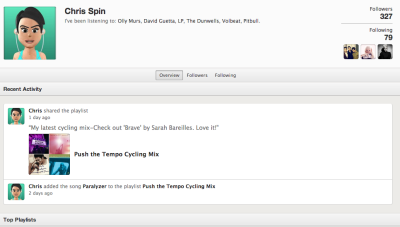
One of my favorite things about the newest update is the social section, with it’s emphasis on following others and viewing their activity. Click on a user and go to their profile page. You can view their published and followed playlists just like before AND you can now see their most recent activity and their ‘following’ activity-another great way to find new people to follow!
With all of these great new updates comes one little glitch. This one has caused instructors quite a bit of frustration. They took away the playlist timer. I can’t think of a good reason why they would do it, but they did. To get around this, I use on online timer which you can find here. It adds an extra step to my playlist preparation, and it’s kind of an inconvenience, but it really doesn't take too much longer once you get used to it.
These changes in Spotify are a step in the right direction, and I hope to see more updates and changes from them in the future. Great job on this update Spotify!
What do you think? Do you like the new updates? Is there anything you would like to see Spotify add to make your job as an instructor easier?
The TV Weatherman said that this weekend will be the warmest since Labor Day… that was about 8 months ago. No wonder we're all so itching to get outside!
Today's track is all about holding out hope that you'll make it through to the end. Many times, in life and on a long climb, you reach the point when you have to make a decision; do I quit? or do I take a moment to re-commit to the effort at hand?
I love to tell my class; “cycling is an endurance sport.”
“The root word is endure = persevering all the way to the end of your challenge, whatever it may be.”
“What limits most of us isn't our physical endurance.” “Sure our legs maybe tired, HR's at threshold and our lungs are burning… but that's not what's holding any of us back right now.” “The only thing holding you back, right now is YOU.”
A track like the 7 minute version of Giants from Chicane, with it's slight pause at the 3:38 point, offers the perfect place for you to explain; “cycling is an endurance sport… you'll need to choose to endure this” and then coach everyone to re-commit to the climb to the summit.
By Jennifer Lintz, Registered Dietitian and ICI/PRO Member Soigneur
Now that I'm finally on Spotify, there is one feature that I particularly appreciate:
Spotify Radio.
Pre-Spotify, this was my process for finding new music and creating playlists:
Listen to Pandora.
Make a note of songs that would work well in class.
Download new tunes from eMusic.
Create playlist in iTunes.
Not anymore!
Spotify has become my one-stop shop for creating class profiles. Instead of going from Pandora to eMusic to iTunes, I now do every single bit of my playlist prep in Spotify. This is my current routine:
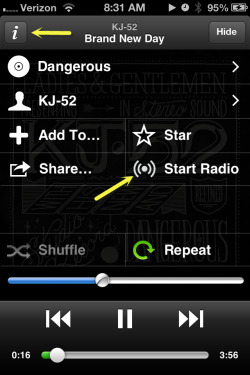
Click the “i” for any track and then click Start Radio for a playlist of similar music.
Listen to Spotify Radio. I also enjoy looking at my friends' and colleagues' Spotify playlists for ideas.
Add songs I like directly to my class playlist.
The “directly” part was a huge selling piece for me.In addition to hitting the “Thumbs Up” button, which immediately saves songs to the “Liked from Radio” playlist, you can add radio songs directly to your class playlist by:
dragging them to a playlist on your computer OR
clicking “Add to _______” and selecting the appropriate playlist
Talk about a time saver!
On top of this feature, Spotify has unlimited skips, meaning we can hit the “Thumbs Down” button as many times as we would like. The number of stations is unlimited, too. You can create radio stations based on a specific artist, song, genre, or even a playlist you already made.
My love of Spotify caused me to cancel my $16.99/month eMusic membership and sign up for Spotify Premium ($9.99/month) so that I can use my music “offline” when I am teaching classes. So far, I am not looking back!
Team ICG Master Trainer Missy Crosson contributes our latest Audio PROfile – Rolling to the Classics.
Profile Description: I created this profile with the sole purpose of letting the music itself create the ride. I wanted the songs themselves to control intensity, cadence, movement motivation, and even position on the bike. Music has a powerful effect on an individuals’ exercise experience. It distracts from discomfort, enhances ones mood, increases ability to endure physical and psychological stress, and may even promote metabolic efficiency.




 By Jennifer Lintz, Registered Dietitian and ICI/PRO Member Soigneur