
by John | Jan 6, 2015 | Best Practices, Big Box Instructor, Instructor Training, KEEPING IT FUN, Music, Spotify
Spotify is continuously updating both their computer software and iPhone/Android Apps. To keep you up-to-speed with changes and improvements, here are a few new tricks you might not be aware of – a few of these are courtesy of PC Magazine:
Recover Deleted Playlists
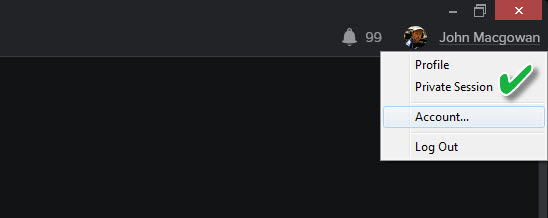
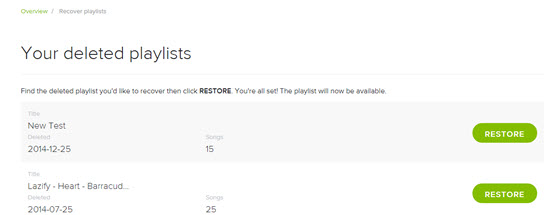
Oh Crap! Ever have that sinking feeling when you've inadvertently deleted a spotify playlist? Have no fear. Spotify has a place where you can recover deleted playlists. To find your deleted playlists go to your Spotify Profile (opens in your browser) and scroll down to Recover Playlists.
While you're on your Spotify profile
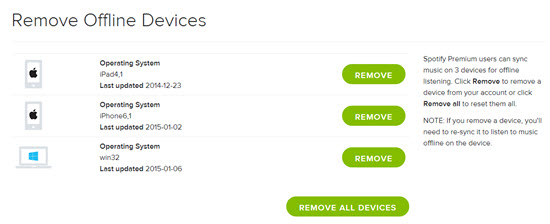
Spotify only allows you to sync three devices. So if you've upgraded, replaced or added any devices (new iPad for Christmas?) you can Remove Offline Devices there.
Clean House
If your sidebar has your scrolling through a few hundred playlists, it maybe time to get organized! While it's not a new feature, how to create new Playlist Folders isn't readily apparent > but it is easy. From the File navigation you can select New Playlist Folder or the Ctrl+Shift+N shortcut has the same result. Create a folder name and then drag playlists into the folder.

Garbage in… Garbage out
To be fair, the Normal setting for sound quality is fine for most listening situations and streaming. Your studio isn't one of them. Can I assume you what the very best sounding music possible? Amplification of music will magnify the quality (or lack of quality) and the difference will be noticeable to your participants. Follow the Settings > Music Quality and set the Sync Quality to Extreme. Sure it takes a bit more memory, but the clarity and PUNCH of your Extreme 320 kbps tracks will make a subtle (yet impactful) impression on your class! NOTE: this setting only effects music you've set to make available offline > which is the only way you should be playing class music.

Find the best EQ for your studio
Do you have a few participants who always show up early? I do and last Thursday (New Years Day) I put them to work before the start time for class. I used Aly & Fila — Perfect Love – Radio Edit, a fun track from this Jan 1st Playlist and went through each option on the Equalizer: Settings > Playback > scroll down > Equalizer. The Dance EQ setting was the popular favorite so Dance was what I used – and will continue to use in that studio.
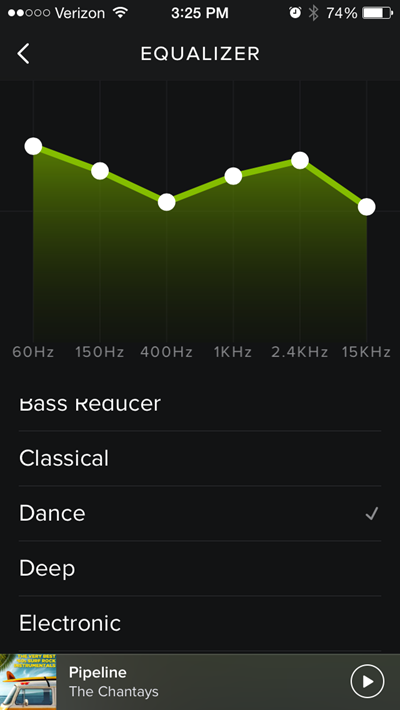
NOTE: If you want to get really fancy you can tap and drag the white dots to make your own custom EQ setting. It appears that Spotify remembers your setting after it's been closed, even though the little check mark doesn't show the next time you open Spotify, so it's all good 🙂
What's this remote control thing?
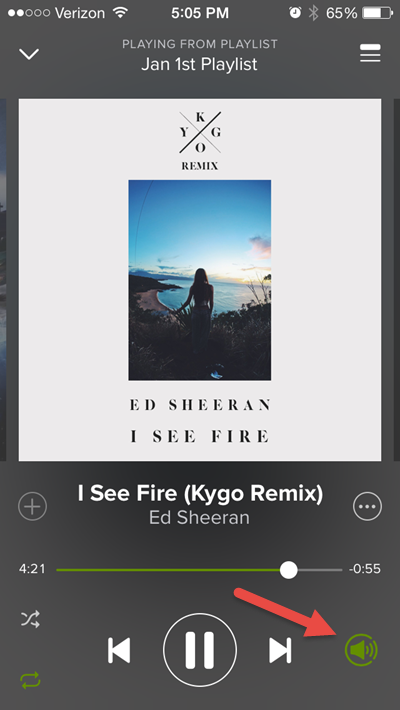
Spotify assumes that if you're playing music from your computer, you automaticly what to control said music from your handheld device. But what if you don't want to control your music from your iPhone? It drove me crazy for a while until I figured out that I could turn off the remote control by taping the green speaker icon shown below.
Did I miss anything?
by Christine Hawthorne | Jan 1, 2015 | Featured Instructor, Music, Spotify

2014 was another great year for music. Many of the songs that made my list this year dropped in the second half of the year and a few actually came out in 2013 with remixes that dropped in 2014. And I may have cheated here or there with songs that came out in late 2013 and didn’t fall on my radar until this year. Regardless, I’m sure you’ll find something you can use in this list. Maybe you’ll even find something new to you, or a song you had used earlier in the year but had forgotten about. You might even consider putting together a playlist including some of these favorites for your class to ring in 2015.
This year, I’m sharing with you how I used each song in my class. Feel free to use them in the same way or share how you use them in the comment section.
Here are my top 20 Indoor Cycling Songs of 2014 (in no particular order):
1.Lips Are Movin’ by Meghan Trainor: I like this one (at least for cycling) so much better than All About That Bass. They’re both fun, light songs that can always elicit smiles. How I used it: standing climb, warm up
2.Geronimo by Sheppard: There’s nothing NOT to love about this totally catchy tune. How I used it: standing climb, seated climb, warm up
3.Shot Me Down-feat.Skylar Grey by David Guetta: I love this adaptation of Nancy Sinatra’s ‘Bang Bang’ featuring Skylar Grey. It starts out slow and then builds, slows again and finishes with a strong beat. How I used it: alternating seated/standing climb
4.I Bet My Life by Imagine Dragons: This single was released on October 27 to promote their upcoming album Smoke and Mirrors. A big contender for my favorite song of the year. How I used it: standing climb with standing accelerations on the chorus
5.Turn Down For What by DJ Snake, Lil Jon: Technically, this song came out at the very end of 2013, but I didn’t start using it until 2014. Rolling Stone voted it as the 2nd best song of 2014 and I have to agree. How I used it: seated flat with accelerations on the chorus
6.Love Runs Out by OneRepublic: This song was supposed to be the first single from OneRepublic’s album Native, but apparently it wasn’t finished in time. It came out in 2014 with the re-release of the album, and it’s just as amazing as the rest of the songs on Native. How I used it: seated or standing climb/ warm up *Check out the remixes.
7.Fireball by Pitbull, John Ryan: My classes can’t get enough Pitbull, so I was so excited when this song was released in July. The horn melody at the end of each chorus sounds a lot like the Champ’s ‘Tequila’. It’s just a fun song with a ton of great Pitbull energy. How I used it: standing climb
8.All of Me-Tiesto’s Birthday Treatment Remix-Radio Edit by John Legend : All of Me, the original, came out in 2013, and this remix dropped in early 2014. While remixes don’t always work for me, this one really did and I love using it in my classes. How I used it: standing or seated climb
9.Animals by Martin Garrix: Another song that officially dropped in 2013, but I didn’t really start using it until 2014 so it’s going on the list. How I used it: alternating seated/standing climb *Check out the remixes.
10.Uptown Funk by Mark Ronson, Bruno Mars: This single was just released in November. I love the guest vocals by Bruno Mars and the retro sound. How I used it: This is a tough one at just under 60 RPMs, but we don’t always pedal to the beat. I’ve used this one as both a standing climb and a warm up.
11.Come With Me Now by KONGOS : This song by South African band KONGOS was initially released in 2011 but just found commercial success in the US this year. I’m voting for this one as my favorite of 2014. How I used it: seated fast flat road
12.Delirious (Boneless) by Steve Aoki, Chris Lake, Tujarr : This is one of those songs that has a great beat and just keeps your pedals moving. There are several different remixes to choose from as well. How I used it: standing climb *Check out the remixes.
13.Raging Fire by Phillip Phillips: I would definitely say this song is every bit as good as his previously released Home. How I used it: jumps on a hill, seated accelerations on the chorus
14.Sing by Ed Sheeran: This song was written by Sheeran and Pharrell Williams. Williams also provides uncredited background vocals. How I used it: alternating seated/standing climb
15.Centuries by Fall Out Boy: This song was released in September as a lead single for their upcoming album American Beauty/American Psycho. How I used it: seated flat road
16. Maroon 5: I’ve actually chosen two favorites from their most recent album V. The first is Maps, which was the lead single for the album. How I used it: standing climb. The second is Animals, which was the second single from the same album. How I used it: seated flat road
17. Hoochie Coochie by Band of Skulls: At 2 minutes and 40 seconds, it’s short and sweet. It’s around 75 RPMs, so it’s just between a seated flat and seated climb-your choice.
18. Shut up And Dance by Walk the Moon: Another very recent release that I’ve loved using lately. It has a catchy beat and it’s just fun and lively. How I used it: seated or standing climb
19.Come Get It Bae by Pharrell Williams : Pharrell pretty much became a household name this year. How could I not use one of his songs? How I used it: seated or standing climb, warm up
20. Take Me To Church by Hozier: This song has been on my repeat radar since I discovered it. Apparently I’m not the only one because it has received a Grammy nomination for Song of the Year! I will definitely be rooting for this one to win. How I used it: cool down
There you have it. My top 20 of 2014. It was so hard to decide which ones would make the list and if you asked me on a different day, the list might look completely different. I know there are so many great songs that didn’t quite make it, so here’s a list of honorable mentions:
Blame by Calvin Harris, John Newman (check out the remixes)
Peace by O.A.R
All About That Bass by Meghan Trainor
The Days by Avicii
The Nights by Avicii
Stolen Dance by Milky Chance
Am I Wrong by Nico & Vinz
A Sky Full of Stars by Coldplay
Problem Ariana Grande, Iggy Azalea
Angel in Blue Jeans by Train
Cadillac, Cadillac by Train
Feet Don’t Fail Me Now by NEEDTOBREATHE
Bang Bang by Macy Gray
The Man By Aloe Blacc
Ticking Bomb by Aloe Blacc
Can You Do This by Aloe Blacc
Summer by Calvin Harris
Ten Feet Tall by Afrojack, Wrabel (check out the remixes)
The Soundmaker by Rodrigo y Gabriela
Budapest by George Ezra
Fever by The Black Keys
Here’s the Spotify playlist which includes all of the songs mentioned:
What do you think? Did I get it right? Did I miss any? I welcome your comments and music suggestions. 🙂 Here’s to a happy and healthy new year filled with some great new music!
by John | Dec 18, 2014 | Instructor Tech Help, iTunes & Spotify Training, Music, Spotify
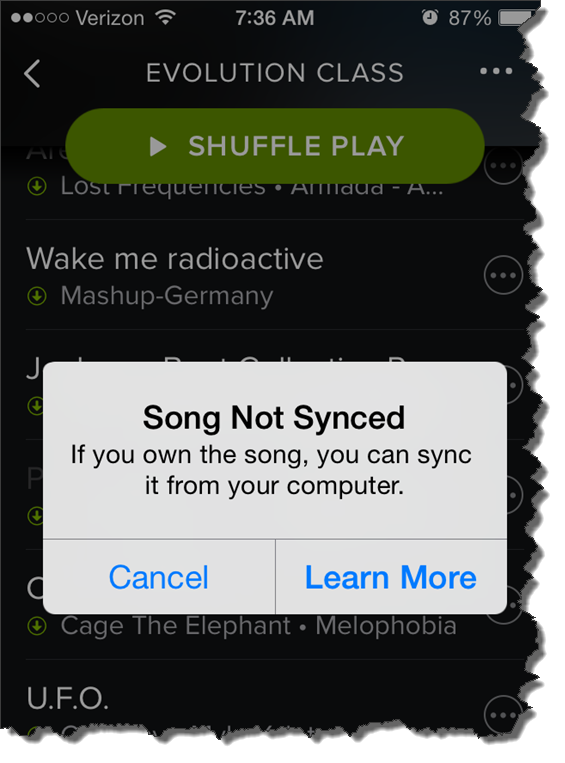
This morning at about 5:30, as is my normal routine, I check to see that my playlist is ready for my 6:00 AM class. The frustrating notice above appeared when I clicked one of the local tracks in my playlist.
I've seen this before
Amy has been having this same problem with her iPhone 6. Best we can tell, this started after she updated to the latest version iOS 8.1.2. Playlists that have worked perfectly in the past now have local tracks that won't play.
But not all local tracks are MIA – which is very confusing to me. For some I figured out that Spotify was substituting one of their tracks. Others work just fine. When I checked the folder location on my computer and compared working tracks vs. nonworking tracks – I can't find any difference. Unfortunately many of the remixes Amy and I like to use aren't available to use with Spotify = we're SOL.
So far I don't have a solution
We tried everything we could think of on Amy's iPhone; rebooted the phone, checked for a Spotify update, copied all the tracks into another playlist, toggled the Available Offline off and on multiple times… nothing has worked.
Do you have any ideas?
I'm fresh out 🙁
by John | Dec 13, 2014 | Instructor Tech Help, Latest News, Music, Spotify

Quick question: what do you feel is missing with (or should be added to) Spotify or Deezer, that would make it the complete music delivery package we need as Instructors?
From where I'm sitting, having the option to include non-Spotify/Deezer tracks in playlists I share – and then have those tracks play for whoever I shared with.
I'm not sure yet, just getting a feel for it – but bop.fm maybe a service we can use in the future. bop.fm connects to many of the popular music sites and their iPhone App allows you to assemble a playlist from multiple sources like; Spotify, Deezer, SoundCloud, YouTube, etc.. and then you can share the playlist with anyone. As long as you have a premium subscription, the bop.fm playlist will stream & play the songlist accuratly.
The trouble with local files > you can't share them
When I create a playlist with the purpose of sharing it, I'm either super careful not to include any of my local files – or – I make sure to include a download link for any tracks that aren't in Spotify/Deezer. But this is still really limiting because there are lots of awesome remixes and mashups that can really complete a playlist.
The trouble with SoundCloud > no option to download many of their tracks
You might search SoundCloud for a specific root track and find dozens of great quality remixes. Which is great except most don't offer any download option = you can only stream them. So you could build and stream a SoundCloud playlist as your class music, but there's no option to include any tracks from anywhere else.
So bop.fm maybe a solution?
Yes bop.fm will aggragate tracks from multiple sources. Which solves the initial problem of sharing a playlist with you. Unfortunately there isn't an “offline” option to download all of the tracks to your device – placing your and your class at the mercy of your Internet service. If you've got a great wireless signal you might give bop.fm a try. I don't, so I say bop.fm might be an option for us in the future if/when they include an offline mode in the future. Spotify's early iPhone App didn't at first, it was added later.
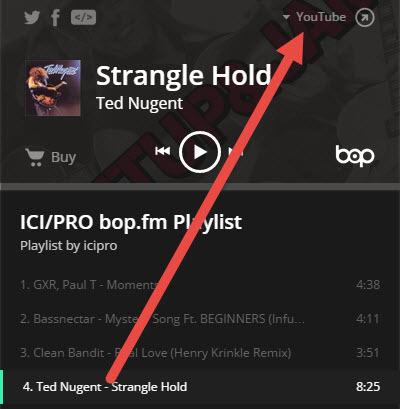
Here's a sample playlist of a few songs sourced from multiple sites so you can see an example here ICI/PRO bop.fm Playlist | Listen for free at bop.fm
Note how the playlist identifies the source of each track – this Bassnectar track is from SoundCloud.
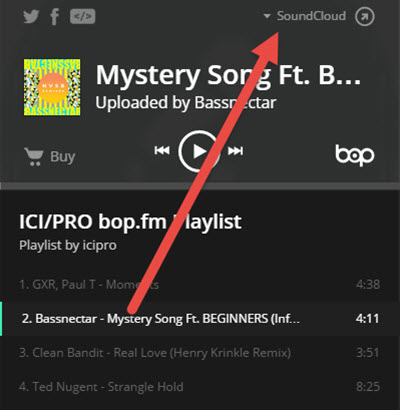
While this version of Stranglehold comes from YouTube – pretty cool, eh?
by John | Dec 6, 2014 | Instructor Tech Help, Latest News, Music, PRO Podcasts, Spotify

Here's a great deal for anyone who's been dragging their feet on subscribing to Spotify. Sign up now and get three months for $0.99 – this is for USA customers, you'll need to check to see if the offer is available in your country.
If you're concerned about learning the in's and out's of Spotify – we've got you covered here at ICI/PRO.
Find a bunch of articles to learn the basics of Spotify here + a bunch of tips and tricks.
Beyond the access to millions of tracks – one of the main benefits of Spotify is how easy it is to share playlists between friends. As an ICI/PRO member you're considered a friend and we have over 60 fabulous playlists that you can download here.
Looking for that perfect track? We have 8 collaborative playlists where you can find song selections from other ICI/PRO members and you can add your own.
by John | Nov 24, 2014 | Big Box Instructor, Instructor Tech Help, Music, Spotify
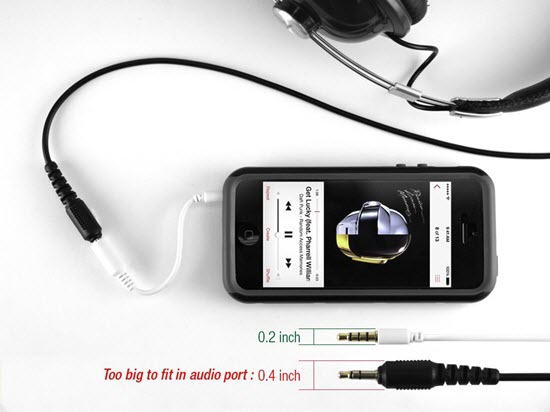
Do you have this problem? Click image to see this adapter at Amazon
I never expected this problem
Amy and I both updated our iPhones last week. She got a new iPhone 6 and I went with a 5s. Both are lighter and thinner than the iPhone 4s' we replaced. Thin is great, until you add a case to them. Now the club's connection cord to the stereo is too thick to fit into the iPhone cases' female jack = neither of us can use our phones to teach without; A. removing the case or B. use a bluetooth receiver to connect wirelessly.
So to fix this I ordered two very inexpensive 3.5mm adapters today from Amazon – $4.99 each with free Prime* shipping. One for each of us. I'm tempted to tape it securely to the existing cord at the one LifeTime where I teach, but inevitably it will disappear and then I'll be stuck with nothing.
*I'm two years with Amazon Prime and without a doubt it's been worth every penny. I cannot begin to tell you how much stress and anxiety this service has saved me. Whenever I think; I need to remember to get some more AA batteries (or whatever) the next time I'm at Target I break into a cold sweat. There never is a “next time” because I never just go “shopping.” So either I'll forget to plan a special trip to Target – or worse – on the off chance I'm ever at Target, I will forget to buy batteries.
Now when I notice I need more readers, batteries, headphone jacks or more Chef Jays bars – I jump on Amazon, hit a few keys and in two days they'll be at my door. No wondering how much shipping will be on a $10 item – it's free 🙂
Now if I could just think of something to get Amy for Christmas…
