Now that more of your students wear heart-rate monitors (HRM) (see previous post “How To Get Your Students To Wear a HRM”), you must teach them how to use one.
An important first step is sometimes lost when introducing HRMs. Instructors immediately start estimating maximum heart rate and discussing zones. But the first measurement of intensity, how hard the students are exercising, must always be perception.
Relating perceived exertion to heart rate is a fascinating personal discovery for the indoor-cycling student. If it’s done correctly, the student will immediately ask at what heart rate he/she should be training. Then a discussion of training zone estimates makes perfect sense.
The following protocol, developed by Team ICG®, provides a template for a “first HRM experience” that the student won’t forget. Initially, you want the HRM to help the student link a given heart rate with a perception, which enhances awareness. The student feels his/her body go through changes in perceived exertion, along with a visible numerical progression.
Resting HR — 2 minutes
Once the students are wearing their HRMs, have them sit quietly on the bike. No pedaling, no talking, just sitting still. Tell them to breathe deeply, relax and see how low they can drop their HRs. This is not a true resting value, but shows them how relaxation and breathing affect their HR. It also gives them a numeric indication of how prepared the body is to receive training. It may well dictate an alteration of their plan for the day.
Warm-Up — 15 minutes
Roll the legs with no resistance on the bike. Feel the ease of motion, the momentum. Get into a rhythm with it: no effort, just smooth, continuous, even circles. Before taking the HR up, we want to accomplish two things. First, we must shunt blood to the leg muscles. Fifteen minutes of easy spinning will do that. Second, we want the students to sense what’s happening in the body as they get warm.
For the first 5 minutes, set the cadence at 90-100 rpm. Have the students increase the resistance just enough to feel as if their legs are working, without changing cadence. This isn’t much effort. Just bring the HR up slightly.
The first change in perceived exertion is an increase in body temperature. Assuming the room is appropriately cooled, the air temperature initially felt cool or cold. Ask them to notice the change — the air no longer feels cold — and note at what heart rate that occurred. Was it 5 beats up from resting? 10 beats?
For the second 5 minutes, have them make another small increase in the resistance. The second sensation in perceived exertion is awareness of breath. Their breathing pattern has not really changed. Their breathing is not hard or labored. They’ve just become aware that they’re breathing, something we’re unconscious of most of the time. At what HR did they become aware of their breathing?
For the third 5 minutes, bring on a little more resistance without changing cadence and raise the HR again slightly. Two things must happen here. They must notice that all momentum is gone from their pedaling. There’s a distinct point, especially on chain-driven bikes, where the sensation of momentum is replaced by effort. This is very visible to the instructor — the “looseness” is gone from the pedaling — however, it’s still not hard.
The other thing they need to notice is a sudden spike in body temperature. They now feel hot. We experience discomfort just before we begin to sweat because the cooling of evaporation hasn’t begun. What’s the heart rate when this happens?
Settle the cadence down to 90 rpm as they continue to work and begin to sweat. This is the next level of perceived exertion. At what HR did they begin to sweat? They’ll notice the hot feeling leave, then a cool sensation against their skin. They might feel perspiration on the brow, under the arms, or elsewhere.
Their warm-up is done.
As you can see, this isn’t an elaborate or complicated warm-up, just a gradual awareness process for the students. The next step is a heart rate ladder, again to connect the students with their perception of the effort.
Heart-Rate Ladder — 20 minutes
Now that the students are warmed-up, it’s time to take them through levels of greater exertion, while connecting their perception of the effort with the HR at which it occurs. Most of this work takes place seated, so give them periodic breaks from the saddle.
Level 1
Level 1 continues the intensity that they reached by the end of the warm-up. All feeling of momentum has been replaced by a feeling of effort. They’re aware of their breathing and have cracked a sweat.
Their HRs should be consistent. Tell them the first lesson of heart-rate training is stabilization. They should be at a HR that they could maintain for hours. Forget about mechanical difficulties, how the saddle feels, whether they need water, fuel, etc. Ask them to settle into a HR that — in terms of the effort level — they could hold for hours.
Maintain that intensity for 5 minutes.
It’s not uncommon for them to be unsure about whether they’re at the right level of effort. Tell them to check their HR, sense their effort level and ask themselves, “Could I maintain this for 1 hour? 2 hours? 3 hours?” If the effort is too high, they’ll have an internal reaction to the question and should adjust as necessary.
Keep the cadence at 90 rpm; this is important. Let them know that the HR they’re training at is called a target HR. Their job is to maintain that target at 90 rpm.
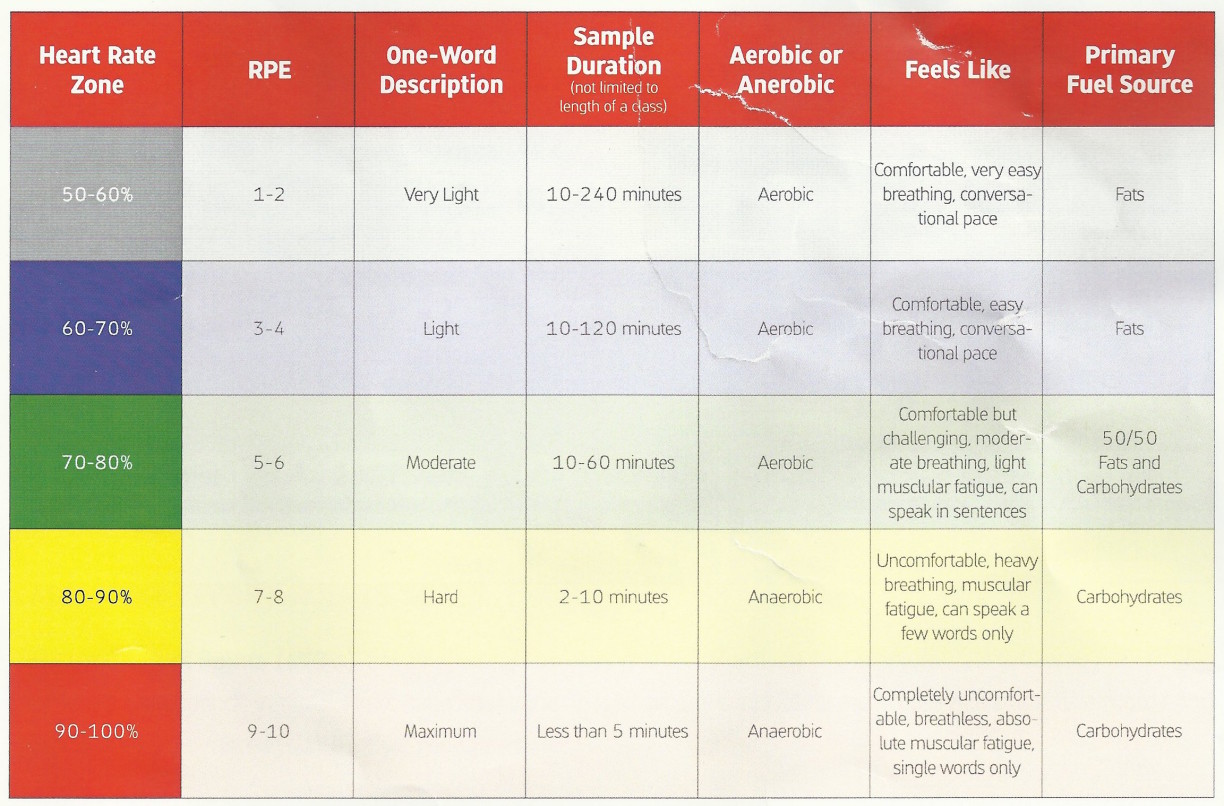
At this point, it’s helpful to explain what’s going on metabolically. Discuss aerobic vs. anaerobic metabolism and changes in the use of fat and carbohydrate as fuel.
As mentioned above, Level 1 is of the same intensity as the final part of the warm-up. From here, the progression builds to greater levels of effort, which will be covered in the next post.
If you're one of the 10,000 Instructors who teach at one of the 300 clubs or studios currently using GroupExPRO to manage class subs and Instructor communications, you can skip listening to this Podcast.
If you're not, please read on…
For Instructors who are tired of; sub requests for class formats you don't teach, the endless string of needless Reply to All mass emails that fill your inbox, the difficulty you have simply finding a sub or worst of all (at least for me) not being notified when there's a class you can teach.
Or maybe you manage your club's Instructor team and are completely overwhelmed by Instructors who can't (or won't) find subs for their own classes and expect you to pull a rabbit out of your hat at the last minute to cover their class – or end up teaching the class yourself.
Either way you'll want to take a few moments to listen to this interview with Schwinn Master Trainer Shannon Fable. Shannon is a long time group fitness department manager who, together with her husband, created GroupExPRO to solve the problem of managing the continuous need for fitness class subs.
If you can relate to the frustration I express during this interview Shannon has a simple way for you to forward information about GroupExPRO to the proper person in your organization. Click > indoorcycleinstructor.com/subhelp to be taken to her referral page. Add your info and your manager's – then please add a short note about how you see this improving your club or studio.
As her way to thank you for your efforts, Shannon will be sending you a $50.00 gift card if your recommendation leads to GroupExPRO being implemented in your facility.
Sometimes, with the best intentions (and a lot of effort), new fitness businesses don't work out as planned. Which leads to sending out a sad email like this one:
John, sadly I have to close down 2 of my studios and consolidate to one due to landlord doubling the rent. Is there anywhere I can
post that I have 30 slightly used RealRyder Spin bikes available so I do not have to put them into storage?
Bob
My initial response was; I'm sorry Bob, I really don't have anyway to help you 🙁
But then I remembered seeing an email from a company who offers a service that I could add to our Pedal-On.com forum. It creates the marketplace that would help Bob (or you for that matter) advertise and sell used Indoor Cycling bikes and/or other equipment.
UPDATED 9/2014 these are sold.
Are you looking for help with your new or existing studio?
We've helped dozens of new studio owners and we can help you too.
All you need to do is ask – click here for our contact form.
Tom Scotto from Cycling Fusion presents the second in his series of Audio PROfiles designed as the companion to Global Ride virtual cycling DVDs.
Paceline Cycling in France – DVD #2
PROFILE DESCRIPTION
A five minute warm-up and cool-down provide bookends to the perfect ride at the base of the French Alps. Two steady 20-minute efforts separated by a 5-minute recovery will provide many training scenarios and objectives with this DVD. OBJECTIVE AND INTENSITY
Since the structure of this DVD is based around two 20-minute steady-state efforts, one could easily approach this as a tempo ride (Zone 3) with intermediate recovery or a 2×20 threshold field test pushing the limits of Zone 4.
After watching the presidential debate last night, I remembered this post that addresses the importance of being prepared. Originally posted on Oct 9th 2014.
Many of us have been guilty of showing up for class and then just “winging it”. But are we putting forth the best YOU when you're making stuff up as you go along?
I've featured Alexa Fischer's short videos in the past and feel you just might re-think your class preparation after watching this video… and then the video that follows below.
If you appreciate Alexa's wisdom like I do, I highly recomend subscribing to her email list. Go here and fill in form in the righthand sidebar.
Winging It
Here's the video Alexa refers to where Billy Joel agrees to let an unknown student play piano for him. If you need a “day brightener” this will be it 🙂
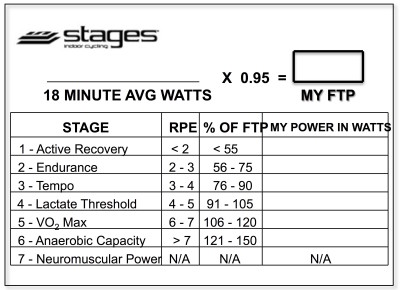
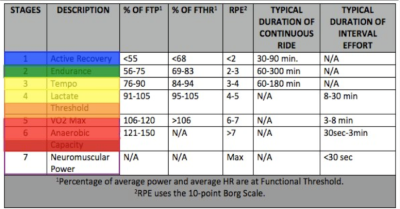
Below, Premium Members can view and download a printable Class Profile that can be used in class, read a detailed description of the Power Based Training Zones and download a printable Power Postcard.
[wlm_private ‘PRO-Platinum|PRO-Monthly|PRO-Gratis|PRO-Seasonal|Platinum-trial|Monthly-trial|PRO-Military|30-Days-of-PRO|90 Day PRO|Stages-Instructor|Schwinn-Instructor|Instructor-Bonus|28 Day Challenge']