
by Joey Stabile | Feb 28, 2018 | Best Practices, Bonus Materials, Creativity Indoor Classes, Instructor Training, iTunes, iTunes & Spotify Training, Music, New Instructor 101, Spotify

This is post one in a multi-post series that will explain how to use and select music to compliment your class. As the series progresses, I will be sure to include the links to the previous posts so that the entire series can be found in the latest post.
As an instructor, music can become the most challenging part of any indoor class; however it can be one of the most important parts of the class. I have heard it said that we are not DJs on a bike, we are cycling coaches. While I may agree with the sentiment, we can not underestimate the importance of music in the delivery of a class. You could structure the most ideal training program with the very best designed drills, but if your music is off and does not match the work, chances are very good that the class will disappoint your riders. While we believe that the class focus and design should be well thought out before the music is added, the addition of music to your drills will truly make or brake your class.
What is it that makes the selection of music so crucial; music is a one of the most powerful mediums. It can facilitate communication that goes beyond words, enables meanings to be shared, and promotes the development and maintenance of individual, group, cultural and national identities. Music can alter movements, moods and emotions. Few other items that you come in contact with can effect such a wide range of human functions and feelings.
So, how do we begin with the so important task of selecting the right music for your class? It all begins with belief. You must believe in your music and your playlist or your class will not believe in it either. While there are seemingly endless types and styles of music and everyone in your class can have a different preference, it is your ability to believe and sell the ride that will matter. To make it a little easier, if you incorporate some basic principles, you will succeed more times than not:
Know Your Demographic
The demographics of an indoor cycling class can be affected by many factors including your club’s location (city vs. suburbs), day of the week and time of day that your class is offered, and if your class is designed around a specific focus or theme. One of the easiest ways to accomplish this principle is to take the time to learn what your riders like by simply asking them. You will never be able to please everyone all of the time, but people appreciate being listened to and will respect you if they believe your are doing your best to give everyone something they enjoy. Please, remember to remind your people that not all great music is great indoor cycling music and that it may take a few weeks to get their requests into one of your rides.
For Foundational classes (beginner), remember the overall focus is to provide a fun environment for people to gain some initial cycling fitness or possibly just fitness in general. With the exception of the warm-up (and possibly the cool-down/stretch), working songs should be music your riders will recognize, and maybe even sing along to. While the beat matching of the ride is still critical, you should take extra time with this group to be sure the music is fun and will keep them coming back for more.
For intermediate and advanced classes, it is critical that the music be beat-matched and of similar intensity to the work that you are asking of the riders. When we ask more of the riders, this also demands more of us as instructors. We need to put in the extra time to find “just the right music” that will not only support our drills, but it will also enhance them. Ideally, the riders should be able to close their eyes, or look away from the cycle display, and still hold the proper cadence by focusing on the beat and feel of the music. Aside from the beat, the intensity is also important: an epic climb demands an epic musical work to help us reach the summit.
One of our foundations at Cycling Fusion is that songs used for the first warm-up segment should NOT have vocals. The warm-up is where you spend a good portion of the time introducing yourself, the purpose of the class and give various instructions such as safety guidelines, proper position and how to gauge the level of effort. It is important that your voice be the only one heard in the cycling studio during the warm-up so riders have a clear understanding of expectations and how to approach the class.
In the next post, we will talk about Pulse, BPM and RPM and how using them will enhance your ride and heighten the student’s experience.
by Christine Hawthorne | Dec 8, 2017 | iTunes, iTunes & Spotify Training, Music, Spotify
 I get a lot of questions about Spotify, but the one question that I get over and over from people that are interested switching from iTunes is: “Do you own the music?”, or “Can I sync music from Spotify to my iPod or burn it to CD? “ And my answer is always the same: “No, you can’t, but you won’t believe what you CAN do for only $9.99 a month!” Now I know that bothers a lot of people. What's the sense in spending $9.99 a month and having nothing to show for it? How is this worth the cost?
It seems that when it comes to music for our cycling classes, there are two camps: Those that want to own all of their music, and those that see their music as more disposable and don't mind ‘borrowing' it.
If you are strictly an iTunes user, then you own the music that you purchase. Well, at least you own the license to listen to songs on many devices.(* Here’s an interesting article from CNN that raises questions about digital music ownership.) It’s all yours. I once strictly used iTunes and now I own a LOT of music. Most if it I rarely listen to or use in my playlists anymore. It just sits there taking up storage space on my computer.
If you are a Spotify user, you are essentially borrowing the music. You are paying Spotify $9.99 for UNLIMITED access to their extensive library of tunes. I (along with many other cycling instructors that have jumped on the Spotify bandwagon) believe that the borrowing is the way to go.
Here are my top 8 reasons why I would rather borrow music from Spotify than buy it :
- I have unlimited access to music. I rarely am unable to find a song that I am looking for. If that does happen, I will purchase the song on iTunes or Amazon, but I’m still not spending as much money as I was pre-Spotify.
- I can listen to a song all the way through and then decide if it’s something I want to use in my playlist. I can’t count the number of times that I have purchased a song on iTunes and then later found that it was not suitable for my playlist.
- Spotify has a radio feature that allows me to ‘like’ songs as I listen. These songs then go into a file called ‘liked from the radio’ and can be easily accessed for future playlists. This is a great tool for finding new music.
- I don’t have songs (most of which I’m not listening to) clogging up all of my computer space.
- I can take my playlists ‘offline’, which means I can use them anywhere, even without an Internet connection. **You do need to have an iPhone or smart phone device to sync your music.
- I can follow other instructors and see what they’re listening to. I can check out their playlists and if I like what I hear, I can pull a few of the songs over to my own files. If I’m in a bit of a rut, I can even follow someones entire playlist and sync it to my device to use in my own class. (Tip: This is frowned upon if you work in the same gym.)
- Many songs that I borrow, I may only use a few times. If I use it more than that, it will always be there. If I don’t use it again, I won’t feel that I have wasted my money. There are many other songs out there just waiting to go on my next playlist.
- In my leisure time, I do enjoy listening to music. The music that I listen to at home or in the car is not always the same as the music I listen to in my cycling classes. For example, I love using Pitbull in my classes. I can honestly say that I would never listen to his music outside of my class. So owning a bunch of Pitbull does not seem cost effective to me. Here’s another example: My all time favorite band is the Beatles. I have rarely used any Beatles tunes in my classes, but I love to listen to them in my leisure time. Do I own all of my Beatles music? You bet I do. And if I want to borrow it from Spotify, I have that option too.
Spotify is the best $9.99/month I have ever spent as an instructor. It has made my class preparation less time consuming, more fun and much more convenient and to me and that is worth every penny.
What do you think? Do you feel more comfortable owning your music or are you OK with borrowing it?
by John | Jun 25, 2017 | iTunes & Spotify Training, Product Reviews
2/2014 UPDATE: This software is no longer available.
With all this talk about PRO/Playlists and Spotify I can't forget my friends with iTunes 🙂
I received an email today from Richard, who's an ICI/PRO member, asking if I could help him…
Over a year ago I had to restore my computer and I used a back up drive to restore my music, actually I gave it to someone else to restore. When I got it back all my music was there but there were multiple entries of the same songs, some as many as 7 or 8 in iTunes.
I tried the iTunes duplicate feature to try to eliminate them but I have so many it was an endless task. Then I tried to delete all but one song in the list but when I clicked on some of the song listings, some played and some did not. So by mistake I deleted a lot of songs before I realized my error. I use Mixmeister 6 to build all of my playlist and then export a 1 hour long mixed file to iTunes to download to an iPod Touch. I think I might as well delete the music I have in the iTunes files and rebuild iTunes from what I have left in my music files.
I really don’t use iTunes much other than to transfer to the Touch. Do you have any thoughts on how I might correct this huge file problem?
You may remember (I sure haven't forgotten) that last fall I needed to replace my computer's hard drive after dropping it on the floor. Thankfully I was completely backed up with Carbonite and was able to restore everything… except I now have the same problem as Richard, dozens of duplicates showing in iTunes. So I thought this would be a good time for another I Can Help Video where I look into TuneUp – a popular plugin for iTunes designed to quickly remove duplicate listings in iTunes.
UPDATE: I just got an email from this company and they offered a 20% to our community. Use promo code CYCLING if you decide to invest in the full version.
If duplicate listings, missing artwork and Track 1/Track2/Track3 listings drives you crazy – TuneUp for iTunes looks like a good solution for you.
Update: As I continued to explore TuneUp I discovered how well it can replace Track 1/Track2/Track3 and I made another video about it here at iTunes TuneUp Software Review Videos.
Originally posted 2011-08-14 05:38:41.
by John | Jun 20, 2017 | iTunes & Spotify Training, Master Instructor Blog, Spotify
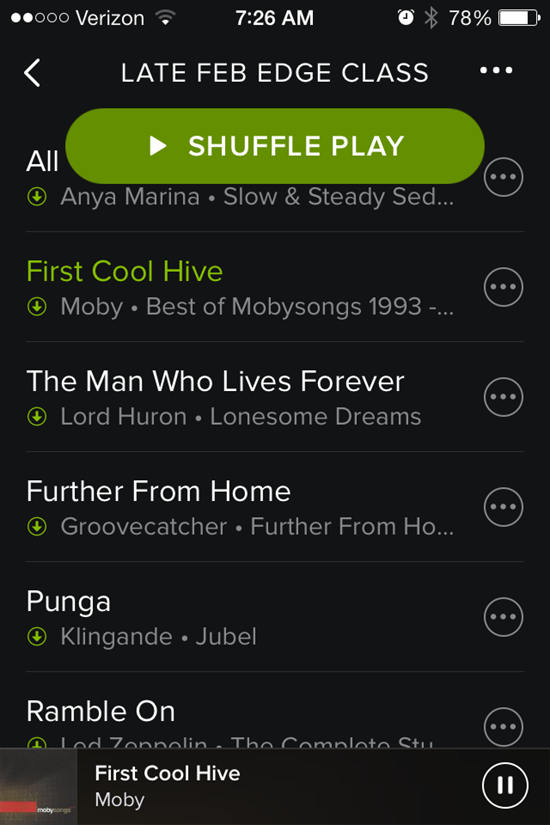
That shuffle button stays right there on the top.
I was greeted by another Spotify update this morning and see they've added a new way to accidentally screw up your class 🙁
Forgive me if you have already experienced this Spotify update. I might be a few days late reporting the change – I've been using the new Schwinn Class Tamer app and wanted to use a past Spotify playlist today.
That big Shuffle Play button sits there at the top, taunting you to inadvertently touch it (or drip on it) and mix up your song order. It won't go away. Swipe up or down to scroll through the playlist to see what's next and that dang button stays right there at the top. Who thought that would be a good idea?
I do like the white on black fonts – they're a bit easier for me to see/read – but still the same frustratingly tiny track length time font.
During class this morning it took me a few tries to get out of the Now Playing Info screen. Tapping anywhere on the bar across the top doesn't work anymore – you need to carefully tap the little X in the top-left corner.
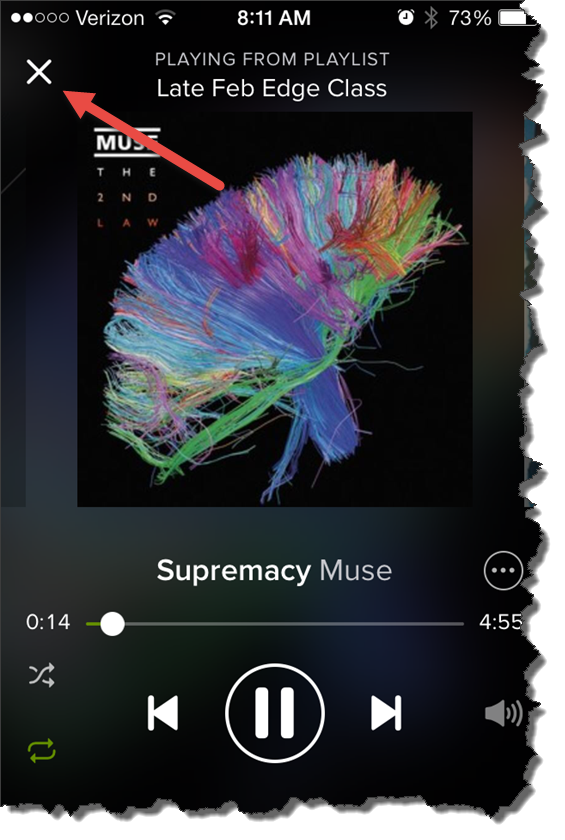
For some reason I couldn't see that X this morning.
Originally posted 2014-04-03 08:20:34.
by John | Jul 9, 2015 | Instructor Tech Help, Instructor Training, iTunes, iTunes & Spotify Training, Latest News, Music, Spotify
Both of these questions have pretty much the same solution…
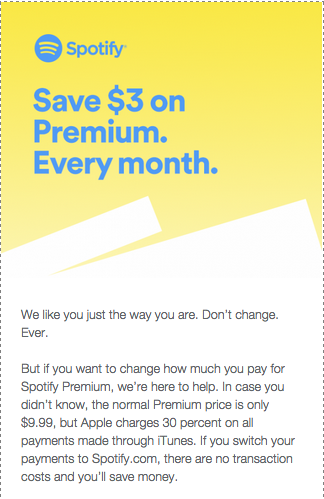
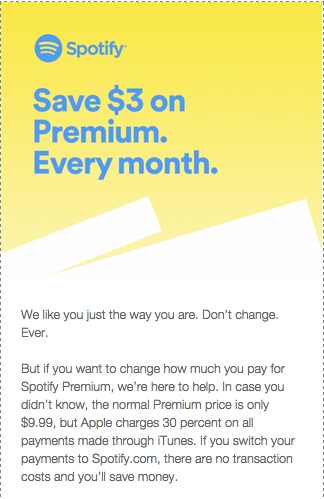
Spotify is jumping in Apple's face with this and I find it kind of funny 🙂 Turns out that if you're paying your monthly Spotify subscription through iTunes, you are paying an extra $3.00 a month. Why? Because iTunes charges an extra 30% on top of recurrent subscriptions.
Spotify is trying to raise awareness around the fact that it's cheaper to subscribe on the web instead of through Apple's App Store. The leading subscription music service plans to email iPhone customers the below note encouraging them, if they haven't already, to start paying at Spotify.com and save a few dollars. “In case you didn’t know, the normal Premium price is only $9.99, but Apple charges 30 percent on all payments made through iTunes,” the email blast reads. “You can get the exact same Spotify for only $9.99/month, and it’s super simple.”
The message is followed with a step-by-step tutorial that explains how to shut off auto-renew through iTunes (so Apple won't keep charging you the higher $12.99-per-month rate) and transfer your account to the web – something that can only be done once your current subscription lapses. “Pardon us if you can't do this immediately. Your current plan needs to end first,” Spotify says.
This will only apply if you downloaded and subscribed to Spotify using your iDevice. Most of us (me included) used our computers and subscribed directly with Spotify.
But this got me thinking; how do I cancel my free trial to Apple Music?
Turns out it's easy to cancel any monthly subscriptions.[wlm_private ‘PRO-Platinum|PRO-Monthly|PRO-Gratis|PRO-Seasonal|Platinum-trial|Monthly-trial|PRO-Military|30-Days-of-PRO|90 Day PRO|Stages-Instructor|Schwinn-Instructor|Instructor-Bonus|28 Day Challenge']
Open the Music App on your phone and click the silhouette icon in the top-left corner.

Next choose View Apple ID and Log In.

Then under Subscriptions > Manage
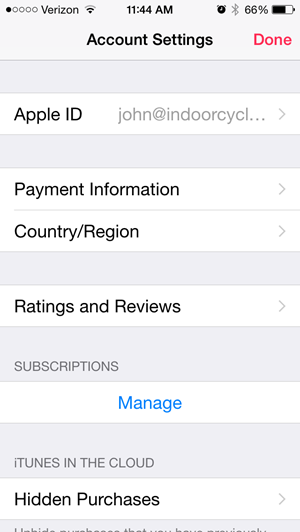
This screen will show your Apple Music and other auto-pay subscriptions, including Spotify if that's how you're subscribed.
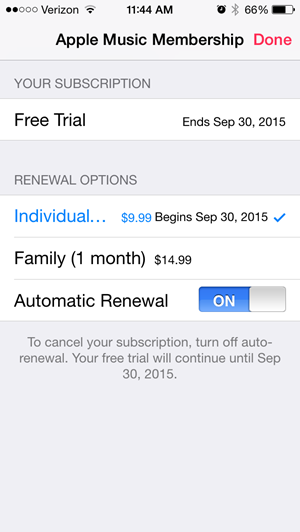
NOTE: cancelling won't end your trial early.
Please let me know if you have additional questions. [/wlm_private]
by John | Jun 30, 2015 | Instructor Training, iTunes, iTunes & Spotify Training, Music, Spotify
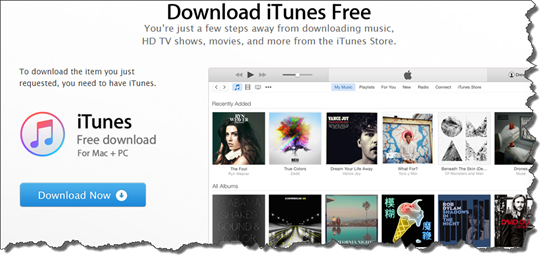
iTunes 12.2 wasn't ready for the launch – so I have no idea how, or even if, it works 🙁
7/1 9:40am – could this be anymore confusing? Trying to save a streamed track to a playlist named 7/1 Test Playlist I created this morning. After exhausting all obvious methods, I tried first adding it to MY Music = success. Turns out that to add an Apple Music track to a playlist, it first needs to be downloaded to your computer like all of your local tracks…
BUT THEN I DISCOVERED THIS

You have got to be kidding me – really Apple? You won't allow me to transfer a playlist from my computer to my iPhone?
So it looks like the only offline usage of Apple Music is on a computer 🙁
I'm not wasting anymore time with this.
7/1 8:06am – seeing iTunes 12.2 is now available (link) and downloading it now. I will be posting my experiences shortly.
I'll be adding updates of my initial experiences above, as I have them… I'll save you some time by telling you that I already hate Apple Music.
Alright, I'm a little biased on the subject. I've developed a dislike for iTunes over the years and Apple Music hasn't done anything to change that opinion.
I was excited to try the new Apple Music Streaming Music service today. It went live at 11:00est and if you update your iPhone or iPad to the latest version of iOS 8.4 you'll see the new iTunes logo. Click it and (if you're lucky) the new Apple Music will open. I say lucky because it took 4 tries (opening and then closing the App) to get past the welcome screen.

I got kind of tired seeing this screen, and nothing more.
Once I had a functioning iPad App – I quickly realised that, like Spotify, building playlists will be easier from a desktop. Apple Music is part of iTunes 12.2… unfortunately at the time I posted this it wasn't available.
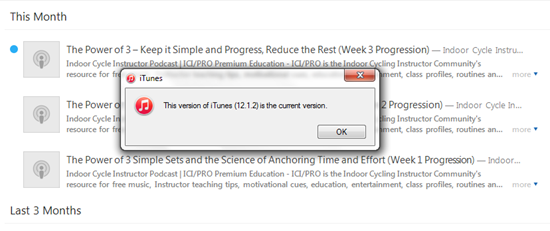
Err, no this isn't the most current version 🙁
Moving attempting to move a track into a playlist on my iPad requires a number of clicks; first click the track to play it > then click the “…” more icon for an option to move to a playlist. I prefaced this with attempted to move > after repeated tries I've yet to successfully see any tracks added to my test playlist. So I can't tell you how it works, because it doesn't.

No Cross Fade
This is a deal breaker for me. Apple Music doesn't appear to offer a crossfade > Just the EQ and volume limiter you had in iTunes.I love the crossfade feature in Spotify and can't even consider delivering class music without it. The one exception would be when I used one of Dennis Mellon's premixed class MP3s, which he's already fully mixed, so it's a non-issue.
I'm going to wait to see if Apple can sort out their issues, and release iTunes 12.2 so I can try the desktop version.
Stay tuned – but don't hold your breath. Spotify doesn't appear to have a competitor here for Indoor Cycling Instructors.
