Master Instructor Tom Scotto's latest Audio PROfile
OBJECTIVE AND INTENSITY
The objective of Getting Started With Intervals Audio PROfile is to allow riders to first understand that there are many ways to perform intervals. An “interval” is just a duration of time. Not only can the amount of time spent during each interval vary, but the approach as well. For example, intervals can focus on strength, aerobic fitness, threshold management or pedal stroke technique. In addition to the length of each effort, the target intensity and target cadence play a role in how the body interprets the stress and benefit.
Created by: Cameron Chinatti / Stagesâ„¢ Indoor Cycling
Training Type: All levels — beginner friendly
Cycling Specificity: Introduction to metrics
Total Class Length: 45 minutes
Note from John: Cameron’s PROfile is specific to the FreeMotion S11 series of indoor cycles. With a little creativity on your part this profile could be used with any brand of Indoor Cycle that displays power.
Tommy Taylor with professional cyclist George Hincapie
Finding a sub for your typical Indoor Cycling class can be a real challenge at times… finding someone qualified to coach a room full of experienced cyclists and endurance athletes expecting a Performance Cycle class can be nearly impossible. Impossible that is unless you happen to be friends with a popular, local cycling coach like my friend Tommy Taylor 🙂 Tom agreed to coach this week's Performance Cycling class for me, while I'm in Phoenix for a family wedding!
This week's class profile is a repeat of week one – which was very well received by my athletes – Coach Troy’s Spinervals Competition 22.0 — Time Trialapalooza. This week will be different with many now having a true understanding of FTP after our assessment last week! Tom is a believer of the “Best Effort” I include in every class to give everyone a baseline wattage to work off of = no one is sitting there wondering; “what the heck is my threshold you're telling me to work below, @ or above?
Class length 75 minutes + Cool Down
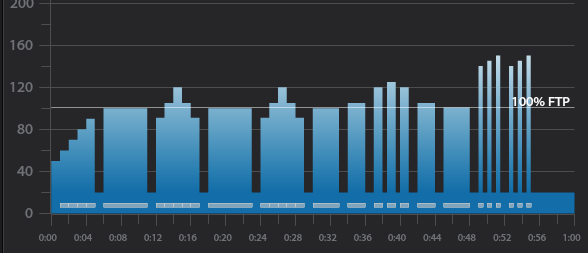
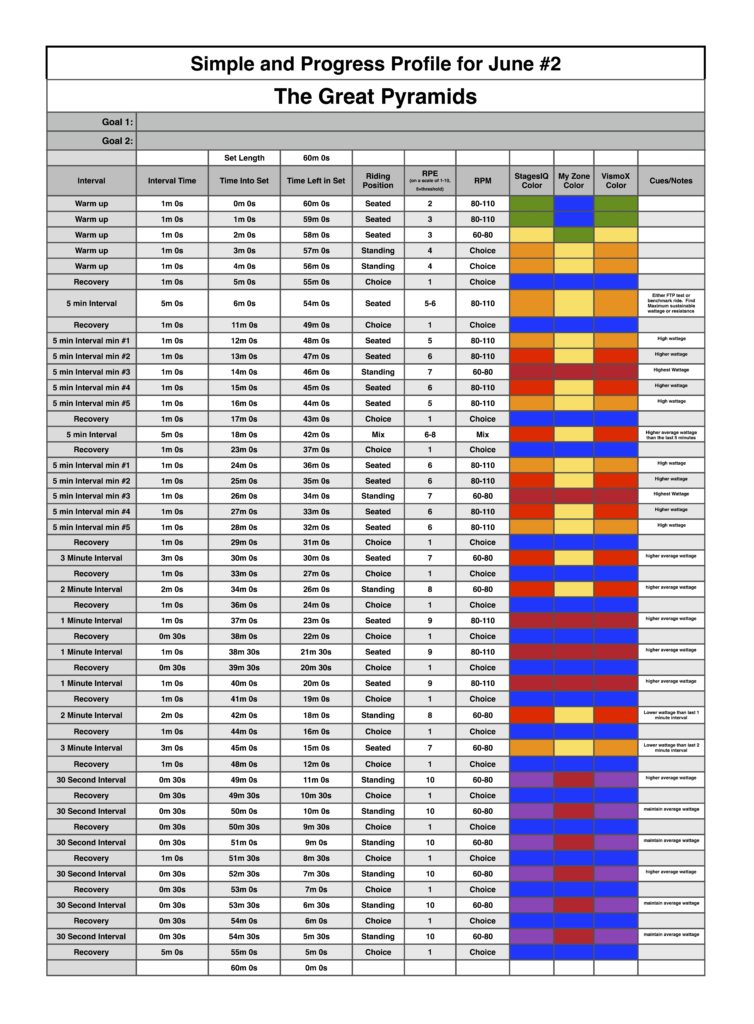
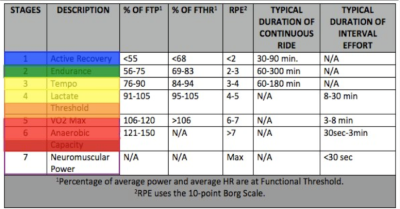
Warm Up — 10 minutes. 5 minutes of gradual increases in wattage. During the second 5 mins. we’re finding the wattage where everyone is first noticing a change in breathing; VT1 / Aerobic Threshold = the top of the Recover Zone shown above. This establishes a rough understanding of a base wattage that we use throughout the rest of class.
3 x 30 sec. Hard / 30 sec. Easy – Openers to AT/LT. I cue these by first having everyone find the amount of load @ 70 RPM that has them feeling they should (not just could) come out of the saddle. The 30 sec. Hard is then simply accelerating to 90+ RPM which results in some pretty impressive power numbers. The 30 sec. Easy is back to 70 RPM — many will stand during the Easy portion.
2 minutes rest – I encourage riders to focus on their recovery. Once they feel calm in their breathing, bring back the Base level work wattage.
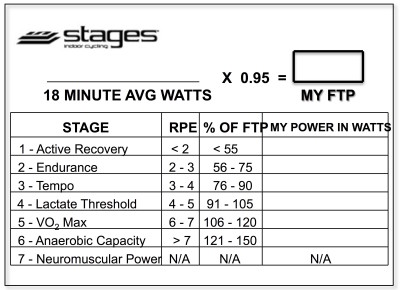
20 min. Tempo — Here I included a 4 min. “Best Effort” to establish a benchmark PTP Personal Threshold Power (top of the Perform Zone) or ride at 110% of FTP if known. It’s very helpful to riders to have that understanding of their personal upper wattage number. The “Best Effort” Threshold # + the Base Threshold # we found earlier form the three Power working zones I use in class.
– 1 min. build at preferred cadence (suggested as 85-95 rpm) — press the Stage Button to reset the averages.
– 4 min. “Best Effort” This should hurt, but be do-able. I ask everyone to observe their average at the end and then…
– 15 min. reduce effort slightly (15% — 20%) and maintain wattage in between the two Thresholds.
I have everyone note the combined average, over the full 20 minutes, at the end of this effort. I’ll use this wattage in the Tempo Intervals to follow.
5 min. Rest — Once breathing calms we bring back ~ Base Wattage and ride out of the saddle for a break.
15 min. Tempo — Quickly establish the average wattage from the 20 min. Interval. > Stage Button and then maintain. You may want to offer slight changes in cadence & load, while keeping wattage = to the initially established #.
5 min. Rest –
10 min Tempo — Time is shorter… so we should be able to work a little harder. Again quickly establish the average wattage from the 20 min. Interval + (if possible) add 10-20 watts > Stage Button and maintain
5 min. Rest
5 min. Tempo — What have you got left? I’ve got a really competitive group and although I heard some grumbling, they all appeared to push this 5 minutes at (some above) their PTP / FTP
Cool Down
Here’s my Playlist from week one's class in Spotify and Deezer – all are 10 minute+ songs. As this is a timed class, I don’t worry about trying to match the efforts to the music.
Two Recordings of Me teaching this profile on the Stages SC3 IC Bike
June 14th, 2016 Class Recording.
June 17th,2016 Class Recording
65 minute “Play it and Forget it” harmonically mixed music set that was used for the June 14th,2016 recording. This mix was featured in a previous post. You can check it out by clicking here.
If you have not downloaded the VismoX app yet, what are you waiting for? This app takes these profiles to the next level of understanding power and your body's reaction to it.
Below, Premium Members can follow links to download all the above media, view and download a printable Class Profile that can be used in class, read a detailed description of the Power Based Training Zones and download a printable Power Postcard.
[wlm_private ‘PRO-Platinum|PRO-Monthly|PRO-Gratis|PRO-Seasonal|Platinum-trial|Monthly-trial|PRO-Military|30-Days-of-PRO|90 Day PRO|Stages-Instructor|Schwinn-Instructor|Instructor-Bonus|28 Day Challenge']