RACE DAY was another winner of our Ultimate Instructor Class Profile contest from Instructor Mark Peterson!
For the love of the Road Race! The inspiration for this ride was the recent Pro Cycling Challenge in Colorado but the ride is generic in the sense that you could do this ride as a stage of any Cycling Race. The objective of the ride is to educate my students on the sport of Bike Racing, entertain and to provide some of those moments of lung splitting, leg busting intensity that is Road Racing!
Mark is a detail guy and what made his contest submission unique is that he created it using the ClassBuilder iPad/iPhone App from Cycling Fusion.
The graphic at the top displays during the entire class. A marker moves along on the screen, helping everyone understand where they are and more importantly, what's coming next.
This was Mark's second visit to the Podcast. You can listen to ICI Podcast #190 — Virtual Class Ride Prep to learn his tips and trick to effectively using video in your class.
Chrispins sent me a note earlier this week about how the iPhone/iPad Class Builder App will now work with Spotify playlists. Fantastic! I've been waiting for someone to create an Instructor App that uses Spotify.
I have a sort of love-hate relationship with the Spotify App… I love the huge selection of music available for $10 a month, sharing playlists and especially the cross fade – it has my playlists sounding like a near professional mix, with no extra effort. But I hate the tiny numbers they use for the track length timers. If you're a 30 something year old Instructor, with youthful eyes, those itty bitty numbers are probably not a problem. I (and there's a good chance you) on the other hand, have reached the start of my Golden Years where everything looks a little fuzzy without my readers.
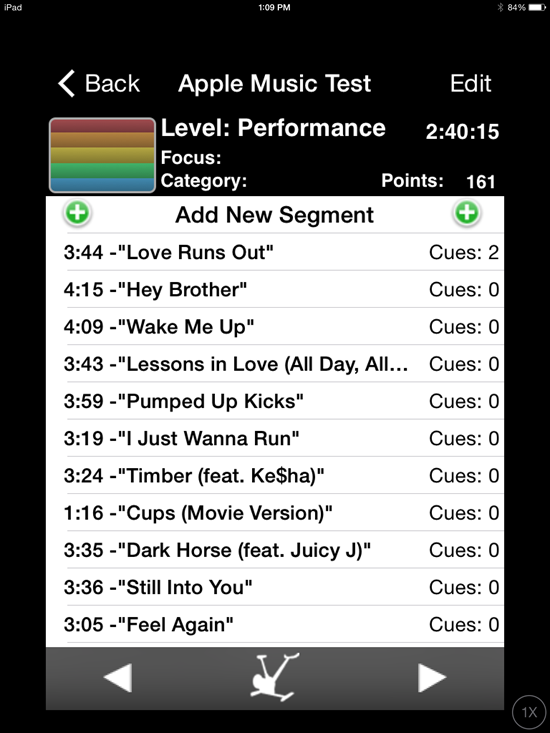
Class Builder has BIG NUMBERS – which is awesome and that feature alone is enough for me to look past the $19.95 cost of the App. The options to add cues, tied to each specific track, could really simplify teaching a well crafted profile. Projecting the class profile's training zones on a screen would be cool if your studio's system will accept the video signal from your device.
Class Builder does have a few limitations…
Class Builder requires a premium Spotify account
No off-line mode… only streaming using WiFi.
But before you purchase Class Builder, with the plan that you'll be using music from Spotify, there's something important that you should be aware of – Class Builder doesn't offer a play music off line, option. To use Spotify in a class, where you're using the Class Builder App as the music player, you'll need to be connected to a reliable wireless internet connection. Which is fine if you've got one. In the studio where I teach, the WiFi is weak and when I've tried to use it in the past I was repeatedly asked to sign in to the WiFi multiple times. So I'm doing some testing to find if I can feel comfortable using Class Builder.
No option for Local tracks
Spotify will only stream Spotify tracks. Because Class Builder can only stream music, it can not play your local iTunes music tracks.
I realize this is can be confusing. Let me try to explain: Let's say you want to include a fun remix or mashup MP3 that you have in iTunes, in a playlist on your iPhone/iPad. The only option is to sync your device with your computer, using the same WiFi to connect between them and then set the playlist on your device to Make Available Off Line or my iPad now says Download Playlist.
Because Class Builder has no ability to download, or make tracks available off line, there is no option to include your local files (iTunes) in a playlist used with Class Builder.
No cross fade or EQ either
There was some early discussions about Class Builder on one of the Instructor Facebook groups. People were having a hard time understanding why, for example, Class Builder wouldn't follow the settings they've made in the Spotify App or play in an off line mode. It took me a while before I understood where the confusion was coming from; Instructors were rightly thinking that “I have everything set correctly on the Spotify App… why isn't this working?”
Class Builder doesn't use the Spotify App on your iPhone – Class Builder is a completely separate App that can access your premium Spotify account. I haven't tried it, but I'm guessing you could delete the Spotify App off your phone and Class Builder would continue to steam music from Spotify.
Realizing that much of what I've written here is conjecture, I've scheduled an interview with the App's developer Gene Nacey, from Cycling Fusion, for early AM Friday. We'll explore this latest version of Class Builder. If you have any questions you'd like me to ask him – please leave a comment below. Friday 8/8 update: scheduling issues have moved this out until next week – stay tuned.
P.S. If you already own Class Builder, the Spotify option was included with the latest update. From the Home Screen go to Settings > tap the Spotify logo > enter your Spotify User and Password. If you've been playing with this please let us know your experiences.
Do ClassBuilder and Schwinn's Class Tamer iPhone Apps work with Apple Music?
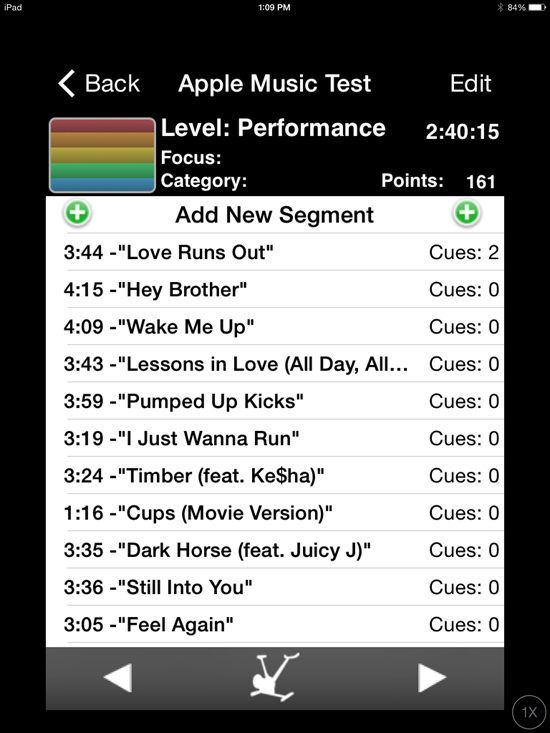
This person on Facebook said they both do… which would be very cool. So I renewed my efforts, fought through the confusion and she's right! I was able to open an Apple Music playlist that Dennis Mellon sent me, with either ClassBuilder or Class Tamer with my iPad*. I added a few cues and nearly everything worked perfectly – even in off-line mode.
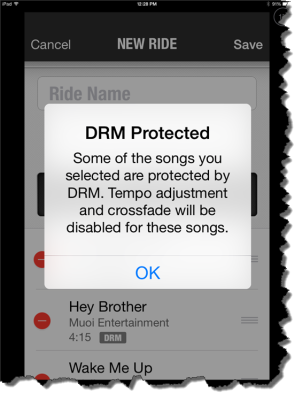
The two exceptions being the cross fade and tempo adjustment functions in Class Tamer won't work. It's because of the DRM that protects each track delivered through Apple's streaming service.
With Apple Music, that would be all of the songs you selected have DRM.
* Tempering my enthusiasm is Apple Music on my iPhone still doesn't work. It refuses to see the the Apple Music playlists in iTunes on my laptop.
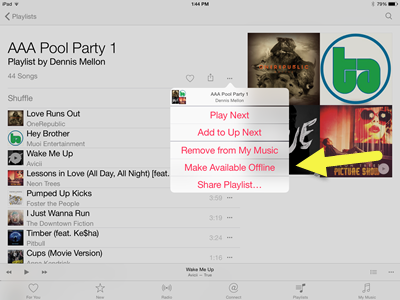
Here's that playlist from Dennis if you'd like to experiment. I'd open that link with your iPhone/iPad. Then set the playlist to Make Available Offline so ClassBuilder or Class Tamer can see the tracks. It appears to me that these downloaded tracks are normal AAC music files, except for the DRM that prevents you from copying, burning to a CD or keeping the files if you don't continue your monthly payments.
Tap the … more icon for the off-line option.
When I tried to open it on my computer it repeatedly send me to the “Download iTunes” page – even though I had iTunes open. I rebooted everything and when I re-opened iTunes I could see the new playlist… but at this point I still can't drag the playlist onto my phone and sync using wifi or the cord.
At launch, many users had trouble adding new music to their libraries, due to an apparent bug with the iCloud Music Library, which wouldn't activate for some users (myself included). This feature, which allows you to sync your collection across devices, is apparently also required to add tracks to your collection in the first place (even if you're only using Apple Music on one device). Strange. Although Apple had apparently fixed the iCloud Music Library bug within a matter of hours, the fact that the service requires this extra step for such basic functionality is a head-scratcher. Nearly 24 hours later, the songs I've been saving in the app still aren't showing up under the “My Music” tab. Presumably that will change at some point.
While it's convenient to be able to merge your existing tracks with Apple Music's library, the mechanism used to do this will madden many people: You have to use iTunes. Some of us would prefer to never see or think about iTunes ever again. And the thing is, it's totally possible to transfer music from your computer to a phone without using clunky desktop software. Spotify lets you sync your local MP3s to its mobile apps, but even that requires routing things through the Spotify desktop app.
What an interesting space streaming music has become.
Facebook has been in talks with major record labels with the intention of “getting into music”, according to reports.
Record labels including Sony Music Entertainment, Universal Music Group, and Warner Music Group have all spoken with Facebook, according to The Verge, though the exact purpose of the talks has yet to be confirmed.
Speculation around why Facebook is expressing an interest in music has centred around the possibility of a streaming service to rival the likes of Apple Music and Spotify.
Sources close to the talks claim that they are still in the early stages, but suggest that Facebook is planning something “unique”.
A separate report by Variety on 1 July detailing Facebook's intentions to test video ads could hint at the manner in which the social network plans to monetise any potential service.
Facebook's addition of listen buttons to artist's pages is as far as the firm has gone in creating its own music service and a fully developed streaming service could be seen as the next natural step.
With all the cash Facebook has, I wouldn't be surprised if they bought Spotify and/or Deezer shortly. We'll just have to wait and see.