by John | Jun 20, 2017 | iTunes & Spotify Training, Master Instructor Blog, Spotify
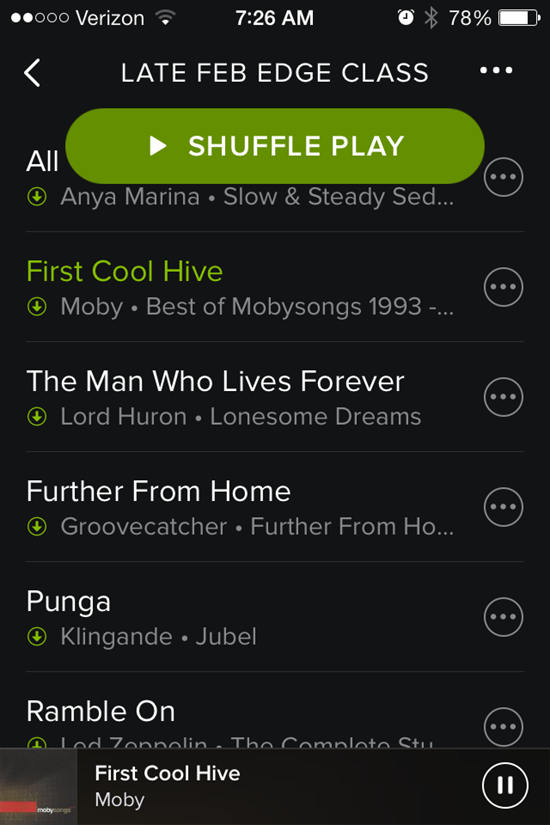
That shuffle button stays right there on the top.
I was greeted by another Spotify update this morning and see they've added a new way to accidentally screw up your class 🙁
Forgive me if you have already experienced this Spotify update. I might be a few days late reporting the change – I've been using the new Schwinn Class Tamer app and wanted to use a past Spotify playlist today.
That big Shuffle Play button sits there at the top, taunting you to inadvertently touch it (or drip on it) and mix up your song order. It won't go away. Swipe up or down to scroll through the playlist to see what's next and that dang button stays right there at the top. Who thought that would be a good idea?
I do like the white on black fonts – they're a bit easier for me to see/read – but still the same frustratingly tiny track length time font.
During class this morning it took me a few tries to get out of the Now Playing Info screen. Tapping anywhere on the bar across the top doesn't work anymore – you need to carefully tap the little X in the top-left corner.
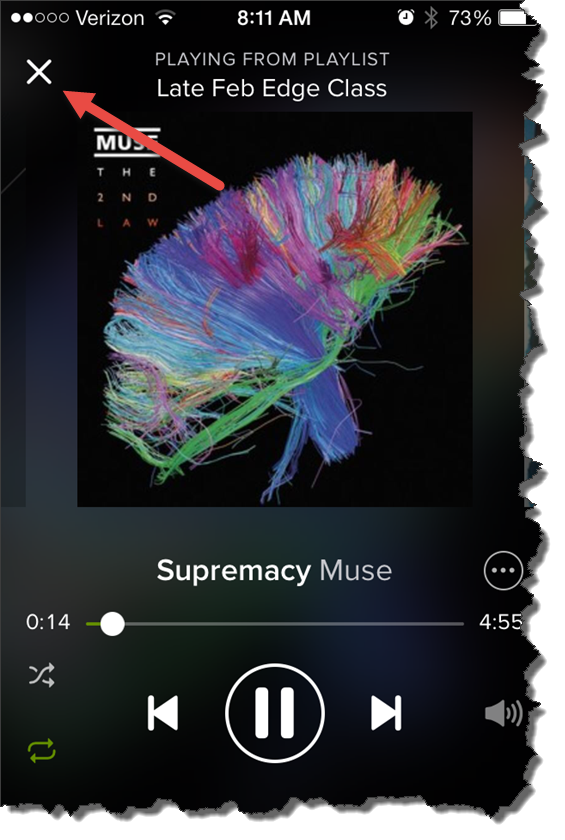
For some reason I couldn't see that X this morning.
Originally posted 2014-04-03 08:20:34.
by Christine Hawthorne | Jun 18, 2017 | Instructor Training, KEEPING IT FUN, Music
This week's track will bring your class up a slow, steep hill as the rpm remains the same, but the gear becomes more intense with each minute. Bishop Briggs‘ song, River is one that will get stuck in your head long after this hill is over and you'll want to use it again and again. It would also make a great standing climb. (64rpm)
River by Bishop Briggs iTunes link
by Dennis Mellon | Jun 18, 2017 | Dennis Mellon, Video
This is a video of my all time favorite Tour de France Stage and it includes my all time favorite indoor cycling song, O'Fortuna.
[wlm_private ‘PRO-Platinum|PRO-Monthly|PRO-Gratis|PRO-Seasonal|Platinum-trial|Monthly-trial|PRO-Military|30-Days-of-PRO|90 Day PRO|Stages-Instructor|Schwinn-Instructor|Instructor-Bonus|28 Day Challenge']
Right click and follow directions below to download this Video
Right Click on the blue underlined link
Select “Download Linked File As”
Select a download location
Once file is completely downloaded, find it in the location you selected
Drag the file into your iTunes or Spotify library OR
Right Click on the file and Select “Open With”
From the drop down menu select “iTunes” or “Spotify”
File should begin playing and is now part of your iTunes or Spotify library
To download the above media on a PC:
Right Click on the blue underlined link
Select “Save Link As”
Select a download location
Once file is completely downloaded, find it in the location you selected
Drag the file into your iTunes or Spotify library OR
Right Click on the file and Select “Open With”
From the drop down menu select “iTunes” or “Spotify”
File should begin playing and is now part of your iTunes or Spotify library
Click here to watch a video on how to download media files from ICI/Pro.
[/wlm_private]
Podcast: Play in new window | Download
Originally posted 2015-11-24 22:46:02.
by Christine Hawthorne | Jun 10, 2017 | Instructor Training, KEEPING IT FUN, Music
This new release from Harry Styles‘ self named album makes a great faster hill at around 74 rpm. It's a totally different sound than you're used to hearing from the One Direction star, and it will definitely rock your next class. Here is Kiwi:
Kiwi by Harry Styles iTunes link
While you're checking out the newest releases, don't overlook this one by Robin Schulz and James Blunt called OK. As with the Harry Styles song, this is not what you're used to hearing from the You're Beautiful singer. It has more of a house beat to it that lends a strong beat to pedal to at 62 rpm.
OK by Robin Schulz, James Blunt iTunes link
by John | Jun 8, 2017 | Best Practices, Instructor Tech Help, Master Instructor Blog, Spotify
ICI/PRO member Dr. Marc Schlosberg is one of those Early Adopters you've no doubt heard discussed in the media. This group is quick to experiment with and embrace new technology. Marc was one of the first Instructors to use Spotify in his classes and he joined me on the podcast to discuss this (at the time) exciting new option for delivering music to our classes. Marc sent me this email yesterday, providing his comments related to my conversation with Chris Hawthorne on Podcast #303
Hi John,
I was listening to the latest podcast and heard about the Spotify syncing issues. I have a couple of suggestions/solutions. I think the reason rebooting all units works to fix syncing is that the newest versions are then installed on all devices. I believe syncing problems develop when Spotify updates and there is a version mismatch. You don’t always know this is the case or sometimes it’s difficult to track that one device has updated, but you haven’t checked the others. Simply shutting Spotify down, checking for updates and updating it, then restarting the program should solve the problem. You have to do this with all the devices you use.
Another roadblock to syncing is lack of space on a device. It won’t tell you you’re out of space, but won’t take individual tracks offline — they stay grey rather than green. It’s a good idea to switch playlists to online only after you’ve used them to preserve space (except for those you always like to have in your back pocket). You could also delete unused apps to make room. My iPhone is 16gb and I’ve run into this problems (and 16gb used to be an unimaginable amount of space). It’s probably less of an issue for those with 32gb and up or Android devices with huge plugin memory — unless the memory is full.
Whoa — it looks like Spotify updated their iPhone interface yet again while I was writing this.
Hope this helps.
Take care,
Marc
Thanks for this Marc! Your suggestion that available storage maybe limiting the number of “off line” playlists is a good one and begs the question; “how can I tell how full is the memory on my iPhone?”
There are a couple of places that will show you how much space/memory you've got left. My preference is to go to: Settings > General > Usage… where at the top you'll see how much room there is for a few more playlists.
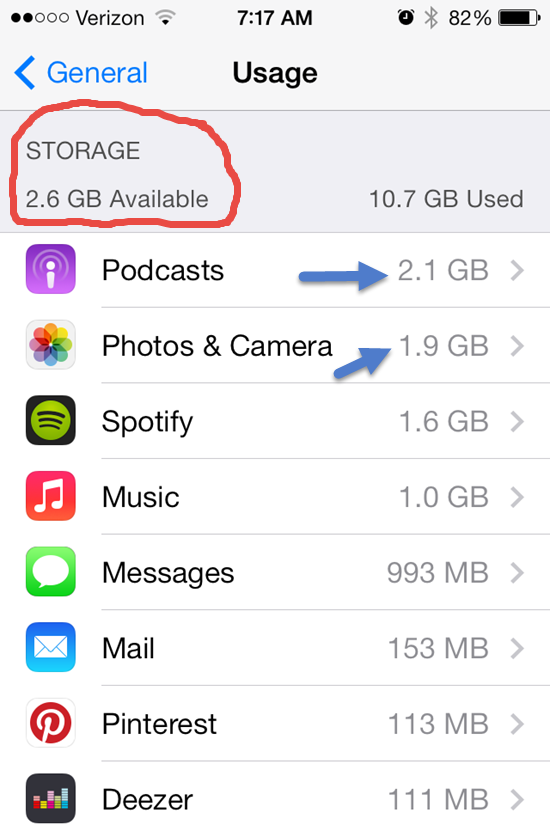
This also shows you all the other memory hungry Apps on your phone. One common culprit is your camera's memory and all those pictures and HD videos. Downloading them to your computer and then deleting can free up some space.
Depending on your settings, Podcasts download automatically and can quickly crowd out your favorite playlists. Open your Podcast App select a specific Podcast > Settings > Episodes to keep and select a number to save (Last 2 / Last 5 / ect…) instead of All.
Do you have any other tricks you can share?
Originally posted 2014-04-04 07:53:40.
by Christine Hawthorne | Jun 4, 2017 | Instructor Training, Music
Every instructor needs to have songs like this week's favorite track in their library. Keep this one in your flat road folder and take it out when you are looking for a longer flat road to ride on. Though they've been around for quite a while, I've just recently found Nahko and Medicine for The People and their song Black as Night from their 2013 album Dark as Night. I love the lyrics: “I believe in the good things coming…”.
Riders will even out at around 97 rpm. *If you edit, watch for a few explicit lyrics at
1:19 and 5:09 (nothing a little ‘talking over' won't fix!)
Black as Night by Nahko and Medicine for The People iTunes link