I taught my final class for LifeTime Fitness yesterday and thought I would use my very last track as this week's free music Friday.[wlm_private ‘PRO-Platinum|PRO-Monthly|PRO-Gratis|PRO-Seasonal|Platinum-trial|Monthly-trial|PRO-Military|30-Days-of-PRO|90 Day PRO|Stages-Instructor|Schwinn-Instructor|PRO-Visitor|PRO-Studio']
Line of Fire from Junip is one of those sneaky songs that starts quiet and unassuming. Then it begins to build @ 92 RPM, in volume and intensity. Listen for the obvious places to cue additional load that come about 20 seconds apart. We built up to our Best Effort power over the first 2:30. Then there's a nice quiet spot to regroup before ramping up again to the BIG FINISH – you decide how long you want to keep everyone above threshold. The total length (before the outro) is 5:22. Plenty of time to really do something cool!
Has this ever happened to you and really messed up the energy of your class?
You switch from the Now Playing screen on your iPhone, back to the Playlist Screen to check what song is coming up next.
Except you're a ways into the class and to see the current song that's playing in the list, you need to carefully scroll down through the playlist. Easy to do when you're sitting at a desk. Not so easy when you are all sweaty and pedaling a bike. So what you intended as a swipe to scroll down the order, becomes a click that starts a different song. This of course messes up everything and has you flustered, trying to get back to the previous song – and at the correct point in the track 🙁
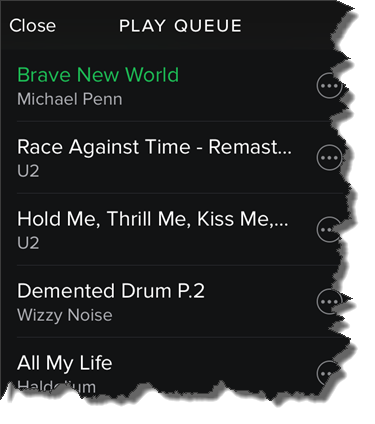
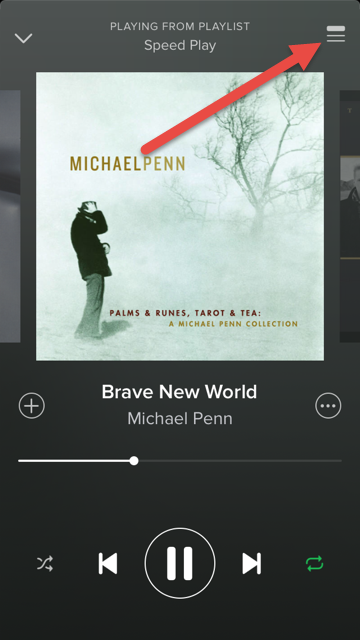
I found a solution for this today. I'm not sure how long it's been there, but there's now an option to see the Play Queue the list of what's coming up next. Here's how you can find it:
From the Now Playing screen > Click the top right icon.
That will open the Play Queue with the current track always at the top!
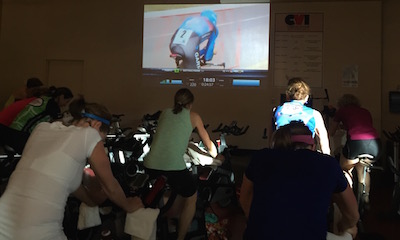
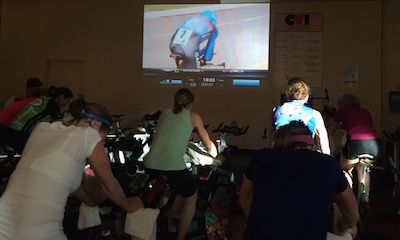
This is an exciting time in the world of indoor cycling! Bikes with power meters are becoming more common place, big box studios are getting a makeover and are more than just echoey converted racquetball courts, small private studios are carving out their own niche and giving riders an “experience”, not just a workout. Many facilities are also using video to help motivate their class participants.
I've been using video in my classes for about 5 years and have put together an extensive video library the includes music videos, concert footage, mountain and road biking videos, extreme sports videos and just about anything I think will motivate my riders. I've decided to start sharing this library with the members of ICI/Pro. Each Thursday I'll post a new video that will be available for download. Over time I hope build an extensive video library that will help ease ICI/Pro members through the transition of using video in their classes.
[wlm_private ‘PRO-Platinum|PRO-Monthly|PRO-Gratis|PRO-Seasonal|Platinum-trial|Monthly-trial|PRO-Military|30-Days-of-PRO|90 Day PRO|Stages-Instructor|Schwinn-Instructor|Instructor-Bonus|28 Day Challenge'].
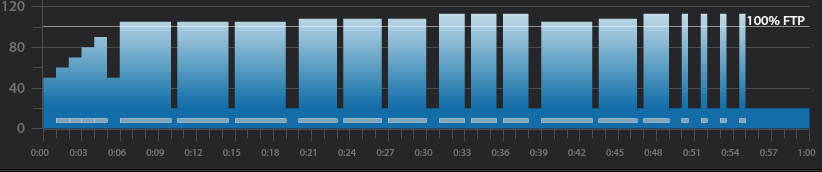
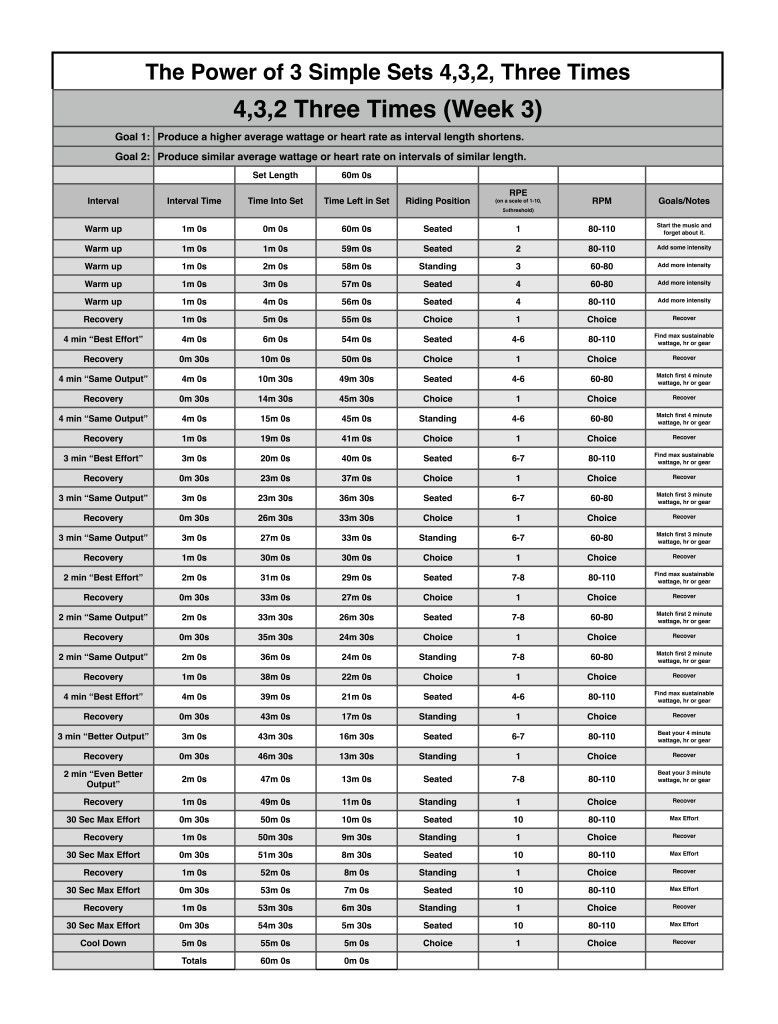
Below you'll find Week 3 of July's Keep it Simple and Progress indoor cycling profile.
Workout Basics:
5 minute warmup
3 x 4 minute intervals with 30 seconds recovery after each
1 minute recovery after the third 4 minute interval
3 x 3 minute intervals with 30 seconds recovery after each
1 minute recovery after the third 3 minute interval
3 x 2 minute intervals with 30 seconds recovery after each
1 minute recovery after the third 2 minute interval
4,3,2 minute intervals with 30 seconds recovery after each
1 minute recovery after the 2 minute interval
4 x 30 second intervals with 1 minute recovery after each
5 minute cool down
3 x 4 minute interval goals and specifics:
1st 4 minute intervals should be ridden seated at 80-110 rpm at Threshold wattage, HR or RPE
30 second recovery or reset
2nd 4 minute interval should be ridden seated at 60-80 rpm at the same wattage, HR or RPE as the 1st.
30 second recovery or reset
3rd 4 minute interval should ridden standing at 60-70 rpm at the same wattage, HR or RPE as 2nd.
1 minute recovery or reset
3 x 3 minute interval goals and specifics:
1st 3 minute intervals should be ridden seated at 80-110 rpm a wattage, HR or RPE that is higher than the last 4 minute interval
30 second recovery or reset
2nd 3 minute interval should be ridden seated at 60-80 rpm at the same wattage, HR or RPE as the 1st 3 minute interval
30 second recovery or reset
3rd 3 minute interval should ridden standing at 60-70 rpm at the same wattage, HR or RPE as 2nd 3 minute interval
1 minute recovery or reset
3 x 2 minute interval goals and specifics:
1st 2 minute intervals should be ridden seated at 80-110 rpm a wattage, HR or RPE that is higher than the last 3 minute interval
30 second recovery or reset
2nd 2 minute interval should be ridden seated at 60-80 rpm at the same wattage, HR or RPE as the 1st 2 minute interval
30 second recovery or reset
3rd 2 minute interval should ridden standing at 60-70 rpm at the same wattage, HR or RPE as 2nd 2 minute interval
1 minute recovery or reset
4,3,2 minute interval goals and specifics:
4 minute intervals should be ridden seated at 80-110 rpm at Threshold wattage, HR or RPE
30 second recovery or reset
3 minute intervals should be ridden seated at 60-80 rpm at a wattage, HR or RPE that is higher than the last 4 minute interval
30 second recovery or reset
2 minute interval should ridden standing at 60-70 rpm at a wattage, HR or RPE that is higher than the last 3 minute interval
1 minute recovery or reset
3 x 30 second interval goals and specifics:
The 4 x 30 second intervals should be ridden at the riders choice RPM or position and should be ridden at maximum effort followed by a 1 minute recovery.
[wlm_private ‘PRO-Platinum|PRO-Monthly|PRO-Gratis|PRO-Seasonal|Platinum-trial|Monthly-trial|PRO-Military|30-Days-of-PRO|90 Day PRO|Stages-Instructor|Schwinn-Instructor|Instructor-Bonus|28 Day Challenge'].
Trainer Road Profile (If you're Trainer Road Member join my Team to get this and all profiles)
Part 1 covered getting participants to stop eating foods they hate and also avoid stress-driven, high-calorie blowouts or using food as entertainment.
Here are two more things you might wish your participants would stop.[wlm_private ‘PRO-Platinum|PRO-Monthly|PRO-Gratis|PRO-Seasonal|Platinum-trial|Monthly-trial|PRO-Military|30-Days-of-PRO|90 Day PRO|Stages-Instructor|Schwinn-Instructor|Instructor-Bonus|28 Day Challenge']
Thinking Only About Calories, Not Food Quality
I don’t think food (or weight) is only about calories in/calories out. I’ve even written articles and a book chapter on it because it’s an important subject — one that has raised angry reactions.
Some nutritionists and dietitians do think that a calorie is a calorie is a calorie.
As the lead nutritionist in a weight-loss program, I worked with a registered dietitian. One participant had typed “HELP!” next to the brownie listed in her food log.
Here was the dietitian’s reply: “This is only X calories, so I’m not worried about it.”
The dietitian didn’t seem to realize that the brownie might have consequences. My specialty — psychoactive nutrition — keeps me aware of those consequences. They might include increased appetite, the onset of cravings, or bingeing — any of which could last for several days.
The dietitian also seemed unaware that the brownie might have been a result of something the participant had eaten earlier that day or the day before.
Or that “HELP!” revealed the lack of control the participant was experiencing.
I have never told a client that all calories are equal — or that it’s okay to eat a certain amount of sugar if you stay within your calorie limits. When you recognize sugar as a psychoactive drug, calories are less important than that.
And this isn’t just about sugar. Even though we now know that saturated fats aren’t as bad as we were told, most of my clients do realize that fried pork rinds are not a healthful option in a daily food plan. Some foods we should just avoid.
At a recent presentation, a man asked about a non-caloric butter replacement. He started using it to save calories, but the junky chemicals in it made it a poor substitute. Coconut oil, raw almond butter, even butter would be better. They have calories but also offer nutrition benefits.
Thinking about calories alone leads to eating without focus or mindful attention.
Cleaning the House Before Housekeeping Gets There
This is something my clients do frequently. I suppose they expect me to reprimand them for the “bad” stuff they’ve been eating. (That never happens!)
They cancel, then reschedule appointments for later on, so they can get themselves together to eat well for a week or so — and keep a food log that shows how well they’re doing.
I’ve also had clients cancel follow-up appointments. Follow-ups are arguably the most important appointments. They give us a chance to discuss what has been working and what hasn’t.
The clients reschedule because they weren’t implementing the first appointment recommendations.
Yet the reasons they’re not implementing could reveal the moments that throw them off-track. Postponing till they’re sure they’ll get a gold star misses those valuable discovery points.
And occasionally, unfortunately, I never hear from them, even though they’ve already paid for their follow-up appointment — and have serious health problems that I specialize in and have studied in depth.
A final issue might be “too many cooks.” A new client came in after meeting with her physical therapist. She presented a week’s worth of food logs, based on her PT’s recommendations. She had already “cleaned house.”
My review of her logs indicated that this woman needed to make several nutrition changes. She was reluctant to do so, though, because the PT had suggested something else.
When it comes to nutrition, your cycling participants are free to do whatever they choose. They can wing it. They can follow steps they’ve found on websites — there’s more nutrition stuff online now than ever before.
They can combine different plans and follow a Paleo diet 2 days a week, the Mediterranean Diet on 2 different days, a vegan diet for 2 days, and a pepperoni pizza and beer binge the last day. Whatever they want.
But they might be eating too much of some things and too little of others, missing vital nutrients. They might skip over key brain chemical info that could make life easier if they knew it. They might find their appetite out of control and not know why. They might have intense cravings and not know why.[/wlm_private]
Food isn't as casual as we sometimes assume it is. You probably wish your participants would stop treating it as if it were. I know I do.
I'm a big fan of controlling the energy of a class or set through music. I often look for high energy fast beats per minute songs to help push my riders to higher and higher intensities, but sometimes I like to use lower energy, yet powerful, slower beats per minute songs to force participants to slow down, focus on pedaling technique and power production at slower revolutions per minute.
I live in Denver Colorado and there are some long climbs here, it's not uncommon for a climb to last over an hour. When on these climbs it's important to maintain a “doable” intensity and find a sustainable rhythm. In the great INDOORS we often climb to max effort then recover a few times per class, but in the great OUTDOORS it's important to control the intensity so riders can make it to the top of the climb. I like to bring this controlled rhythmic type of hill simulation indoors from time to time.
This 3 song mix can be used to simulate a slow and steady climb. During the first song I like to stay seated and find a steady rhythm around my threshold wattage or HR. For the second song I like to mix between sitting and standing, I usually sit for 45 seconds and stand for 15 seconds. The third song has a few energy spikes that I like to use as surges to the top of the hill.
Give it a try and let me know if your class likes it.
[wlm_private ‘PRO-Platinum|PRO-Monthly|PRO-Gratis|PRO-Seasonal|Platinum-trial|Monthly-trial|PRO-Military|30-Days-of-PRO|90 Day PRO|Stages-Instructor|Schwinn-Instructor|Instructor-Bonus|28 Day Challenge']



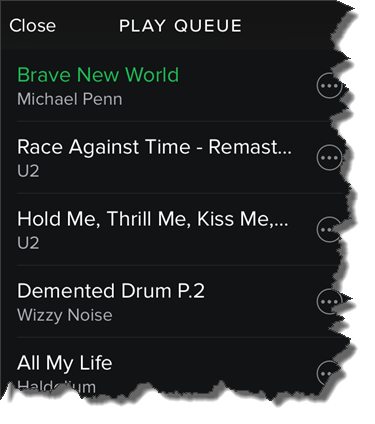

 That will open the Play Queue with the current track always at the top!