
by John | Jul 26, 2017 | Instructor Tech Help, Instructor Training, Product Reviews
I realize that not everyone has access to (or interest in) Spotify. And I'm guessing that the majority of successful Instructors are using the combination of iTunes and an iPhone to deliver their class music. If the later category includes you, this new My Cycle Class iPhone App maybe of interest.

Paul Surette developed myCycleClass to simplify creating a class profile using his iPhone and then guiding him with movements & cues that corrispond to each song.
Not sure if it's just me, but there is often things not obvious (read frustrating) when I first use any App. In the case of myCycleClass it took me a long time to figure out how to actually start the class 🙁 You click the + in the top right corner. Once I figured that part out it seemed to work well, but I'll admit that I didn't try it in an actual class.
You start by adding your typical movements > use the + button to add new.

Then common cues

Using the setting tab you can import iTunes Playlists. Select a playlist and you can add movements and cues.
When you're ready to start class you hit the + sign and are given an option to adjust the class length countdown timer.
One handy feature is you can easily email your playlist / profile to others.

If you are into techie stuff like this and appreciate the structure myCycleClass would bring to your teaching give it a try and let me know your results.
An alternative iPhone App is ClassBuilder from Cycling Fusion. Yes there are considerable differences between the two. The primary difference is myCycleClass is designed for a Movement based class where ClassBuilder is geared toward Intensity based classes.
Originally posted 2012-07-03 09:02:41.
by John | Jun 25, 2017 | iTunes & Spotify Training, Product Reviews

2/2014 UPDATE: This software is no longer available.
With all this talk about PRO/Playlists and Spotify I can't forget my friends with iTunes 🙂
I received an email today from Richard, who's an ICI/PRO member, asking if I could help him…
Over a year ago I had to restore my computer and I used a back up drive to restore my music, actually I gave it to someone else to restore. When I got it back all my music was there but there were multiple entries of the same songs, some as many as 7 or 8 in iTunes.
I tried the iTunes duplicate feature to try to eliminate them but I have so many it was an endless task. Then I tried to delete all but one song in the list but when I clicked on some of the song listings, some played and some did not. So by mistake I deleted a lot of songs before I realized my error. I use Mixmeister 6 to build all of my playlist and then export a 1 hour long mixed file to iTunes to download to an iPod Touch. I think I might as well delete the music I have in the iTunes files and rebuild iTunes from what I have left in my music files.
I really don’t use iTunes much other than to transfer to the Touch. Do you have any thoughts on how I might correct this huge file problem?
You may remember (I sure haven't forgotten) that last fall I needed to replace my computer's hard drive after dropping it on the floor. Thankfully I was completely backed up with Carbonite and was able to restore everything… except I now have the same problem as Richard, dozens of duplicates showing in iTunes. So I thought this would be a good time for another I Can Help Video where I look into TuneUp – a popular plugin for iTunes designed to quickly remove duplicate listings in iTunes.
UPDATE: I just got an email from this company and they offered a 20% to our community. Use promo code CYCLING if you decide to invest in the full version.
If duplicate listings, missing artwork and Track 1/Track2/Track3 listings drives you crazy – TuneUp for iTunes looks like a good solution for you.
Update: As I continued to explore TuneUp I discovered how well it can replace Track 1/Track2/Track3 and I made another video about it here at iTunes TuneUp Software Review Videos.
Originally posted 2011-08-14 05:38:41.
by John | May 9, 2017 | Class DVDS & Videos, Product Reviews
 Does you club offer a Indoor Cycling Movie Night? Mine does as a way to get people in for long rides minus the boredom 🙂 Working on that concept would this work? Have an “Indoor Cycling Endurance Learning Class” where you play instructional DVDs on different topics. I got the idea over at EnduranceFilms.com I have a few of their Indoor Cycling DVDs and as I'm training for my first triathlon I was intrigued by this 5 DVD Triathlon Training Series.

Originally posted 2010-02-28 06:44:13.
by John | May 3, 2017 | Instructor Training, Product Reviews, Training With Power

When I'm asked to review a product or service that includes new technology, I'm always a bit hesitant. You see I like simple and I tend to see many new products trying to solve a problem that really doesn't need to be solved or will add another (needless) layer of complexity/frustration/distraction to the lives of Instructors and/or their students.
Power indication in our classes is a perfect example. Seeing our watts is a huge step for many of us and equally so for our students. We see the value of all this information (metrics) about the amount of work we're doing in class. Many of us are excited to use that data as the basis for improving our fitness.
But what do we do with all this new information?
Collecting your data is a good place to begin. Both the FreeMotion and Schwinn Power Meter consoles offer the option to plug in a USB flash drive. After your training session you can download the ride to your computer to see what you've done. Which is interesting, about two times. Then you realize that looking at a snapshot of a single day isn't really telling you anything of value. If you're an Excel expert you can build a fancy spreadsheet to show graphs where you can see trends. Or you can subscribe to an online service like Training Peaks ($20 a month if you want the graphing features), upload your results and track your fitness. I see online services as an excellent choice for a committed athlete, but a bit over-the-top for the Club Athletes that make up the majority of our classes.
When Cameron Chinatti from Stages Indoor Cycling explained their new iPhone App, which is designed for use with the FreeMotion console, I saw it as a potentially useful tool that could benefit both you and your students.
So I agreed to give it a try to see if it was in fact useful and not needlessly complex or distracting.
Click here to see my review of the FreeMotion S11.9 and S11.0 Indoor Cycles.
Or order a Freemotion S11.0 Indoor Cycle – Includes the Power Sensor Console – from amazon.com with free shipping
Set up.
The console uses Ant+ to communicate with other devices. iPhones don't “hear” Ant+ signals, so Cameron sent me a Wahoo Key – a little device that plugs into the bottom of your iPhone. I then purchased the $0.99 Stages App from the iTunes store and installed it.
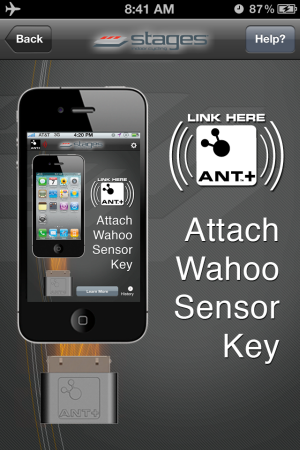
Using the Stages App.
I have a “Is it intuitive and easy to use?” test, which is simply; “do you turn it on and it works… Yes or No?
The App passed – and as long as I followed the proper procedure, every time I turned it on it worked.
The console is designed to “Pair” fancy word for connecting to both a Heart Rate strap and/or your iPhone during “Warm Up” mode. Once you advance to Stage 1 Pairing is no longer available. With the Stages App turned on, pedaling the bike and the console in Warm Up you will see:

Pressing the Stage button brings you to the main screen.

My second test is; “what value does this product provide, beyond some fancy graphics?”
Something we all need to know.
The Stages App will calculate your FTP (Functional Threshold Power) and your Heart Rate at FTP over a series of rides. Understanding your FTP is as important as knowing your Threshold Heart Rate. With both these metabolic markers you can create specific training zones. Once your student's know their Power Zones your class will be a whole lot easier to teach for you and more understandable (and beneficial) for them 🙂
Here's the setup screen where you can select to App to calculate your FTP or you can manually add it if known.

Auto-Calculate FTP is HUGE
I talked to Cameron about the auto-calculate feature because after three rides it was showing my FTP as 186 Watts vs. ~240 watts which I'm normally seeing during a long hard effort. Her response was; “how hard did you ride during those classes?” I admitted that I hadn't worked as hard as I could have. Cameron explained that App is looking for your best 20 minute average wattage and if I don't provide a hard/long effort the App doesn't have the necessary data to work from. It didn't have any trouble calculating my FTHR 🙂
There's much more to this App and I am planning a Podcast with Cameron to explore all it's functionality in more detail. For more now please check out this Quick Start video and if you are teaching or training on a FreeMotion S11 series Indoor Cycle I highly recommend that you start using this App – ASAP.
Order your Freemotion S11.0 Indoor Cycle – with Power Sensor Console
Originally posted 2012-05-13 11:33:38.
by John | May 19, 2015 | Best Practices, Featured Instructor, Instructor Training, KEEPING IT FUN, Leading Group Rides, Product Reviews, Training With Power
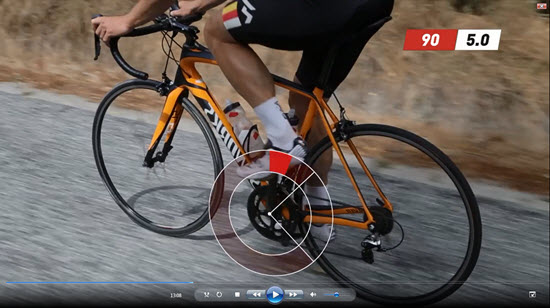
This Indoor Cycling training video will help you learn the Elements of Style
Did anyone teach you how to pedal correctly?
I was lucky to have a mentor when I first started riding outdoors. My friend Eddy not only gently coached me on the finer points of cycling style as we rode together, he demonstrated an impeccable pedaling form. He was so smooth and powerful, that I desperately wanted to emulate how Eddy looked on his bicycle. So over hundreds of miles I watched and listened. Now I'll get an occasional comment about how smooth I am on a bike. I owe it all to Eddy!
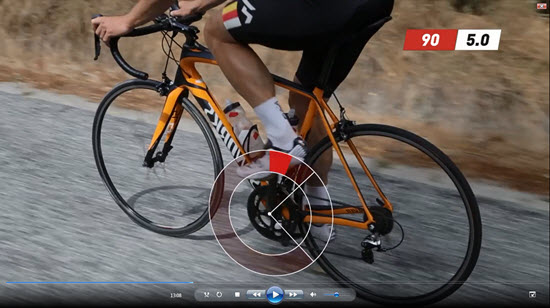
So how do you learn if you don't have a friend or mentor with the experience and patience needed? Might I suggest this 40 minute video from the folks at Sufferfest: The Elements of Style – Efficiency and Awareness
https://vimeo.com/thesufferfest/elementsofstyle
I have an interview planned with David McQuillen the creator/producer of these excellent quality HD training videos tomorrow. So for show prep, I checked out what was new and downloaded The Elements of Style. NOTE: Sufferfest videos are only digital downloads > they don't offer DVDS.
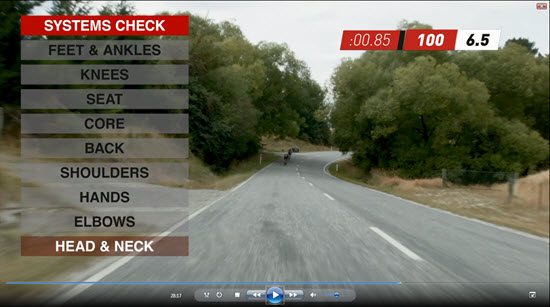
Includes a nice “Systems Check” for proper riding position.
Learn to ride with style
I rode along and completed all of the drills included in this video today – fantastic. The recommendations are solid – although they just might conflict with what you've been told by others.
New Instructors should consider using this training to fine tune how they ride an Indoor Cycle. Maybe setting up with a mirror so you can see yourself from the side.
I know, as part of your training you were told a bunch of things about proper pedal technique and position… but have you ever practiced improving how you ride? More importantly, how do you look – when you're up there on the Instructor bike? Are you demonstrating a cycling style that your participants will want to copy?
THE DETAILS – from their website
Can you ride? Really ride? Can you Suffer with style? Make profound Suffering look effortless?
Although it has very little Suffering in it, Elements of Style may just be our most important video ever. Developed together with the expert team at CyclingTips and shot on location in Wanaka, New Zealand, this 39 minute video provides the very foundation upon which all your Suffering must rest.
Over the course of six specific drills, you’ll learn and practice:
- An exclusive 9-point ‘Systems Check’ you can use on any ride to get into your optimal position.
- A 4-step process for standing up on a climb and generating more power.
- How to engage your core, including your glutes, for more stability and power.
- The components of a smooth pedal stroke and how to bring them together at both low and high cadences.
- How to stay relaxed and efficient under pressure.
Narrated by one of the best cycling commentators in the world, Eurosport’s Carlton Kirby, you’ll get clear instructions about exactly what to do, when and why. We guarantee it will change the way you think about your riding style after doing it JUST ONCE. Do it five times and you’ll automatically adjust your position while out on rides. Do it 10 times and Sufferlandrian angels will burst into tears at the sheer epic beauty of you kicking the crap out of your competition all the while making it look effortless.
*** Download includes a FREE PDF from CyclingTips with further style tips. Look in the .zip folder after download. ***
by John | Dec 14, 2014 | KEEPING IT FUN, Latest News, Product Reviews

The folks at Cycling Fusion are offering their complete Global Ride series of Indoor Cycling videos at a 20% discount between now and the end of the year. Enter discount code VeryVIPDVDs at checkout. This might be a great time to stock up so you're ready with new virtual rides for the craziness that's coming in January 🙂
Here's a sample from from their latest Hawaii series – you'll find all the others here.
