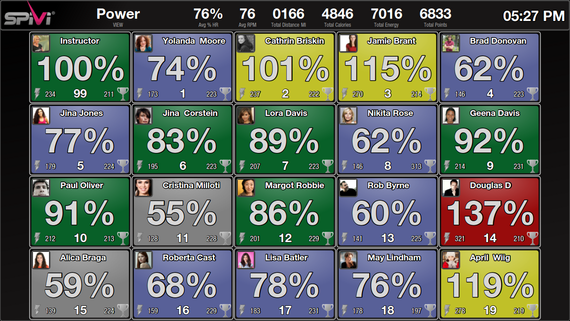
Hey – I just got an email explaining that Spivi has added a FTP (Functional Threshold Power) Test to their display training system. I can't begin to tell you how beneficial these short threshold/best efforts are for engaging participants in your power based classes. That's why I describe these as a Best Practice for anyone teaching with power.
Like PIQ, Spivi offers the option for riders to manually add their FTP / PTP wattage into a user profile. Another option is to enable the Fitness Test option where you can select an 8 or 20 minute FTP test that will record each riders average watts for the period and then add either 90% (8 minute) or 95% (20 minute) of it to their user profile.
To start the FTP tests wizard, press the left analog stick once, just like if it was a button. Now select the requested test from the menu and press the “Start” button to start.
Don't forget to Instruct the group how to ride and what to do during the test. The FTP test lasts as long as the progress bar on the bottom right side of the screens appears.
Did you know that all of the Indoor Cycles that use magnetic resistance (FreeMotion S11.9, Keiser M3i and Schwinn AC) have a built in feature that will help your riders get stronger, create more power and burn more calories if you recognise and cue to it properly?
The feature I'm talking about doesn't have a label to identify it or a button to push to turn it on or off. It's not found in any manual that I'm aware of and there's a good chance it wasn't even mentioned in your training. That doesn't mean it doesn't exist – it's just poorly understood… which is where I come in 🙂
The feature I'm referring to is how cycles with magnetic resistance get progressively harder to pedal as cadence increases.
Now if you're reading this and are thinking; everyone already knows this John. I am going to challenge you and say most don't. I've taken a lot of classes recently on Schwinn AC's, taught by multiple Instructors. In each class the studio was using PIQ to track rider stats and the Instructor explained that they were committed to helping everyone work hard and burn the maximum amount of calories. But none of them took advantage of this unique feature.
This feature, by the way, doesn't exist on Indoor Cycles that uses a friction pad to create resistance.
I described a short experiment I ran in this post, comparing the new Spinner® Blade Ion (friction) with the bike I teach on regularly, the FreeMotion S11.9 (magnetic). I was pretty excited with the results as it confirmed what I had perceived after our club switched from Spinner® NXT's to FreeMotion S11.9's.
You can try a similar experiment on your own.
Riding by yourself, find a seated cadence of ~ 70 rpm and add resistance until you would feel comfortable coming out of the saddle and standing – a medium grade hill.
Stay seated and accelerate your cadence up to 100 + RPM and beyond if possible.
One of two things will happen, depending on which type of resistance is used on your bike.
On a Friction Resistance bike you'll typically feel that the amount of force need to turn the pedals becomes easier, with less and less force required as your RPM increases. Depending where you started from, you'll probably feel the flywheel taking over and begin to feel it run away on you as you get over 100 RPM.
A magnet bike will feel very different. The resistance gets harder and harder, the faster you turn the cranks. If you started with an honest hill there's a good chance you'll quickly reach the point where you simply can't go any faster, because you can't produce the rapidly increasing amount of power needed.
So how do I use and cue this feature if I have it available?
When you want to motivate your class to work hard it's actually very simple > always add/increase cadence to existing resistance.
Here's an example of how I cue this for a typical 3-4 minute “Best Effort” PTP (Personal Threshold Power) interval I include in every class. I include these to give everyone a working PTP for that day, on that specific bike – which helps to negate issues around variances between bikes.
NOTE: This is very effective when you are using the PTP feature on PIQ. From the PIQ manual page 16:
Personal Threshold Power (PTP) Mode In the PTP mode, riders are asked to spend 3 minutes riding as hard as they can to find their “critical power” level. 90% of the Average Power generated during the 3 minute PTP test is used as the PTP number. For example, if a rider rides for 3 minutes at an average of 100 Watts, their PTP would be 90 Watts. At the end of the 3 minute test, a purple PTP number will be displayed for 10 seconds. Using this PTP number, riders will be able to perform zone training based on each individual’s sustainable power level.
For this PTP segment I'll choose a song with a strong 85-95 RPM cadence, with the intent of having everyone at or near the track's RPM during the effort. I used this 88 RPM remix of; “Ain't no rest for the wicked” from Cage the Elephant last week
During the song's intro I'll ask everyone to go to ~70 RPM and add load until they're feeling they could stand.
At the right point in the song (where there's enough time till the end) I'll cue everyone to accelerate to the song's actual tempo 85-95RPM.
Cue thumb over stage button in three… two… stage button and/or click CALC PTP in PIQ to start recording the effort.
After the first minute I'll suggest making any small changes in load to make sure they can sustain the chosen cadence until the end.
I've found through experimentation and rider feedback (I've been doing this in every class I teach for ~ 2 years) that this is the easiest and most effective method I've found to ensure everyone works their hardest during these timed and recorded efforts = a more accurate PTP that I'll use to guide efforts during the rest of the class. I don't have PIQ where I teach – I just ask everyone to remember their PTP average watts once we get to the end.
Please give this a try and let me know your experiences.
Display tracking of each rider's performance during an Indoor Cycling class is proving to be very motivating for the riders and profitable for the studio owners because those participants keep coming back.
Customer retention is hugely important to keeping your classes full. I hear over and over; “once you've shown me my performance, up on a screen and then on that email I get after class, I'm hooked. Why would I ever go back to that Big Box club, who doesn't show me anything?”
Jennifer Ashbrook is the owner of Inner Drive Cycling | Fitness Studio in Newtown Square, PA. Jennifer's studio features FreeMotion S11.9 indoor cycles that provide the performance data that drives the Spivi Display Training system she purchased to differentiate her studio, from other competing fitness clubs in her area.
Jennifer created this short video to help her prospective customers understand Spivi and how it adds to the “WOW” factor of her classes.
You can learn more about Jennifer and her studio by listening to our interview.
I forgot to talk about … It's common for guests to contact me, post interview, with a point or two that they felt should have been included, but weren't. Jennifer emailed me to add:
Hi John,
I just wanted to thank you for the chance to talk with you about Spivi this morning — I really enjoyed it! A couple of things I think maybe I should clarify about Spivi that I forgot to mention — when I explained how Spivi “normalizes” or handicaps riders, I indicated that they are normalized based on power output — and that’s a major part of the equation for bikes with power — but the system also takes into account cadence; it factors all of that together and “ranks” riders based on “Spivi Points” — which (as I understand it) factors in riders age, weight, gender, FTP (if know and power data is available), and cadence — perhaps other factors… The system can also pick up heart rate from ANT+ heart rate straps.
Two articles, about two different Indoor Cycling Studios, came across my desk today! The fun part for me was how they both featured ICI/PRO members who've hung out their shingle and pursued their dreams of a fitness business!
And Rev Up also takes advantage of technology to help people keep up with their workouts and fitness goals. Each bike has a mechanical device that calculates the amount of work a person does while exercising.
“One of the challenges has been, typically in spinning, is that people get on there for 45 minutes to an hour, and they get all hot and sweaty, and they guess how many calories they might have burned; they don’t really know,” Beane says. “With our system, they have a very accurate (record), as well as a way to track how many calories did you burn, how many watts did you produce. … Since that data all goes into your account, you can track over time, ‘How well am I doing? How am I progressing?’”
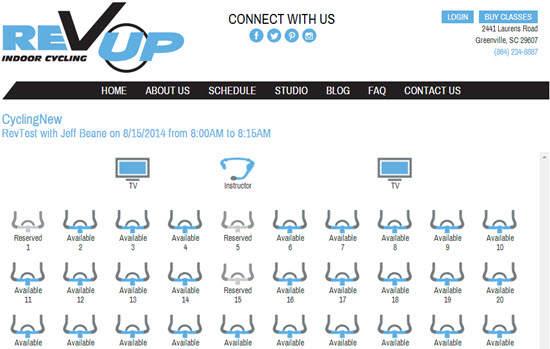
A screen shot of Jeff's online reservation page, from his great looking LiveEdit, website is above. By registering for a specific bike, the Performance IQ system knows who's – who in the class and then displays and records the rider's performance data in their user's account.
Jeff's studio is still very new. He'll probably appreciate learning how a bike reservation system has solved some problems at CBCycle Barn, from owner Karen Casler…
How CB CycleBarn Indoor Cycling Studio Used a Bike Reservation System to Cure ‘It's MY Bike Syndrome'
What are your customers saying about your site and the Stations app? (Live Edit's name for their reservation system)
Customers love booking their bikes! It has a trickle down effect of both customer and studio benefits. The Stations app allows me to give the customer what I feel is the most powerful customer service tool there is. The Stations app lets the customer know exactly what to expect!
Aside from knowing what to expect, another bonus is that by booking a bike online, customers are immediately escalated to VIP status. I like to use the analogy of flying American Airlines vs. Southwest Airlines. People are territorial about their space in any GroupX class. Before the Stations app, any territiorial Bike Vultures arrived early and hovered anxiously, waiting to stake claim to “their” bike.
Territory anxiety is now a thing of the past–but that’s something I expected when we added the Stations app. What I didn’t expect was that the Stations app would relax everyone! Some of the greatest feedback I’ve received is from the riders who had simply put up with the Bike Vultures because it’s been that way since the beginning of GroupX time. It never occurred to anyone (myself included) to complain about the “It’s MY Bike Syndrome” riders.
The very day the Stations app launched, the tension that we didn’t even previously acknowledge was instantly gone. Customers shared with me that they had felt so uncomfortable waiting for a class to start because of riders inflicted with IMBS. They had stories of being pushed, accidently hit with gym bags, and shoved aside in the stampede to stake claim to a bike. But that’s not all. Riders from the class before the IMBS stampede had also been made to feel uncomfortable. Their amazing hour of cardiotherapy zen was abruptly disrupted by hovering Bike Vultures before the first rider could wipe down the bike and gather their belongings.
VIP status … Check.
Bike Vulture Extinct … Check.
Performance IQ Compatibility … Check.
Knowing Exactly What To Expect … Check.
As a studio owner, how can it possibly get any better ?
How bout … Parking Lot Congestion Relieved … Check.
One of the most common issues for any dedicated indoor cycling studio is the parking lot crossover between classes. Because it is no longer necessary to arrive early to secure bike real estate (and trust me some people arrive as much as 30+ minutes early,) riders now show up 5 minutes or less before class starts. This allows the first class to make their exit and gives a lil’ breathing room for those coming in for the next class.
Priceless.
And there is one more box to check…
Competitive Advantage … Check.
At the moment, none of the big box gyms around our studio offer a Stations app reservation system. Using the Stations app makes reserving your class and showing up for class easy.
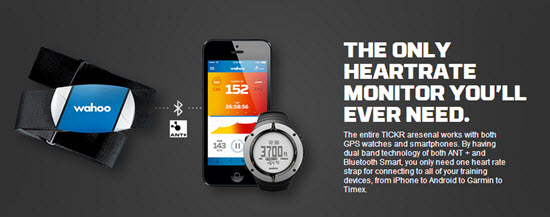
Finally a Heart Rate strap with both Bluetooth and Ant+ connectivity 🙂
I've been using a new TICKER Heart Rate Monitor straps – I'm excited to tell you about them + they'll be awesome used with the new Apple Smartwatch.
The guys at Wahoo Fitness emailed me today about their new line of HR straps that send out both BLE (Bluetooth Low Energy) and Ant+ frequencies. About time someone thought to offer both in the same monitor strap!
Up until now, your decision about what monitor strap to purchase was based on what device you wanted to connect with:
I want to connect to my iPhone / smart phone = you buy a bluetooth strap. Bluetooth is the only signal your phone can pair with.
I want to connect to a Garmin bike computer or use the strap with Performance IQ's display system = you purchase an ANT+ strap.
This new TICKR strap has both Bluetooth and ANT+ and it doesn't cost anymore than most single frequency straps – that's awesome in my book!
They've solved a second problem
How many times have you felt like saying; “IS THIS DAMN THING ON?
No Heart Rate strap, that I've ever seen, gives you any understanding that it's working. Is the battery good or dead? Do I need more spit to get it connected? I'm seeing that these new TICKR straps have two colored LED lights to show the TICKR’s device connection and heart rate detection – more awesomeness – and no more wasted trips to Walgreen's to buy one of those ridiculously expensive little flat batteries, when that isn't the problem.
I can't wait to try one and will update you once I have.



To start the FTP tests wizard, press the left analog stick once, just like if it was a button. Now select the requested test from the menu and press the “Start” button to start.



 and hovered anxiously, waiting to stake claim to “their” bike.