If you're a frustrated iPad/iPhone user, tired of seeing this notice, help is on the way!
September 2013 Update: This is now fixed… but you may have already discovered that 🙂
… but Safari doesn't support Flash… so now what?
You may have tried to download the latest version of Flash only to see…
Word is that you can thank the late Steve Jobs for why you can't listen to the Podcast, using the embedded player on page, with an Apple portable device. Right or wrong, Apple Jobs decided not to include support for what's called Flash in the Safari internet browser that was included with your iPad/iPhone.
Without getting super technical, up until recently most media content (audio & video) worked using software called Flash. Those little YouTube videos on the right of this article are Flash players. But like everything else, things improve and change. The latest and greatest new media player uses HTML5. It's thought that HTML5 will replace Flash at some point, but there's a modern day BETA vs. VHS debate going on that involves multiple players who don't have history of playing nice with each other; Apple, Google and Microsoft.
Understanding that VHS won the day over BETA due to mass-market acceptance, Apple Jobs choose to force the issue by removing Flash support from software that runs your Apple portable devise – but kept Flash enabled on Apple computers. That's why you can still listen using the Podcast player, when you're using your Mac Laptop.
Potential solutions for you.
Install the Apple Podcast App if you haven't already. Non members can use it to subscribe to the free podcast and ICI/PRO members can use it to subscribe to their Super Secret iTunes Feed to access everything we publish. You can find a short tutorial here.
Switch to a different Internet Browser – The Puffin Browser which supports Flash – NOTE: the free version only supports Flash for 14 days. The paid version is $2.99
My iPhone running Puffin plays the Podcast just fine 🙂
I've been steadily growing more and more frustrated with Apple. It seems they are getting a little too big for their britches – like the Microsoft of old. The new iTunes is a joke (it doesn't even size itself properly to fit my computer screen = I can't see the scroll bar) and don't get me started on Apple's pathetic maps app – dump it and install the Google Maps app so you're not completely lost tomorrow.
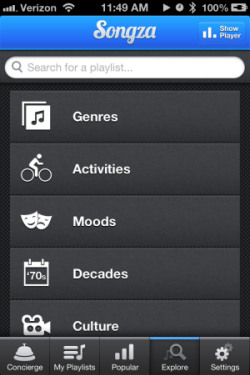
This won't replace Spotify, but if you enjoy a steady stream of background music, that's geared to your activity or mood, Songza maybe something you'll enjoy.
Available in the USA and (if you can believe it with their very restrictive licensing) Canada, Songza is the latest of the free streaming music services following Pandora, iTunes and Spotify.
Songza has been around for a while and appears to be gaining peoples attention and influence, but there isn't much press about them. I did find this article from CNBC.com
Songza is a music streaming service that aims to provide what Roman calls a “soundtrack for your life,” matching curated playlists to the time of day, day of the week, your taste in music and what you're doing while you're listening (i.e. waking up, working out, eating dinner, etc.).
Working? Relaxing? At the gym? Songza plays you the right music at the right time.
What makes Songza different is how they've created playlists based on common activities. Doing some housework? You can cue up one of more than two dozen different playlists. Working at home and would prefer music without lyrics? They have a bunch. Making out? At a formal dinner party? Shopping at a vintage store? All covered + over 30 more.
I wasn't much of music background person until Amy bought us this Sony RDPX200iP Docking Stationfor us for Christmas. So it's very cool for me to have either Spotify or now Songza playing while I'm doing whatever. Only trouble is that then I don't have Shazam available if I'm using my iPhone – but Songza will also play from your computer, so it's a great discovery tool for finding the perfect track for your next class. Get the free app for iPhone/iPad or Android.
Think your latest playlist is the bomb? You can even contribute your work to Songza – but for licensing reasons you can't listen to it yourself.
NOTE: while I was experimenting with Songza it occurred to me that there's no way to prevent Songza from using your 3g/4g data service unless you place your iPhone on airplane mode and then turn the wireless back on = no phone call from Ed McMann telling you that you've won the publisher's clearing house sweepstakes or from one of your college students that it's time to pay for another semester. Not finding an answer on their support page, I sent and email and will follow up when I know more.
Myth #8 – Adjusting bicycle shoe SPD cleats correctly is hard/confusing/frustrating/impossible and should be left to professional bike fitters or the guy at the local bike shop.
Amy's Shoes are now perfectly adjusted!
This actually wasn't a myth (as far as I was concerned) up until yesterday. Properly adjusting cleat position can be a maddening process to get right. So I wouldn't have included this in my 10 myths of Indoor Cycle Rider Setup / Bike Fit, but I can now after the UPS guy delivered this amazing $25.00 Ergon TP1 Bicycle Pedal Cleat Tool yesterday.
If you've ever tried to adjust the cleats on your own shoes you're probably nodding your head in agreement to how difficult this is to get right.
First; with your shoes on, find the joint of your big toe it's under the fleshy bump on the inside of your foot – the widest part – and mark it's location.
Then loosely attach the cleat.
Move the cleat to what looks like the right position and then tighten the two screws securely.
Clip the shoe into the pedal to see if you got it right… you didn't?
Note the change(s) needed and un-clip.
Flip the shoe over and prepare for the inevitable confusion; I want the shoe to go forward and in and rotate out a bit more… but everything is backwards so I should move the cleat back, out and rotate it in… but this is the left shoe so it goes; down, over and in?
After a dozen or more attempts you throw up your hands and declare; this just isn't so importantand call it good, wherever it ends up. You then vow to ignore any feelings that your feet aren't quite right while riding, choosing instead to get used to it 🙁
So it would make perfect sense that you would shy away from offering to adjust one (or both) of your participants cleats.
After trying out this new tool last night, I found myself rummaging around the house for every old pair of shoes I could find, so I could adjust their cleats. It was so easy (and efficient) to use that it became like a sort of therapy for me. I was actually enjoying adjusting cleats! In mere minutes I was able to adjust both cleats properly; ball of the foot over the pedal spindle, Q Factor and rotation all perfect – and perfect mirror each other's settings.
Notice in this before picture how both Amy's shoes are rotated inward = her knees would need to move out to compensate, not good.
Here's a short video showing how simple this tool is to use.
I promised we'd be offering full transcriptions of our best Podcast interviews and here they are!
You will find them by following the Transcription tag which will identify those Podcast interviews with a companion printout you can read online or download.
It takes about two weeks for the service we use to transcribe these and Jennifer will be adding them continuously in the future.
Look for transcriptions of past interviews from Jay Blahnik and Lawrence Biscontini in the near future.
I'm very excited to introduce you to Jennifer Lintz the latest member of the ICI/PRO Team!
Jennifer's official title is PRO Member Soigneur and she's available to assist you with any questions or concerns you may have – but no, she isn't available for post race massages.
A Registered Dietitian, Jennifer is currently serving on the team of Group Fitness Instructors at Mayo Clinic’s Dan Abraham Healthy Living Center. She also works as a Freelance Writer for Indiana University Health’s Team: Bariatrics Blog.
She is an AFAA Certified Group Exercise Instructor, ACE Certified Personal Trainer, and Mad Dogg SPINNING® Instructor. Jennifer completed her Dietetic Internship at the University of Minnesota Medical Center, Fairview. She has worked as the Healthy Kids Act Co-Project Director for the Iowa Department of Education and also as a Health Screener/Coach and Seminar Presenter for HealthSource Solutions.
Professional cycling teams have one or more Soigneurs. These personal assistants are dedicated to looking after the needs of each rider. In case you're wondering; “how exactly do you pronounce Soigneur” like I was, this video from Team Jelly Belly will be of help.
I've known Jennifer for a number of years and interviewed her back on podcast #169 after she had completed her Spinning orientation. You can read her past articles here.
I'm very excited to have her on board here at ICI/PRO to assist both of us! I have her working on a number of enhancements to ICI/PRO and you will begin seeing them starting today.



 for us for Christmas. So it's very cool for me to have either Spotify or now Songza playing while I'm doing whatever. Only trouble is that then I don't have Shazam available if I'm using my iPhone – but Songza will also play from your computer, so it's a great discovery tool for finding the perfect track for your next class. Get the free app for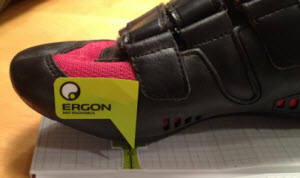
 yesterday.
 Here's a short video showing how simple this tool is to use.