
by John | Jun 30, 2017 | Boutique Instructor, Instructor Tech Help, Instructor Training, KEEPING IT FUN, Master Instructor Blog, Spotify

Chrispins sent me a note earlier this week about how the iPhone/iPad Class Builder App will now work with Spotify playlists. Fantastic! I've been waiting for someone to create an Instructor App that uses Spotify.
I have a sort of love-hate relationship with the Spotify App… I love the huge selection of music available for $10 a month, sharing playlists and especially the cross fade – it has my playlists sounding like a near professional mix, with no extra effort. But I hate the tiny numbers they use for the track length timers. If you're a 30 something year old Instructor, with youthful eyes, those itty bitty numbers are probably not a problem. I (and there's a good chance you) on the other hand, have reached the start of my Golden Years where everything looks a little fuzzy without my readers.
Class Builder has BIG NUMBERS – which is awesome and that feature alone is enough for me to look past the $19.95 cost of the App. The options to add cues, tied to each specific track, could really simplify teaching a well crafted profile. Projecting the class profile's training zones on a screen would be cool if your studio's system will accept the video signal from your device.
Class Builder does have a few limitations…
Class Builder requires a premium Spotify account
No off-line mode… only streaming using WiFi.
But before you purchase Class Builder, with the plan that you'll be using music from Spotify, there's something important that you should be aware of – Class Builder doesn't offer a play music off line, option. To use Spotify in a class, where you're using the Class Builder App as the music player, you'll need to be connected to a reliable wireless internet connection. Which is fine if you've got one. In the studio where I teach, the WiFi is weak and when I've tried to use it in the past I was repeatedly asked to sign in to the WiFi multiple times. So I'm doing some testing to find if I can feel comfortable using Class Builder.
No option for Local tracks
Spotify will only stream Spotify tracks. Because Class Builder can only stream music, it can not play your local iTunes music tracks.
I realize this is can be confusing. Let me try to explain: Let's say you want to include a fun remix or mashup MP3 that you have in iTunes, in a playlist on your iPhone/iPad. The only option is to sync your device with your computer, using the same WiFi to connect between them and then set the playlist on your device to Make Available Off Line or my iPad now says Download Playlist.
Because Class Builder has no ability to download, or make tracks available off line, there is no option to include your local files (iTunes) in a playlist used with Class Builder.
No cross fade or EQ either
There was some early discussions about Class Builder on one of the Instructor Facebook groups. People were having a hard time understanding why, for example, Class Builder wouldn't follow the settings they've made in the Spotify App or play in an off line mode. It took me a while before I understood where the confusion was coming from; Instructors were rightly thinking that “I have everything set correctly on the Spotify App… why isn't this working?”
Class Builder doesn't use the Spotify App on your iPhone – Class Builder is a completely separate App that can access your premium Spotify account. I haven't tried it, but I'm guessing you could delete the Spotify App off your phone and Class Builder would continue to steam music from Spotify.
Realizing that much of what I've written here is conjecture, I've scheduled an interview with the App's developer Gene Nacey, from Cycling Fusion, for early AM Friday. We'll explore this latest version of Class Builder. If you have any questions you'd like me to ask him – please leave a comment below. Friday 8/8 update: scheduling issues have moved this out until next week – stay tuned.
P.S. If you already own Class Builder, the Spotify option was included with the latest update. From the Home Screen go to Settings > tap the Spotify logo > enter your Spotify User and Password. If you've been playing with this please let us know your experiences.
Originally posted 2014-08-07 10:35:02.
by John | Jun 20, 2017 | iTunes & Spotify Training, Master Instructor Blog, Spotify
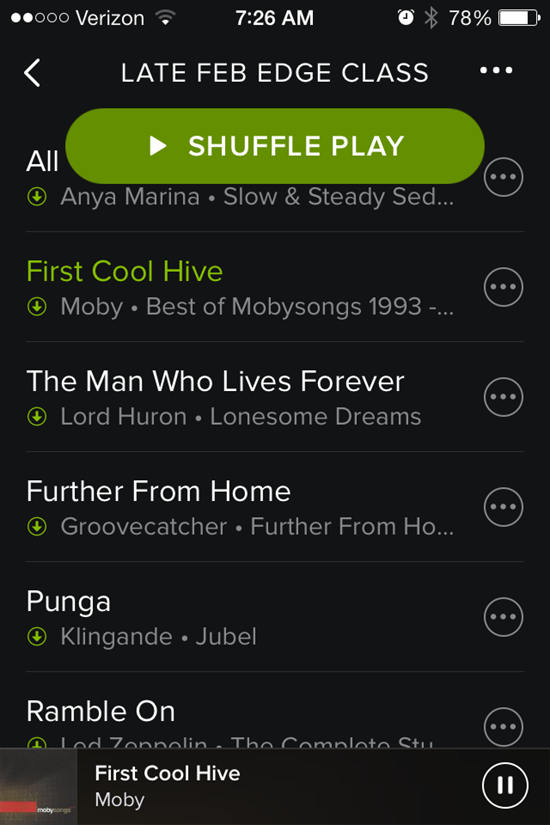
That shuffle button stays right there on the top.
I was greeted by another Spotify update this morning and see they've added a new way to accidentally screw up your class 🙁
Forgive me if you have already experienced this Spotify update. I might be a few days late reporting the change – I've been using the new Schwinn Class Tamer app and wanted to use a past Spotify playlist today.
That big Shuffle Play button sits there at the top, taunting you to inadvertently touch it (or drip on it) and mix up your song order. It won't go away. Swipe up or down to scroll through the playlist to see what's next and that dang button stays right there at the top. Who thought that would be a good idea?
I do like the white on black fonts – they're a bit easier for me to see/read – but still the same frustratingly tiny track length time font.
During class this morning it took me a few tries to get out of the Now Playing Info screen. Tapping anywhere on the bar across the top doesn't work anymore – you need to carefully tap the little X in the top-left corner.
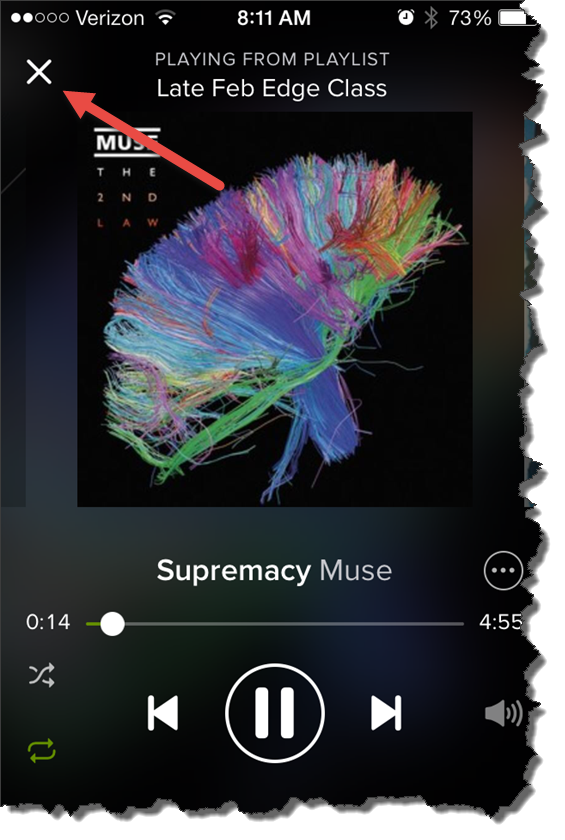
For some reason I couldn't see that X this morning.
Originally posted 2014-04-03 08:20:34.
by John | Jun 8, 2017 | Best Practices, Instructor Tech Help, Master Instructor Blog, Spotify
ICI/PRO member Dr. Marc Schlosberg is one of those Early Adopters you've no doubt heard discussed in the media. This group is quick to experiment with and embrace new technology. Marc was one of the first Instructors to use Spotify in his classes and he joined me on the podcast to discuss this (at the time) exciting new option for delivering music to our classes. Marc sent me this email yesterday, providing his comments related to my conversation with Chris Hawthorne on Podcast #303
Hi John,
I was listening to the latest podcast and heard about the Spotify syncing issues. I have a couple of suggestions/solutions. I think the reason rebooting all units works to fix syncing is that the newest versions are then installed on all devices. I believe syncing problems develop when Spotify updates and there is a version mismatch. You don’t always know this is the case or sometimes it’s difficult to track that one device has updated, but you haven’t checked the others. Simply shutting Spotify down, checking for updates and updating it, then restarting the program should solve the problem. You have to do this with all the devices you use.
Another roadblock to syncing is lack of space on a device. It won’t tell you you’re out of space, but won’t take individual tracks offline — they stay grey rather than green. It’s a good idea to switch playlists to online only after you’ve used them to preserve space (except for those you always like to have in your back pocket). You could also delete unused apps to make room. My iPhone is 16gb and I’ve run into this problems (and 16gb used to be an unimaginable amount of space). It’s probably less of an issue for those with 32gb and up or Android devices with huge plugin memory — unless the memory is full.
Whoa — it looks like Spotify updated their iPhone interface yet again while I was writing this.
Hope this helps.
Take care,
Marc
Thanks for this Marc! Your suggestion that available storage maybe limiting the number of “off line” playlists is a good one and begs the question; “how can I tell how full is the memory on my iPhone?”
There are a couple of places that will show you how much space/memory you've got left. My preference is to go to: Settings > General > Usage… where at the top you'll see how much room there is for a few more playlists.
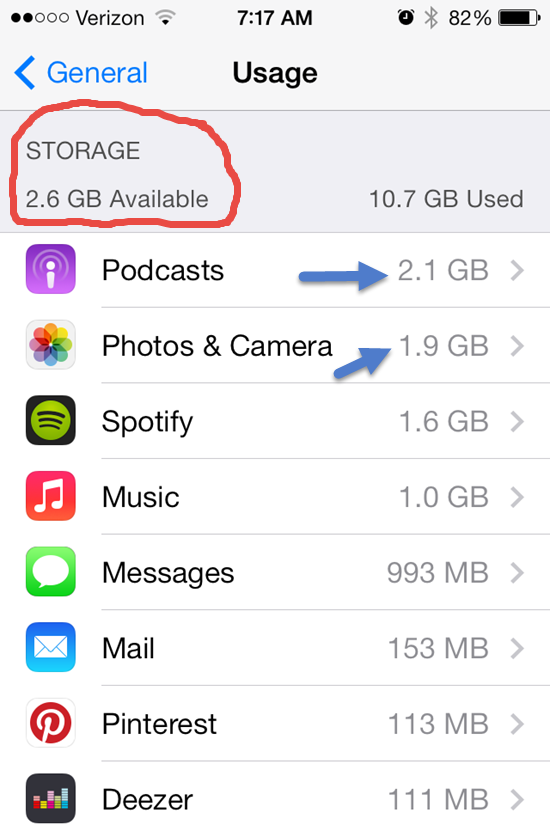
This also shows you all the other memory hungry Apps on your phone. One common culprit is your camera's memory and all those pictures and HD videos. Downloading them to your computer and then deleting can free up some space.
Depending on your settings, Podcasts download automatically and can quickly crowd out your favorite playlists. Open your Podcast App select a specific Podcast > Settings > Episodes to keep and select a number to save (Last 2 / Last 5 / ect…) instead of All.
Do you have any other tricks you can share?
Originally posted 2014-04-04 07:53:40.
by John | May 12, 2017 | Audio PROfiles, Spotify, Training With Power
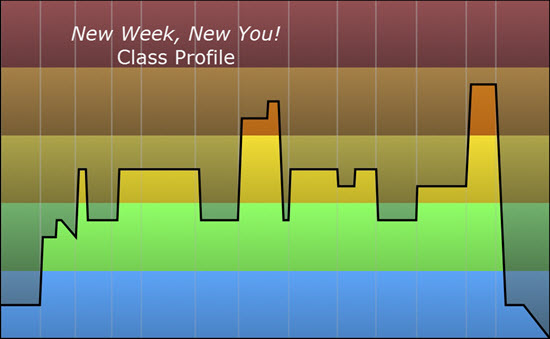
Click image to access Spotify & iTunes Music Playlists
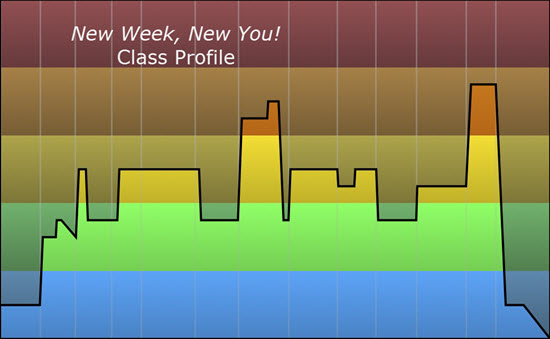
Cycling Fusion Master Trainer Zack Hawthorne has published a new class profile:
New Week, New You!
We have been hitting you guys with some higher rate rides. Well this is what I would consider a
“fun” ride around town. We are getting a lot of base miles. Base miles are always important year
round, why not do them outside? There are two sharp spikes on the graph. These are meant to
be fun, hopefully the music makes you feel the same. This is supposed to be ridden as a day in
the life sound track. So settle in get ready to rip around for a quick ride. Remember to allow your
students to come up and stretch as needed.
Download the PDF for New Week, New You!
Subscribers to Cycling Fusion's weekly ride service receive access to both Spotify and iTunes Music playlists 🙂
by John | May 7, 2017 | Date Specific, Spotify
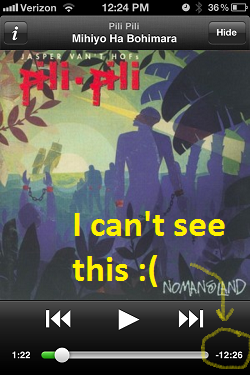
I don't own an iPad (my birthday is soon Amy – in case you need an idea) but if I did I would want to use it in my class now that Spotify has an official iPad App! The biggest reason I would prefer it, over my iPhone, is the font size. The “Time Remaining” is nearly unreadable by me. My class is frequently laughing at me as I sit there, arm extended at full length, trying to read the @#$%^& time remaining in a darkened studio. Yes I know it would be much easier to just bring my readers… I'm just not quite ready to admit my age related vision impairment 🙁
Here's the video that shows the new Spotify iPad App.
Click here for resources to help you with Spotify.
Originally posted 2012-05-08 05:08:03.
by John | Apr 28, 2017 | Instructor Tips and Tricks, Spotify
I love answering questions from Instructors 🙂
Click Image to learn more about training for ICI/PRO Members.
Hi John,
Since you are a Spotify guru, I thought you might know the answer to this question: Spotify says their music is for non-commercial use and that you can't use it to play at even a school. I haven't found anything from Spotify mentioning that it isn't allowed in fitness classes, and I know a LOT of people (including myself) who love to use it. Any thoughts?
This is from Spotify's page:
Can I use Spotify to play music in my bar, restaurant, store, school
etc?<https://support.spotify.com/us/learn-more/faq/#!/article/public-usage>
ANSWER:
No, the Terms &
Conditions<http://www.spotify.com/se/legal/end-user-agreement/> that
you agree to when registering for Spotify state that Spotify is for
personal, non-commercial use.
We discussed this exact concern two years ago when we were just getting our feet wet with Spotify.
While researching this post: Teaching In a world where nothing is permitted I discovered that all of the music delivery methods we use have similar restrictions:
Before I got too excited, I decided to check what other Terms and Conditions I have agreed to — who reads those things anyway? It turns out that every music service or music software I use is restricted to Personal Use Only. Let’s go down the list:
- iTunes has a similar restriction — (i) You shall be authorized to use iTunes Products only for personal, noncommercial use.
- Windows Media Player from Microsoft — Unless otherwise specified, the Services are for your personal and non-commercial use.
- My copy of MixMeister Express (no link) says: You may only use the MixMeister Software for Your private, non-commercial use.
You can add Deezer to that list:
The Developer agrees that the use of the Services is strictly limited for a non-commercial purpose and in a non-commercial environment.
It means that the Developer shall not perceive, receive, generate, benefit or create directly or indirectly, any moneys, incomes, revenues, data or any other consideration in connection with the use of neither the Services themselves, nor any and all Content accessed through the Services.
So am I screwed? Do I need to learn how to perform as a one-man-band?
No
Are you prevented from using Spotify, iTunes, Windows Media Player or MixMeister to produce and deliver music for your class tomorrow?
I’m not an Attorney, so that’s going to be your choice. I certainly don’t want to be advocating you do something that’s potentially in conflict with something you have agreed not to do… but I personally don’t see this as comparable with using music that’s been illegally downloaded in some fashion. Actually just the opposite.
You’ve heard me state on this recent Podcast about music licensing that; as a content creator, I’m very much against the distribution of copyrighted materials without due compensation given to the creators.
My feeling is that as long as the studio is properly licensed for playing music, this won’t be seen as much of an issue. Music labels are already dealing with the enormous amount of illegal file sharing that happens every day. iTunes changed how many people acquired music by creating a service that’s so convenient (and secure) that millions of people would rather pay a $0.99 than waste their time going elsewhere.
Like iTunes, I believe that Spotify can actually reduce the amount of sharing that ends in no revenue for the record labels by offering a convenient method of finding and accessing music.
That said, I want to offer this disclaimer: Links to Spotify playlists you find here are intended for your personal use only.
What do you think about this?
Do you have a question or problem we can help with? If so, please let us know and we'll do our best to answer it for you.
Originally posted 2013-10-15 05:09:37.
