This ride is from Joey!! – “PLEASE: Listen to the podcast of Joey (me) delivering this ride at www.indoorcycleinstructor.com (ICI/Pro). This class is focused on explosive power with some seated and standing strength that is primarily used to pre-exhaust the legs for the explosive sections. I hope you enjoy this ride as much as I enjoyed riding and recording it.” Joey
This ride is from Gene Nacey!! – “This week’s episode of The Weekly Ride was an amazing pleasure for me; I was able to take, and record, Gene Nacey delivering this weeks ride, which he authored.
As an instructor, I find that I have very little time to get out an take classes that I am not delivering. But when I can break free for a class, it is a pleasure. As many of you may know, Gene and I have been friends, and business associates, for years now, and getting to take one of his classes is a rare treat as when we are together at a studio, we are usually working.
This class was an interval based ride design, and boy was it hard. As always, use your discretion when cueing intensity and tension. Gene delivered this ride using Keiser Bikes, so you will hear him refer to “gears” but you can certainly cue tension without the gears you need to.
Remember, you can get the full PDF of the ride choreography, the Apple Music and Spotify playlists, and the downloadable file to put all of the cues into MyFitnessDJ, as well as the link to purchase the class for iClass Builder at indoorcycleinstructor.com. There is no other monthly service out there that does as much for you, the instructor.
I hope you enjoy this ride as much as I enjoyed riding and recording it.” Joey
This week's ride focused on cadence work…..I absolutely love cadence work. While I think the hardest work we do is speed work (that is next week), I find cadence work to be the most satisfying. I love working on the control and building the leg's ability to accurately respond to the work.
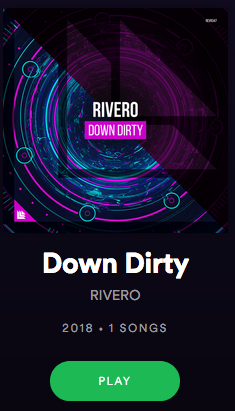
So, in working on this week's ride I came across Down Dirty by Rivero. This song has a ton of energy, and it provides just the right breaks and accelerations that work perfectly for cadence work.
I would give this song a chance. I have included my timing below:
This is post one in a multi-post series that will explain how to use and select music to compliment your class. As the series progresses, I will be sure to include the links to the previous posts so that the entire series can be found in the latest post.
As an instructor, music can become the most challenging part of any indoor class; however it can be one of the most important parts of the class. I have heard it said that we are not DJs on a bike, we are cycling coaches. While I may agree with the sentiment, we can not underestimate the importance of music in the delivery of a class. You could structure the most ideal training program with the very best designed drills, but if your music is off and does not match the work, chances are very good that the class will disappoint your riders. While we believe that the class focus and design should be well thought out before the music is added, the addition of music to your drills will truly make or brake your class.
What is it that makes the selection of music so crucial; music is a one of the most powerful mediums. It can facilitate communication that goes beyond words, enables meanings to be shared, and promotes the development and maintenance of individual, group, cultural and national identities. Music can alter movements, moods and emotions. Few other items that you come in contact with can effect such a wide range of human functions and feelings.
So, how do we begin with the so important task of selecting the right music for your class? It all begins with belief. You must believe in your music and your playlist or your class will not believe in it either. While there are seemingly endless types and styles of music and everyone in your class can have a different preference, it is your ability to believe and sell the ride that will matter. To make it a little easier, if you incorporate some basic principles, you will succeed more times than not:
Know Your Demographic
The demographics of an indoor cycling class can be affected by many factors including your club’s location (city vs. suburbs), day of the week and time of day that your class is offered, and if your class is designed around a specific focus or theme. One of the easiest ways to accomplish this principle is to take the time to learn what your riders like by simply asking them. You will never be able to please everyone all of the time, but people appreciate being listened to and will respect you if they believe your are doing your best to give everyone something they enjoy. Please, remember to remind your people that not all great music is great indoor cycling music and that it may take a few weeks to get their requests into one of your rides.
For Foundational classes (beginner), remember the overall focus is to provide a fun environment for people to gain some initial cycling fitness or possibly just fitness in general. With the exception of the warm-up (and possibly the cool-down/stretch), working songs should be music your riders will recognize, and maybe even sing along to. While the beat matching of the ride is still critical, you should take extra time with this group to be sure the music is fun and will keep them coming back for more.
For intermediate and advanced classes, it is critical that the music be beat-matched and of similar intensity to the work that you are asking of the riders. When we ask more of the riders, this also demands more of us as instructors. We need to put in the extra time to find “just the right music” that will not only support our drills, but it will also enhance them. Ideally, the riders should be able to close their eyes, or look away from the cycle display, and still hold the proper cadence by focusing on the beat and feel of the music. Aside from the beat, the intensity is also important: an epic climb demands an epic musical work to help us reach the summit.
One of our foundations at Cycling Fusion is that songs used for the first warm-up segment should NOT have vocals. The warm-up is where you spend a good portion of the time introducing yourself, the purpose of the class and give various instructions such as safety guidelines, proper position and how to gauge the level of effort. It is important that your voice be the only one heard in the cycling studio during the warm-up so riders have a clear understanding of expectations and how to approach the class.
In the next post, we will talk about Pulse, BPM and RPM and how using them will enhance your ride and heighten the student’s experience.
Work Set Length: 13:44 + 7:17 recovery [21 minutes]
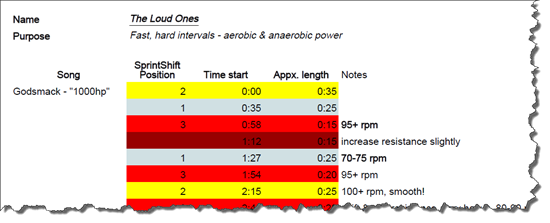
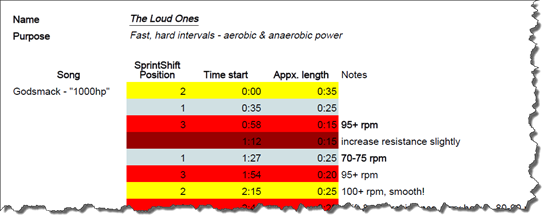
The Sprint Shift on the new Stages SC3 bike is your interval training solution. Left position for easy, Center position for medium, Right position for hard. Make micro-adjustments with the resistance knob during the interval. Could it be any easier?
Now, I am a big believer in training with power, benchmarking your effort, and documenting your progress. All three are important for successful long-term cycling training but people sometimes misunderstand my position as “all science, timed intervals — no fun.” That's not the case at all!
For the 3 songs below, all I would track is total distance traveled. My riders would hit “The Loud Ones” maybe once every 10 rides and see if they went farther. You could also use average wattage or average speed – it is still a benchmark, just not a complicated one.
As for the science, these are aerobic and anaerobic power intervals – near maximum, brief efforts with short rests. This makes you strong during the frantic parts of road races, during time trials on hilly terrain, and when you want to inflict some pain on your group ride mates. The ride gradually slows in cadence as the resistance and length of efforts creep steadily upward.
But don't think too much about all of that. Do a quality warm-up with 2 or 3 very short sprint-type efforts, tell your participants they are in for some HARD WORK, then just turn it up, follow the music's energy, and have some rough, fast, sweaty fun!
[P.S.: You really just have to feel the music to get the transitions. Don't try to follow the time stamps to the letter. But the Sprint Shift makes that possible! Call each position (left, center, right) “gear 1, gear 2, gear 3” if you like. Slam the lever into gear and ride hard!]
[P.P.S.: After “Little Man,” I like to throw in one long, steady effort, usually to “Animus Vox” by The Glitch Mob. You can take your pick of ‘finisher.']
I get a lot of questions about Spotify, but the one question that I get over and over from people that are interested switching from iTunes is: “Do you own the music?”, or “Can I sync music from Spotify to my iPod or burn it to CD? “ And my answer is always the same: “No, you can’t, but you won’t believe what you CAN do for only $9.99 a month!” Now I know that bothers a lot of people. What's the sense in spending $9.99 a month and having nothing to show for it? How is this worth the cost?
It seems that when it comes to music for our cycling classes, there are two camps: Those that want to own all of their music, and those that see their music as more disposable and don't mind ‘borrowing' it.
If you are strictly an iTunes user, then you own the music that you purchase. Well, at least you own the license to listen to songs on many devices.(* Here’s an interesting article from CNN that raises questions about digital music ownership.) It’s all yours. I once strictly used iTunes and now I own a LOT of music. Most if it I rarely listen to or use in my playlists anymore. It just sits there taking up storage space on my computer.
If you are a Spotify user, you are essentially borrowing the music. You are paying Spotify $9.99 for UNLIMITED access to their extensive library of tunes. I (along with many other cycling instructors that have jumped on the Spotify bandwagon) believe that the borrowing is the way to go.
Here are my top 8 reasons why I would rather borrow music from Spotify than buy it :
I have unlimited access to music. I rarely am unable to find a song that I am looking for. If that does happen, I will purchase the song on iTunes or Amazon, but I’m still not spending as much money as I was pre-Spotify.
I can listen to a song all the way through and then decide if it’s something I want to use in my playlist. I can’t count the number of times that I have purchased a song on iTunes and then later found that it was not suitable for my playlist.
Spotify has a radio feature that allows me to ‘like’ songs as I listen. These songs then go into a file called ‘liked from the radio’ and can be easily accessed for future playlists. This is a great tool for finding new music.
I don’t have songs (most of which I’m not listening to) clogging up all of my computer space.
I can take my playlists ‘offline’, which means I can use them anywhere, even without an Internet connection. **You do need to have an iPhone or smart phone device to sync your music.
I can follow other instructors and see what they’re listening to. I can check out their playlists and if I like what I hear, I can pull a few of the songs over to my own files. If I’m in a bit of a rut, I can even follow someones entire playlist and sync it to my device to use in my own class. (Tip: This is frowned upon if you work in the same gym.)
Many songs that I borrow, I may only use a few times. If I use it more than that, it will always be there. If I don’t use it again, I won’t feel that I have wasted my money. There are many other songs out there just waiting to go on my next playlist.
In my leisure time, I do enjoy listening to music. The music that I listen to at home or in the car is not always the same as the music I listen to in my cycling classes. For example, I love using Pitbull in my classes. I can honestly say that I would never listen to his music outside of my class. So owning a bunch of Pitbull does not seem cost effective to me. Here’s another example: My all time favorite band is the Beatles. I have rarely used any Beatles tunes in my classes, but I love to listen to them in my leisure time. Do I own all of my Beatles music? You bet I do. And if I want to borrow it from Spotify, I have that option too.
Spotify is the best $9.99/month I have ever spent as an instructor. It has made my class preparation less time consuming, more fun and much more convenient and to me and that is worth every penny.
What do you think? Do you feel more comfortable owning your music or are you OK with borrowing it?





 I get a lot of questions about Spotify, but the one question that I get over and over from people that are interested switching from iTunes is: “Do you own the music?”, or “Can I sync music from Spotify to my iPod or burn it to CD? “ And my answer is always the same: “No, you can’t, but you won’t believe what you CAN do for only $9.99 a month!” Now I know that bothers a lot of people. What's the sense in spending $9.99 a month and having nothing to show for it? How is this worth the cost?