I love group display systems. I mean I really really really love group display systems. Systems like Performance IQ and My Zone make classes so much more interactive and they magically make participants work so much harder AND smarter.
I teach at multiple locations in the Denver area and two of them use group display systems. One, just recently, launched Stages IQ which is Stages Indoor Cycling's version of Performance IQ and the other has been using My Zone for about 6 months. Stages IQ uses the power meter that is on every bike in the cycling studio. My Zone picks up the heart rate that is transmitted from the proprietary My Zone chest strap. When I teach a class with Stages IQ EVERYONE in the class can be part of the group display system. When I teach a My Zone class ONLY those who have purchased the MY Zone chest strap can enjoy the group display system.
The energy felt in the studio using Stages IQ is infectious as EVERYONE is working for a common goal and can see if they are successfully achieving that goal. The energy in the My Zone studio is not the same because, on a good day, only 25% of the participants may have the necessary MY Zone chest strap to see their heart rate on the group display system.
I have been working in the fitness industry for 25 years and heart rate based group exercise classes have NEVER been successful because the only way to ensure everyone's compliance is to “loan out” heart rate monitors and this becomes a very time consuming and expensive proposition, this also goes without saying that there are far better ways to determine intensity like power and pace.
If you are looking into a group display system and you want 100% compliance with the system you need to provide members with EVERYTHING to use the system. If they are required to purchase their own hardware or do more than simply sign up for the class they will not do it and your investment will have been wasted.
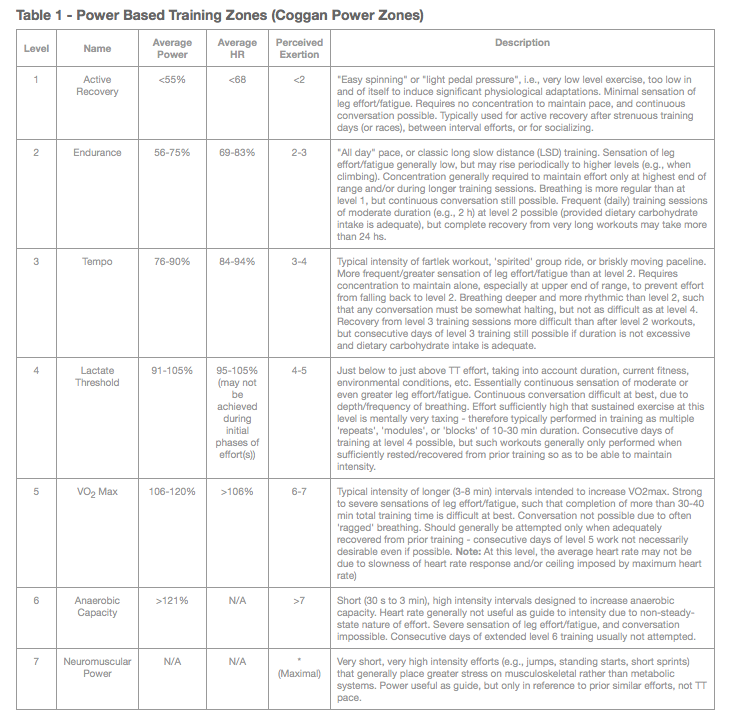
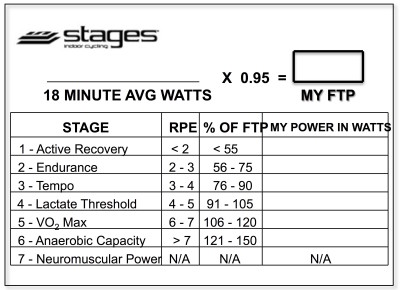
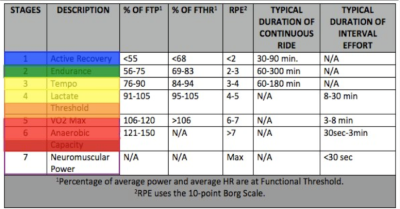
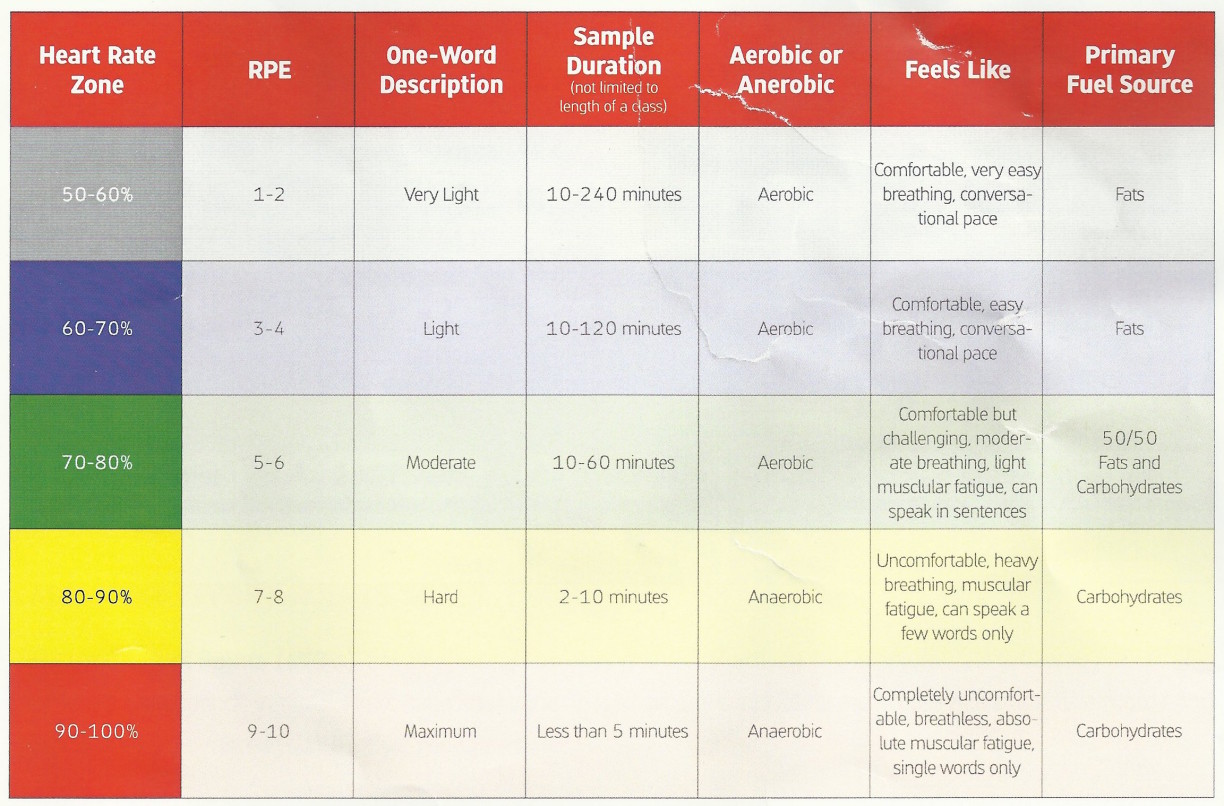
I have been receiving an incredible amount of positive feedback about these progressive profiles, so I have decided to provide ICI/Pro members with two profiles per week starting in September. In order to keep it Simple and keep it Progressive I'm going to provide a profile every Wednesday that focuses on intervals that are @ or Above Threshold (Zones 4,5 and 6) and on Saturday or Sunday I'll post a profile that focuses on intervals that are @ or Below Threshold (Zones 2,3 and 4). Heart Rate, Power and RPE zone descriptions are available below.
Through my years an endurance coach and indoor cycling instructor I have seen my athletes and class participants make great gains by following a progressive program for 3 weeks then using the 4th week for recovery or a “free” or non-technical workout. In order to stick to this plan I'll be providing 3 weeks of @ or Above Threshold workouts followed by a “Free-For-All” workout. I'll also be providing 3 weeks @ or Below Threshold workouts followed by a FTP (Functional Threshold Power) or FTHR (Functional Threshold Heart Rate) workout. I believe the testing profile is VERY important to show riders the gains they are making as well as finding new and REAL numbers to work with for the next month.
Most, but not all, weeks I'll also be providing a 65 minute mixed music set that can be used with these profiles.
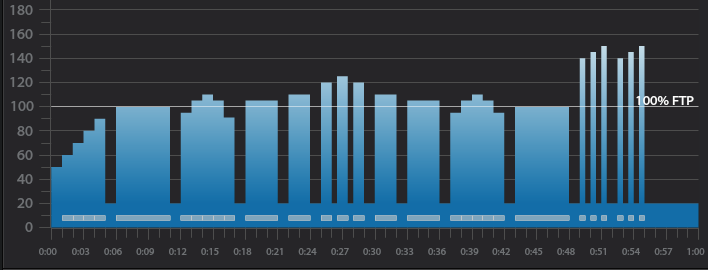
Below you'll find Week 1 of September's @ or Above Threshold Keep it Simple and Progress indoor cycling profile.
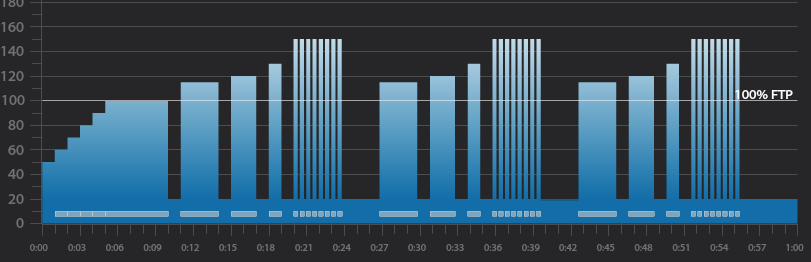
Workout Basics:
5 minute warmup
5 minute benchmark ride to find “Maximum Sustainable Wattage”
1 minute recovery
3 minute interval
1 minute recovery
2 minute interval
1 minute recovery
1 minute interval
1 minute recovery
Tabata Interval 8×20 seconds with 10 seconds recovery after each
3 minute recovery
Repeat the above 3,2,1 minute intervals 2 more times
5 minute cool down
5 minute “Maximum Sustainable Wattage” Test
Settle in to a 5 minute interval at 80-110 rpm.
This interval should be ridden at a maximum sustainable intensity.
if riders know their threshold they can spend this 5 minutes riding at it.
At the end of the interval take note of average wattage or HR or be aware of the RPE.
3 minute interval goals and specifics:
Ride for 3 minutes Seated at 80-110 rpm.
Complete the interval with an average HR or Wattage that is greater than the 5 minute “Maximum Sustainable Wattage” Test
1 minute recovery or reset
2 minute interval goals and specifics:
Ride for 2 minutes Seated at 80-110 rpm.
Complete the interval with an average HR or Wattage that is greater than the previous 3 minute average.
1 minute recovery or reset
1 minute interval goals and specifics:
Ride for 1 minute seated at 80-110 rpm.
Complete the interval with an average HR or Wattage that is greater than the previous 2 minute average.
1 minute recovery or reset
Tabata goals and specifics:
8 x 20 seconds “ON” w/ 10 second rest
Ride the 20 second intervals in a seated position at 80-110 rpm. Rest in a standing position
3 minute recovery or reset
3 minute interval goals and specifics:
Ride for 3 minutes standing at 60-80 rpm.
Complete the interval with an average HR or Wattage that is greater than the 5 minute “Maximum Sustainable Wattage” Test
1 minute recovery or reset
2 minute interval goals and specifics:
Ride for 2 minutes standing at 60-80 rpm.
Complete the interval with an average HR or Wattage that is greater than the previous 3 minute average.
1 minute recovery or reset
1 minute interval goals and specifics:
Ride for 1 minute standing at 60-80 rpm.
Complete the interval with an average HR or Wattage that is greater than the previous 2 minute average.
1 minute recovery or reset
Tabata goals and specifics:
8 x 20 seconds “ON” w/ 10 second rest
Ride the 20 second intervals in a standing position at 60-80 rpm. Rest in a standing position
3 minute recovery or reset
3 minute interval goals and specifics:
Ride for 3 minutes Seated at 60-80 rpm.
Complete the interval with an average HR or Wattage that is greater than the 5 minute “Maximum Sustainable Wattage” Test
1 minute recovery or reset
2 minute interval goals and specifics:
Ride for 2 minutes Seated at 60-80 rpm.
Complete the interval with an average HR or Wattage that is greater than the previous 3 minute average.
1 minute recovery or reset
1 minute interval goals and specifics:
Ride for 1 minute seated at 60-80 rpm.
Complete the interval with an average HR or Wattage that is greater than the previous 2 minute average.
1 minute recovery or reset
Tabata goals and specifics:
8 x 20 seconds “ON” w/ 10 second rest
Ride the 20 second intervals in a seated position at 60-80 rpm. Rest in a standing position
Cool Down
[wlm_private ‘PRO-Platinum|PRO-Monthly|PRO-Gratis|PRO-Seasonal|Platinum-trial|Monthly-trial|PRO-Military|30-Days-of-PRO|90 Day PRO|Stages-Instructor|Schwinn-Instructor|Instructor-Bonus|28 Day Challenge'].
Trainer Road Profile (If you're Trainer Road Member join my Team to get this and all profiles)
Below, Premium Members can view and download a printable Class Profile that can be used in class, read a detailed description of the Power Based Training Zones and download a printable Power Postcard.
[wlm_private ‘PRO-Platinum|PRO-Monthly|PRO-Gratis|PRO-Seasonal|Platinum-trial|Monthly-trial|PRO-Military|30-Days-of-PRO|90 Day PRO|Stages-Instructor|Schwinn-Instructor|Instructor-Bonus|28 Day Challenge']
You know the type; this is the rider who after EVERY class quietly, almost stealthfully, navigates their way to the instructor bike and starts every class critique by saying “That was a great class!”, then pauses for a few seconds and says “But” or “Have you ever considered” or “You should try…” or “why did you…?”.
The first few times this happens you're happy to engage, but as you realize this is going to be an EVERY class occurrence, you start to despise this person. I'm all for constructive criticism and suggestions, but it becomes exhausting having to defend or explain your training philosophy, music choices and cueing to the same person after EVERY class.
Some would say that I shouldn't be so sensitive, that I should embrace the fact that the critiquer wants to discuss my craft with me. I would most often agree, especially if the critiquer approached me after every 3rd or 4th class but when it happens EVERY class I start to feel like it's more passive-aggressive than constructive criticism. Quite frankly it becomes more like nagging than anything else.
Eventually, you realize the critiquer's critiques are only self-serving rants in an attempt to turn your class into a personal indoor cycling training session for them without any concern for the 40 or 50 other riders who may be loving what you are doing. As you wise up to the critiquer's narcissistic tactics, you should try to keep your “end-of-class evaluations” as short as possible. Sometimes they get the hint and back off, but in my experience, they realize they are losing control over you and turn into the tattle-tale. Now you need to be prepared for that dreaded conversation with your supervisor. 99.9% or your class participants probably think you're awesome, but this self-serving, narcissistic, tattle-tailing critiquer is about to make your life miserable.
I would suggest being honest with your supervisor. Most likely management has had to deal with this person in the past and will back you up in this uncomfortable situation. In the unfortunate situation that management is not supportive, you have a hard decision to make. If you are regularly filling your classes and receiving positive feedback from your class participants, I would not change anything about your class. Indoor Cycling is a group activity, and you need to do what is best for the group NOT THE INDIVIDUAL. If management feels the need to kowtow to the wants and needs of every self-serving facility user it may be time to look for another place to teach.
I apologize for the negative tone of this post. It's not always hugs and kisses when you're on the instructor bike. Once in a while, you need to deal with challenging situations and “crazy” people. It takes years of experience to be confident enough in your product to stand up to unwarranted critiques of riders and possibly management. After nearly 25 years on the instructor bike the criticism still stings, EVERYTIME! But now, I listen and “take in” the feedback. If any negative comments are warranted, I'll make the appropriate changes and move on as a better instructor. But when I identify someone as a self-serving, narcissistic, tattle-tailing, critiquer. And when this life sucking vampire approaches me with their 5th “suggestion” of the week, I just smile and say “thank you” as I make my way out the door to my next appointment.
Then, when I get to my car I cue up, crank up and scream along to Eminem's The Way I Am and get on with life.
Below, Premium Members can follow links to download all the above media, view and download a printable Class Profile that can be used in class, read a detailed description of the Power Based Training Zones and download a printable Power Postcard.
[wlm_private ‘PRO-Platinum|PRO-Monthly|PRO-Gratis|PRO-Seasonal|Platinum-trial|Monthly-trial|PRO-Military|30-Days-of-PRO|90 Day PRO|Stages-Instructor|Schwinn-Instructor|Instructor-Bonus|28 Day Challenge']
By Jennifer Lintz, Registered Dietitian Nutritionist and ICI/PRO Contributor
Have you ever not done something because you weren’t sure you could?
As instructors, I have a feeling many of us talk quite a bit about comfort zones (specifically, getting out of them) in our classes, but I often wonder … do we take our own advice?
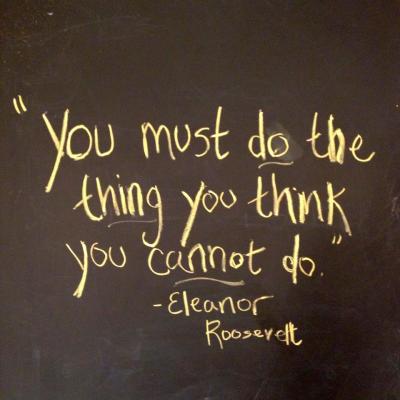
I have seen Eleanor Roosevelt’s quotes on this topic numerous times, but I will admit, I never fully appreciated her words until I actually took them out for a test drive.
Two years ago, a dietetic intern of mine, Amanda, who is now a very close friend, asked me to do something with her called RAGNAR®. Ever heard of it? She told me a little bit about it, but all I processed was:
“You have to run a lot over two days. You will be in a van with 11 other people when you aren’t running. You probably will not sleep.”
I immediately thought “Why would anyone choose to do this?”
I told her I would pass, and thought “Whew. I’m off the hook.”
That was, of course, until she asked me to join her team again the next year.
She assured me it would be “life changing” and “the most fun I’ll ever have.” While I was not convinced it would be either of those things, I begrudgingly agreed to do it.
Our team of 12 – all women – was formed by the early part of 2014, and because many of us live in southeast Minnesota, we chose to do RAGNAR® Great River which starts in Winona, MN, and ends in Minneapolis, MN. Over August 13th and 14th, we would run just over 200 miles as a team. Each runner was assigned 3 legs of the route that ranged anywhere from 3 to 10 miles. Some of us ran during the day, others overnight. I was runner #2, which meant my first leg was 6.2 miles, the second 5.1, and the third 5.6.
Knowing we would be running in the dog days of August, I made sure to get plenty of training under my belt in the months leading up to RAGNAR®, sometimes running a few miles in the morning and later a few more at night. I did everything from steady state runs, to hill-repeats, speed work, tempo runs, cross training, and weight lifting to prepare.
As the event neared, I was feeling fairly confident about my ability to do the running part. My apprehension, I realized, stemmed mainly from knowing I would get virtually no sleep and have very little time to myself. I have long considered myself an introvert who requires plenty of rest, so both of these aspects of RAGNAR® made me nervous. I fully expected to be tired and grumpy when it was over.
Without sharing all of the details, I will tell you that I couldn't have been more wrong. Doing RAGNAR® was an incredible experience and just plain fun … and it wasn't because of the running. Sure, it was exciting to get a couple PRs, but the real value of RAGNAR®, for me, came down to the people and the camaraderie. Needless to say, we are already preparing for next year.
So, how does this tie into teaching indoor cycling? For starters, my self-talk during the training process and the weekend itself gave me fresh ideas for coaching in cycling classes. But, perhaps most importantly, it helped me truly understand what it means to get uncomfortable and why stretching our personal limits can be a beautiful thing. As someone who regularly encourages students to challenge themselves, I found it very valuable to practice what I preach off the bike.
For me, RAGNAR® was just the tip of the iceberg. I now have the beginnings of what I'm calling a “To Try” list; first up is Zumba (let's just say dancing is not one of my strengths). In all seriousness, it reminded me how important it is to be the student and get a taste of what it feels like to be a little nervous.
What would you do if you weren't apprehensive about it? Please feel free to share your experience.
A big THANK YOU to John and ICI/PRO who sponsored our team. Below are a few pictures from the weekend.
The start line at 6:00 a.m. Friday morning.
Community nap time at one of the big exchanges on Saturday afternoon.
I was just finishing my last leg of the race. Felt good!