by Christine Hawthorne | Jul 1, 2017 | Instructor Training, Music
Summer is in full swing and with Independence Day coming up, you may want to consider a theme ride for your next class. While it may be difficult to collect enough themed songs for a Fourth of July playlist, you could definitely include some summer themed songs as well. Here are a few great ideas for you to include along with suggestions on how to use them! Hope your summer is filled with sunny days and full classes!
Love in America (Radio Edit) by JTX/ seated or standing climb (61 rpm)- iTunes link
Fourth of July by Fall Out Boy/ seated flat road or seated climb (80 rpm) iTunes link
And two tracks with the same title:
Freedom by Pitbull /standing climb (60 rpm) iTunes link
Freedom by Pharrell Williams/seated flat road (97 rpm) iTunes link

by John | Jun 30, 2017 | Boutique Instructor, Instructor Tech Help, Instructor Training, KEEPING IT FUN, Master Instructor Blog, Spotify

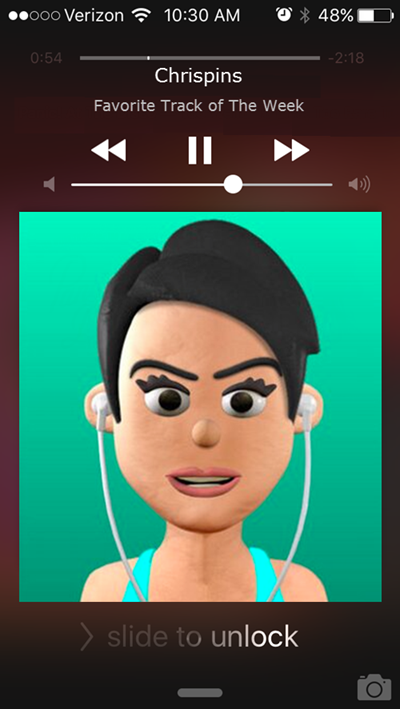
Chrispins sent me a note earlier this week about how the iPhone/iPad Class Builder App will now work with Spotify playlists. Fantastic! I've been waiting for someone to create an Instructor App that uses Spotify.
I have a sort of love-hate relationship with the Spotify App… I love the huge selection of music available for $10 a month, sharing playlists and especially the cross fade – it has my playlists sounding like a near professional mix, with no extra effort. But I hate the tiny numbers they use for the track length timers. If you're a 30 something year old Instructor, with youthful eyes, those itty bitty numbers are probably not a problem. I (and there's a good chance you) on the other hand, have reached the start of my Golden Years where everything looks a little fuzzy without my readers.
Class Builder has BIG NUMBERS – which is awesome and that feature alone is enough for me to look past the $19.95 cost of the App. The options to add cues, tied to each specific track, could really simplify teaching a well crafted profile. Projecting the class profile's training zones on a screen would be cool if your studio's system will accept the video signal from your device.
Class Builder does have a few limitations…
Class Builder requires a premium Spotify account
No off-line mode… only streaming using WiFi.
But before you purchase Class Builder, with the plan that you'll be using music from Spotify, there's something important that you should be aware of – Class Builder doesn't offer a play music off line, option. To use Spotify in a class, where you're using the Class Builder App as the music player, you'll need to be connected to a reliable wireless internet connection. Which is fine if you've got one. In the studio where I teach, the WiFi is weak and when I've tried to use it in the past I was repeatedly asked to sign in to the WiFi multiple times. So I'm doing some testing to find if I can feel comfortable using Class Builder.
No option for Local tracks
Spotify will only stream Spotify tracks. Because Class Builder can only stream music, it can not play your local iTunes music tracks.
I realize this is can be confusing. Let me try to explain: Let's say you want to include a fun remix or mashup MP3 that you have in iTunes, in a playlist on your iPhone/iPad. The only option is to sync your device with your computer, using the same WiFi to connect between them and then set the playlist on your device to Make Available Off Line or my iPad now says Download Playlist.
Because Class Builder has no ability to download, or make tracks available off line, there is no option to include your local files (iTunes) in a playlist used with Class Builder.
No cross fade or EQ either
There was some early discussions about Class Builder on one of the Instructor Facebook groups. People were having a hard time understanding why, for example, Class Builder wouldn't follow the settings they've made in the Spotify App or play in an off line mode. It took me a while before I understood where the confusion was coming from; Instructors were rightly thinking that “I have everything set correctly on the Spotify App… why isn't this working?”
Class Builder doesn't use the Spotify App on your iPhone – Class Builder is a completely separate App that can access your premium Spotify account. I haven't tried it, but I'm guessing you could delete the Spotify App off your phone and Class Builder would continue to steam music from Spotify.
Realizing that much of what I've written here is conjecture, I've scheduled an interview with the App's developer Gene Nacey, from Cycling Fusion, for early AM Friday. We'll explore this latest version of Class Builder. If you have any questions you'd like me to ask him – please leave a comment below. Friday 8/8 update: scheduling issues have moved this out until next week – stay tuned.
P.S. If you already own Class Builder, the Spotify option was included with the latest update. From the Home Screen go to Settings > tap the Spotify logo > enter your Spotify User and Password. If you've been playing with this please let us know your experiences.
Originally posted 2014-08-07 10:35:02.
by Christine Hawthorne | Jun 25, 2017 | Instructor Training, Music
Instructors: It's been one of those weeks for new music. Some really great tracks that you'll want to use in your classes right away have dropped and I'm going to share them along with how I'll be using them in this post!
To start, Imagine Dragons album Evolve is now released in it's entirety. If you haven't been using the early releases (Believer, Whatever It Takes and Thunder) you should definitely give those a listen. In addition, here are a few more that will come in handy:
I Don't Know Why (climb 61 rpm) iTunes Link
Rise Up (flat road 96 rpm) iTunes Link
Yesterday (faster hill 78 rpm) iTunes link
Mouth of The River (flat road 98 rpm) iTunes link
Fallout Boy has a few new pre-releases and my favorite is this one with it's motivational lyrics (“I've got nothing but dreams inside……If I can live through this, I can do anything”).
Champion (flat road 95 rpm) iTunes Link
Not sure how I'm using this one yet, but I had to include this one by The Killers:
The Man iTunes Link
I hope you enjoy these new tunes to help you officially kick off the summer indoor cycling season! Feel free to share your favorite new tunes in the comments!
by John | Jun 20, 2017 | iTunes & Spotify Training, Master Instructor Blog, Spotify
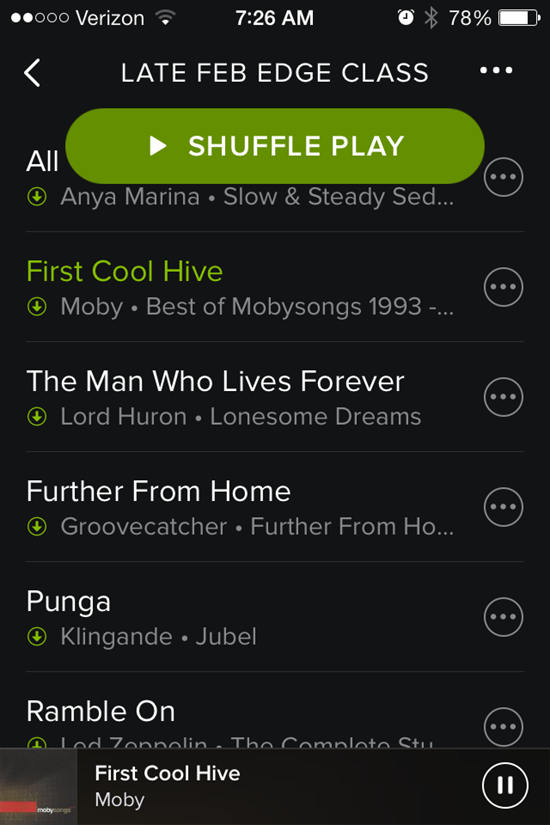
That shuffle button stays right there on the top.
I was greeted by another Spotify update this morning and see they've added a new way to accidentally screw up your class 🙁
Forgive me if you have already experienced this Spotify update. I might be a few days late reporting the change – I've been using the new Schwinn Class Tamer app and wanted to use a past Spotify playlist today.
That big Shuffle Play button sits there at the top, taunting you to inadvertently touch it (or drip on it) and mix up your song order. It won't go away. Swipe up or down to scroll through the playlist to see what's next and that dang button stays right there at the top. Who thought that would be a good idea?
I do like the white on black fonts – they're a bit easier for me to see/read – but still the same frustratingly tiny track length time font.
During class this morning it took me a few tries to get out of the Now Playing Info screen. Tapping anywhere on the bar across the top doesn't work anymore – you need to carefully tap the little X in the top-left corner.
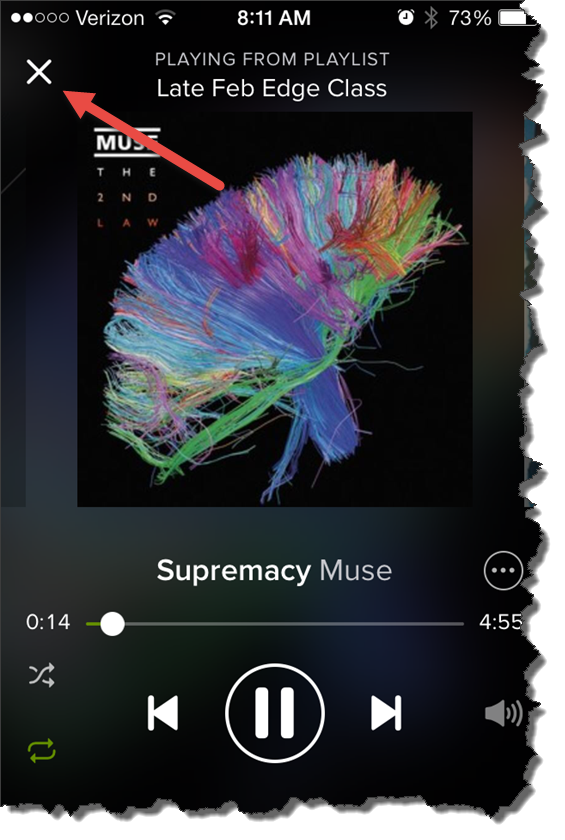
For some reason I couldn't see that X this morning.
Originally posted 2014-04-03 08:20:34.
by Christine Hawthorne | Jun 18, 2017 | Instructor Training, KEEPING IT FUN, Music
This week's track will bring your class up a slow, steep hill as the rpm remains the same, but the gear becomes more intense with each minute. Bishop Briggs‘ song, River is one that will get stuck in your head long after this hill is over and you'll want to use it again and again. It would also make a great standing climb. (64rpm)
River by Bishop Briggs iTunes link
by Dennis Mellon | Jun 18, 2017 | Dennis Mellon, Video
This is a video of my all time favorite Tour de France Stage and it includes my all time favorite indoor cycling song, O'Fortuna.
[wlm_private ‘PRO-Platinum|PRO-Monthly|PRO-Gratis|PRO-Seasonal|Platinum-trial|Monthly-trial|PRO-Military|30-Days-of-PRO|90 Day PRO|Stages-Instructor|Schwinn-Instructor|Instructor-Bonus|28 Day Challenge']
Right click and follow directions below to download this Video
Right Click on the blue underlined link
Select “Download Linked File As”
Select a download location
Once file is completely downloaded, find it in the location you selected
Drag the file into your iTunes or Spotify library OR
Right Click on the file and Select “Open With”
From the drop down menu select “iTunes” or “Spotify”
File should begin playing and is now part of your iTunes or Spotify library
To download the above media on a PC:
Right Click on the blue underlined link
Select “Save Link As”
Select a download location
Once file is completely downloaded, find it in the location you selected
Drag the file into your iTunes or Spotify library OR
Right Click on the file and Select “Open With”
From the drop down menu select “iTunes” or “Spotify”
File should begin playing and is now part of your iTunes or Spotify library
Click here to watch a video on how to download media files from ICI/Pro.
[/wlm_private]
Podcast: Play in new window | Download
Originally posted 2015-11-24 22:46:02.
