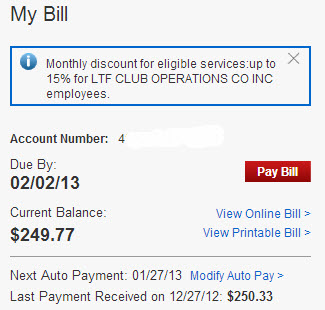
LTF Instructors get a 15% discount – are you taking advantage of this?
I could lease a nice car for what I'm paying Verizon Wireless each month. Service and data plans for daughters; Abby and Carly (two iPhone's), Amy's Droid Razr M and my iPhone run $250.00 a month = $3000.00 a year.
It may not be for you, but that's a serious amount of money to me 🙁
So my ears perked up this morning when I heard an interview on Fox for a company that said Americans pay something like $50 billion more than they should for cell services. The guest, the founder of savelovegive.com, explained that they have an easy way for you to analyze your monthly bill and compare the different service plans.
I didn't take the time to look, but I'm guessing there are other companies that do something similar. What makes savelovegive.com unique is that you can choose to simply pocket the money you save using their service or contribute it to their chosen charity – The Seven Bar Foundation.
The Seven Bar Foundation, a 501(c)3, is the brand for the empowerment of women. As a social enterprise it fuels microfinance institutions by driving profits with purpose with cause-marketing brand partners. To reach a critical mass with its ladder symbolic message, the Foundation hosts the top couture and luxury lingerie shows in the world – Lingerie New York, London Miami, etc. Together with the Foundation’s alliances we enable women in need to start or grow their own small businesses, breaking the cycle of poverty for their children via microfinance. We believe that microfinance is an effective tool to combat poverty and empower women because it fosters self-reliance and encourages sustainable development. As loans are repaid to our Microfinance partners, the funds are then reissued to other entrepreneurs. Investments in Seven Bar Foundation will help countless women over the long-term, constantly growing in size and increasing its impact with every woman that the funds reach.
I love anything that empowers people to become productive 🙂
Using savelovegive.com was free, really easy and took me all of ten minutes to set up. Eight of the ten minutes was consumed by trying to remember which of our four lines was the Primary # and then resetting the forgotten password.
That $102.00 a year could go somewhere better than Verizon. If you choose to spend on on yourself maybe a Spotify premium or ICI/PRO subscription?
You create a user and password at savelovegive.com and then confirm the email they send. The actual tool that analyses your service is called Vera. Enter your cell # and password and Vera goes to work. I was shown four plan options and the potential change in costs. Plan option 1 showed I can save $102.00 a year just by making a simple change to my service.
Now to be fair, Amy watches all our expenses like a hawk (she was a CPA when I first met her), so we were already pretty close to optimal. But the conformation was both comforting and a bit depressing… I was hoping to see some huge, untapped savings we could take advantage of.
If you opt to make the suggest change, savelovegive.com generates an email to send to your carrier this the new plan data. Hit send and hopefully they will respond. It's when your carrier responds that the changes will be made – savelovegive.com doesn't make any changes directly, just shows you which changes to make.
If you're concerned with savelovegive.com having your personal info, I suggest running the test and then you can go back and change your password.
If you try this let other's know your results below.
P.S. savelovegive.com is a great example of a website built using HTML5 – the new hypertech markup language that we were discussing earlier in regards to iPads and how they won't display the Flash audio player that uses the old/current version of HTML.
I see multiple hacked emails each week, that are sending out links to Malware sites to everyone in their contact lists, coming from the accounts of ICI/PRO members and subscribers to our weekly newsletter.
I've had websites that I personally maintain hacked in the past and sending out SPAM, as if it's coming from me.
I'm aware of friends and family who's identity was stolen, creating enormous hassles and expenses to clear their good name.
I'm also very aware the many of us spend a great deal of time online – actually it's not many… we all do. The truth is that there are Hackers watching and waiting for an opportunity to steal your identity and have you pay for their trip to Hawaii, or buy them a new 60″ flat screen TV.
Most importantly, I'm aware that many of you appreciate learning of these hazards, here from a trusted source.
So when I received this advisory from www.trustedsec.com, advising me that the healthcare.gov has serve security issues, I felt it was important to share this with you – so you can protect yourself and your family.
TrustedSec’s CEO David Kennedy released a written and oral statement for the Congressional meeting with the House Committee on Science, Space and Technology at Capitol Hill today (November 19). The meeting was to discuss the security concerns with the healthcare.gov infrastructure. The purpose was not to point out flaws to negatively show the website in any political view. TrustedSec remains neutral and agnostic to anything political related in regards to the Affordable Health Care Act. The purpose was to show that there are serious security concerns with the website. Our concern always remains the protection and security of the United States and it’s allies.
TrustedSec’s CEO David Kennedy will be presenting to Congress on Tuesday November 19, 2013 at 10:00AM ET on the security concerns around the Affordable Healthcare Act — healthcare.gov website. The website has been under scrutiny lately with not only performance issues but a number of glitches and security flaws that have been identified by TrustedSec as well as other independent security researchers.
David will present both a written and oral presentation to the Congressional committee on the security concerns around the website as well as a live demonstration on how an attacker could use information from the site to attack individuals that have registered.
It really is a big deal. There are people finding the personal information they entered at healthcare.gov, using a Google search, if they are even finding healthcare.gov in the first place 🙁
Our recommendation is to stay clear of healthcare.gov until these these security issues have been addresses and unbiased security experts give the all-clear.
Scosche RHYTHM+ Heart Rate Monitor Strap works with ANT+ and BLE devices and consoles.
I'm thinking this new Scosche RHYTHM+ Heart Rate monitor strap could be the best I've ever tested – for a bunch of reasons that include removing what I feel has always been one of the biggest objections to wearing a HR strap.
Despite all of our collective efforts explaining the benefits of training in specific heart rate zones, we're lucky if we have 30% of our participants monitoring their heart rate. I know that some classes are better than that, but based on all of the surveys I've done in the past that's about where we are.
Why?
If I put on my salesman's hat, I know that people don't buy a product or service for lot's of reasons. Salespeople call these objections. If you want to make the sale, you typically need to remove or minimise the prospect's objections; who in this instance is our class participant.
So what are the often stated objections?
No interest – it's almost impossible to sell anything to someone with no interest.
Too expensive – for relatively lowpriced objects like an $80 HR monitor, the selling price objection is often masking some other issue – or – means the prospect isn't seeing enough benefit.
Too complicated – do the manufactures of HR monitors actually use their own products? Setting the typical Polar watch is needlessly complicated. I've gotten to the point where I refuse to help people set their HR watches before or after class because I can't get sucked into a 30 minute project where, more often than not, I'll fail. See #5
Too confusing – as an industry, with all of the branded zone based training systems, we've made heart rate training impossibly confusing for new participants. IMO if you're talking about anything more than three zones based on thresholds, you've lost many of your club athletes. See #5
Too stressful – It's stressful to me when I'm offered a coupon the grocery store, good for my next visit. Why? Because then I'll have to remember the coupon the next time I'm there – which I won't when the cashier asks me; “do you have any coupons?” Our members aren't any different than me or you: getting to class on time is stressful enough. I don't need the added stress of remembering my HR monitor… finding both of my shoes is tough enough. See #8 for the source of even more stress.
Willful ignorance – face it, there are people in your class who want to believe they're burning 1,000 calories in a 45 minute class, where they don't break a sweat. You'll never sell these people on any form of performance measurement (these are the peeps who cover their power console so they can't see their wattage) unless you're running a special on unicorn spit detox syrup.
Uncomfortable – the old versions of hard plastic HR chest straps were very uncomfortable. The new soft straps are an improvement – but they are still not pleasant to wear. Many women won't even think of wearing a HR strap for anatomical reasons. Then there's the other type of uncomfortable as in; “I'm not comfortable opening my shirt to put this strap on, with other people around” 🙁
Unreliable – how many times have you found yourself thinking; IS THIS THING ON? Is the strap battery dead? Maybe I need some additional spit on it? Do I need to shave a horizontal stripe across my hairy chest to get this thing to connect? Wait, who's BPM am I seeing here?
That's 8 realistic reasons why you see so few people wearing a HR strap. The new Scosche RHYTHM+ Heart Rate monitor strap addresses many of the objections I've listed above:
Not complicated – the HR watch is the source of most of the confusion. No watch = no confusion. The RHYTHM+ pairs easily with any bluetooth device (iPhone / Android) using any fitness App that has a HR function. It also pairs with ANT+ monitor consoles found on the Schwinn AC, FreeMotion S series and Spinner Blade Ion. Sorry – the RHYTHM+ doesn't connect with the Keiser M3.
Removes a little stress – It's so small that I can tuck it into my shoe. So if I find both I've also got my HR strap 🙂
Super comfortable – just slide it onto your forearm. Because it uses optical sensors it doesn't need to be moistened and it's not affected by hairy arms. And no one will feel embarrassed when they put it on.
Better reliability – there's a little red light that shines when it's on and it comes with a USB charger.
You'll find more info about the Scosche RHYTHM+ Heart Rate monitor strap here.
Computers and cars fall into the same scary category for me: I depend on them, with little knowledge of how they work and how to repair them if when something goes wrong.
You may not know this- but I got very lucky (or chose wisely), as my husband John is quite a handy mechanic. Phew! The car part is handled. He's also is very familiar with PC's and his brother, Dan, is a Microsoft top-certified technician, so for years I had the computer part handled too.
Last January, I entered a ‘brave new world' and purchased a MacBookPro. Why you ask? The much advertised virus-free intuitiveness of Apple intrigued me, along with the fact that 90% of the people in my new office use and support Apple.
It was a relatively painless transition to MacLand mentally and emotionally. The physical hardware transition has been disappointing. Maybe my expectations were too high, but I'm underwhelmed by a track pad failure / replacement 7 month's in, and then keyboard failure two weeks ago while in Jamaica. (Sign??? Clue??? Do not bring your computer on vacation to ‘work occasionally')?????
We arrived home late Sunday night, and early Monday morning I was on the phone with Apple Care- which is the name for the premium service and extended warranty I purchased. (I won't even get started on the ‘premium service' call wait times..worse than the airlines in the 80'S)!
After confirming it was, in fact, a hardware problem, I made an appointment that afternoon at an Apple Retail store at the Rosedale Mall in St. Paul, MN- about 30 miles from my house. This was the only Apple Retailer that had a keyboard in stock, facilitating replacement in one stop. (I can't function at my job without my computer- so fast turnaround is critical to me).
Long story short- the “Genius Dude”- Chris, told me I had liquid damage which voided my original and extended warranty. He proceeded to tell me the Apple Retail Store policy requires them to send out any machine with liquid damage for thorough testing- to the tune of $750. It's called a ‘Deep Dive'. Isn't that quaint?
Wow! I know the Genius Dudes (and phone retailers) hear this all the time, but I can honestly and truthfully go to my grave knowing I never spilled liquid on my computer. I'm the only one that uses it, so the whole diagnosis was mystifying to me.
This sounds dramatic, but I was minutes away from biting the bullet and purchasing a new computer. In fact, Genius Dude- Chris, asked me to input my password so he could transfer all my information to my new computer. But wait….I can't type in my password, because my keyboard doesn't work. Chris grabbed a remote keyboard and plugged it in for me to type in my password. At that moment, the real genius (daughter Carly) looked at me and said, “Why don't you just by a keyboard for now and decide later what you want to do?” Why not indeed!
Later in the week, I decided to get a second opinion from MicroCenter, an Apple authorized dealer- but not an Apple Retail Store. The cost of admission was $40 for analysis and then we'd go from there.
Well….guess what? MicroCenter's Apple Level 2 Certified Technician- Mack, found no liquid damage what so ever and replaced my keyboard under warranty. Hallelujah! Vindicated! And here's the thing: Mack knew to look for damage (a large spot of coffee or hot chocolate per Genius Chris), as I'd been very transparent about the first diagnosis.
Ever grateful, but wanting to get to the bottom of what happened at the Apple Retailer, I braved the Saturday before Christmas crowds and trekked back to Rosedale Mall to enquire with the manager (or Apple calls them ‘Store Leaders'). I met Manager Hal Reynolds. I calmly (but firmly) explained what had transpired and showed him my MicroCenter paperwork stating no liquid damage. Manager Hal Reynolds would 1.) not acknowledge the opposing diagnosis, or 2.) apologize for anything. On the contrary, he told me he stands behind his technicians 100% and if they said there was liquid damage, there was liquid damage. In fact, he stated Mack at MicroCenter wasn't thorough enough to find it. Manager Hal then provided a supposed picture of my computer keyboard with the damage- procured from Genius Dude Chris, who happened to be in the store that day, but never came out to talk to me. (Carly and I had since been kicking ourselves for not asking to see it on Monday!) The picture simply reinforced to me something funky was going on- because even I would have seen that stain on my keyboard upon opening up my computer for analysis. All failed Apple parts go back to the manufacturer, so MicroCenter would not be reimbursed for warranty parts/labor had they missed this huge stain. I actually wonder now- does the Rosedale Apple Store have a MLCK (master liquid compromised keyboard) that the Genius Dudes switch serial number stickers on as needed? Perhaps the Rosedale Apple Store was over budget on warranty work for 2014? Hmmmm….
Mid conversation, Manager Hal promptly excused himself to meet with another customer, telling me he'd be, “Right back.” 15 minutes later, I was still waiting at the Genius Bar for Hal to be “right back”. Wow! I left the Rosedale Apple Store without talking again to Hal Reynolds, solidifying my vow to never darken the doors of an Apple Retailer again.
What I've learned and want to pass along: 1.) if a technician says you have damage of any kind, ask to see it immediately- especially if it voids your warranty 2.) always get a second opinion 3.) good luck getting any satisfaction from Apple Retail 4.) MicroCenter gets all my business from now on and 5.) there is NO EXCUSE for bad customer service.
I am still working on taking this up the ladder at Apple. It's simply not okay.
My hope is this post will save one of you from the same experience I had.
This weeks ride is from me, Joey! – “In all honesty, I was dreading putting together this week’s ride. My classes have been after me to put together a few theme rides, which I almost never do. This weeks ride is focused on music from the 1970s. I am in the endurance working phase of my micro-periodization for my classes, so I had the profile already put together in my mind. I used one of my favorite endurance profiles, where we start with a higher cadence in the 100s and then work our way down to the 60s adding tension the entire way. The wildest thing happened, I had an amazing time. Once I started listening to the music I kept on thinking: “Oh, I remember and love that one” and it just kept on happening. I ended up with over 140 songs on my short list to choose from. It really made putting this class together fun. I hope that you enjoy riding it as much as I have.” Joey