Last spring I was getting a flood of emails from hacked email accounts 🙁
Because we are regularly emailing close to 10,000 Instructors, my email address is in all those contact lists. When an account is compromised, the first thing the hackers do is send an email to everyone on your list. That email typically includes a nasty link that, when your mom/dad/babysitter or club department head clicks, could infect their computer with a virus or worse… like taking complete control of your computer.
It even happened to me – an old yahoo.com email I haven't used in years started sending out spam emails. Embarrassing to say the least.
I wrote two posts here & here about the importance of using a good/strong password to prevent this from happening to you. Here were my suggestions.
… take your existing password (if it has 8 or more letters) and add one capital letter and two special characters.
So “password” would be greatly improved by changing it to “@Password!”
Another option would be to combine three easy to remember words, separated by special characters. The three girls in my life are Amy, Abby and Carly so a reasonably secure password could be Amy&Abby&Carly. You can use your first name, your dog’s name and your city or any other three words and special character combination.
One more suggestion — You may have heard you should have a different password for every website — unrealistic. But I personally use a few different passwords, depending on the type of website where I have a user name.
One simple password for sites that don’t matter (No email or financial data) Here’s where you can use “password”
One password for important sites (No financial data)
A complex password for each website that has financial, medical or credit data. Create a prefix password and add the name of the institution at the end like; @Password!=visa or @Password!=bank or @Password!=401k
To be clear, my example of @Password!=visa would in actuality be: @Password!=FirstBankVisa but please don't use “password” instead use an easily remembered root word. Password is the number one, err – password and it's the very first word the hackers try.
But how do you know what you've created is really a good/strong password? This online password strength checking tool can tell you the relative security of any password you dream up. Suggest testing a slightly different version of your password – change one digit-just in case this site is an elaborate scam to actually steal passwords. It did come to me from a trusted source… but you never know.
So “password” (without the quote marks) returns:
Please don't use this password.
Which is pretty much like posting your password online, but @Password!
Much better
Is a big improvement, while @Password!=FirstBankVisa should be pretty secure.
Now you're talking 🙂
So until we all have the new iPhone 5S with fingerprint recognition, please protect yourself and change your passwords.
Our family has nick-names for just about everything; Ruby, Jade, Baby Rocket and Scootie are in actuality; my red Mazda 3, Abby's green Mazda 3, Amy's black Acura TL and Carly's Honda Scooter. No, you don't want my car insurance bill 🙁
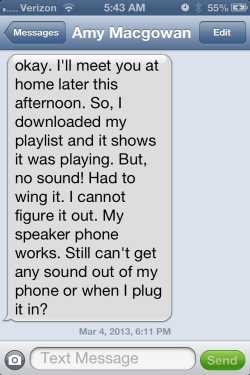
But when one of them (or some other mechanical / electronic device) has failed in some fashion, its name changes to a less endearing term, typically – Pig. So when I saw this text from Amy on Monday, after she had taught her noon class at Cycle Quest, my first thought was; “well, bring the Pig home and I'll see if I can help you figure it out.
Once I had the Pig her Android Razor in my hands, Amy showed me that there were in fact a bunch of her Spotify playlists that wouldn't play. They appeared to be correctly downloaded (Spotify describes making tracks available off-line as Downloaded on a Droid vs. Make Available Off-Line on an iPhone… go figure) and when you clicked a song it showed it as playing, but no sound came out.
I'm not an Apple computer user, so I don't know if the below applies to you – but it probably does.
My brother Dan taught me a number of years ago that the first step in diagnosing any PC computer problem is to Re-Boot (shut down everything) and see if that will fix the problem. Many times that's all that's required.
Dan explained how device software and the hardware they run on are not 100% perfect – resulting in small errors that occur each time you load or run a program. The operating software system can deal with these small errors (which build up over time) until they become unmanageable, resulting in your computer/device changing into a Pig.
So after poking around unsuccessfully, I asked Amy when was the last time she re-booted her phone. She couldn't think of a time, but she did remember seeing a notice that Spotify had updated. This appears to be another difference between Android and Apple. Droid Apps update on their own. Apple device Apps display a little red arrow indicating an update is available & you manually approve each. Hearing Dan's voice in the back of my head saying; “you need to re-boot the Pig”, which we did and problem solved 🙂
Side note Over the past 4 1/2 years I've answered hundreds of tech related questions from ICI/PRO members. A common theme that runs through these requests is; I'm not very Techie, I must be doing something wrong or similar self-defamatory statements where the questioner takes personal responsibility for the problems/issues they are experiencing. THIS IS ALMOST ALWAYS NOT TRUE!
A lot of the technology we use as Instructors IS confusing, frustrating, problematic or just plain doesn't work like you think it should. In nearly every instance I can think of, what was preventing the person asking me the question from solving it themselves, was a reluctance to take the next step.
The next time you run into something confusing, frustrating, problematic or just plain doesn't work like you think it should – give yourself permission to try something else; start clicking buttons… every one you can find. If that doesn't work close the program, walk away, and then return with a fresh perspective.
My brother Dan is really sharp with computers – a real Techie. I've watched him work trying to solve a problem for me and he'll be zooming around my laptop, opening and closing stuff faster than my eyes can follow. I'll ask him; “what are you doing?” and he'll say; “I have no idea… I'm just trying different things, hoping one will work.”
And of course, if all else fails, please know that we're here to help 🙂
“This weeks ride is from Amy! – This is a copy of one of the rides that Amy does during the Cycling Fusion Certifications to show the new instructors a sampling of various drills that they can use to build their rider’s skills.” Joey
“Why do I make less power (fewer watts) standing, then when I'm seated?”
This a a great question that we get often. I loved John's answer, and so I have done a few edits and present it here….. Joey
A great questions from one of the riders in a Performance Cycle class. An observation that shows he's paying attention plus it gives me the chance to clear this up, so you can properly explain this anomaly to your participants.
The short answer is you don't* If resistance and cadence remains the same, in or out of the saddle doesn't matter. The amount of power/watts you are creating doesn't change… because it can't.
The bike decides the right amount of power
You know that Power = Force x Cadence. So let's assume this participant is riding seated and pedaling @80RPM. Their resistance is set to a level that results in the console display showing 150 watts.
Our legs create the perfect amount of force required to get the job done, which in this instance is overcoming the resistance to pedal @ 80RPM. If your resistance setting on the cycle requires “X” amount of force to push down the pedal, your muscles will create exactly “X” – no extra force is created and no less. The combination of that force, multiplied by a cadence of 80 RPM results in the power meter showing 150 watts.
In fact there's an actual law of physics that says that it's impossible to get the same amount of power out of a machine with a reduced amount of power added into it – which is why I'm saying the amount of power/watts you are creating stays exactly the same, if you make no change other than to stand and ride out of the saddle.
“But then why does the power meter show my watts lower, when I'm standing.”
My response was; “you're right it does and there's a simple answer why…
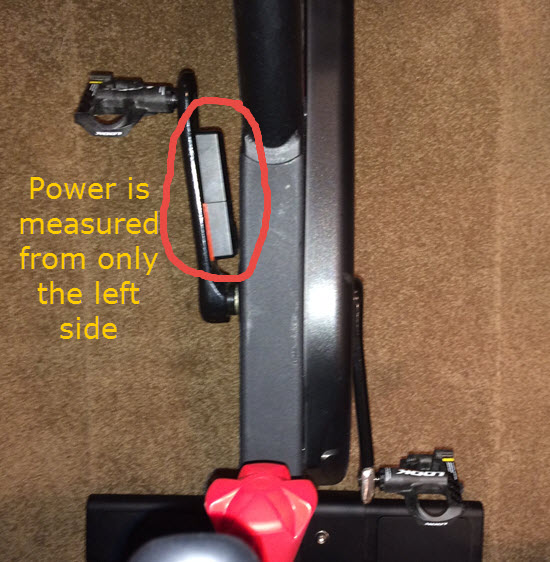
Let me begin with the basics. I teach at a Life Time Fitness Athletic Club and we ride FreeMotion S11.9 with the Carbon Drive belts. FreeMotion's measure power only through the left crankarm as you can see here.
This is my personal S11.0 (the home version) which is why it's black and not the normal silver color. The electronics are identical across all models.
Yes, the meter shows a drop in power…
Many of us who teach or ride on this Indoor Cycle have noticed that the power meter will show a lower wattage number when you transition out of the saddle, without giving any thought as to why. As I explained above, it shouldn't > the wattage number should remain the same. Again; Power is equal to force times cadence. If you didn't change the resistance setting, and you're maintaining the same cadence, the power meter should continue to show the same wattage… but it doesn't because >>>> your legs aren't the same strength.
Your dominate (stronger) leg does more work
The force required to pedal is divided between your two legs – but not equally. Because many (if not all) of us have one leg that's stronger than the other, our brains automatically proportion the amount of force from each. Remember: our legs only create exactly what's needed. Unless you consciously choose otherwise > more force is unconsciously asked from the stronger leg and the opposite leg adds what's left, equaling the total required.
Some quick research showed me that it's very common for one leg to be stronger in most people. Your dominant/stronger leg is typically the same as your writing hand. Since ~90% of people are right handed, the majority of your class will be seeing lower wattages when the come out of the saddle > because they are doing more work with their right leg. The FreeMotion's left hand power meter sensors are seeing a lower amount, of the total amount of work, as coming from your left leg.
Because this IC can only sense force on the left side, when you stand your stronger leg carries a greater percentage of your body weight = the wattages appear lower.
So standing or seated at the same cadence, you continue to create the exact same amount of power. It's just that the power meter doesn't see all of it and displays the reduced amount = the misperception that we create less power standing… which you now understand isn't true 🙂
Make this a feature (not a bug) in your class
Since the Freemotion can show leg strength disparity, why not use it as a training tool?
Novel idea, right?
Start by teaching everyone which leg is their stronger/dominate leg. The simplest way I know is by doing Step-Ups on a box or step raised to the proper level as shown in this short video.
This exercise was eye opening to me, when we did them in Boot Camp. Learning that my right leg is considerably stronger, I'm now really focusing on making my left leg do more work. Hopefully over time, a stronger left leg will result in me having a higher FTP and greater overall muscular endurance.
I suggest having your riders do this as an after class activity > or you could bring a box into your studio and have everyone take a turn.
Using a pair of reasonably sized dumbbells, perform 8-12 reps all on one side and then the other. It should be quickly apparent which (or if) they have a leg strength disparity.
We'll explore drills to exploit this feature and help riders train their weaker leg in future posts! [/wlm_private]
* I'm not referring to pedaling efficiency here, which is a completely different subject.
** Please let me know if this isn't clear, if I've confused you or you have an alternate method of explaining this.
“For all intents and purposes, your body works exactly like the engine in the car that brought you to the studio today.” I like to use that line, especially when I sense I have a bunch of gear heads in the class. First to get their attention by saying something profound and secondly, because it's (grant me a little leeway here) technically true; your body powers a bicycle exactly like an internal combustion engine powers a car.
Now at the risk of one of my daughters admonishing me with “Dad, your class doesn't want another science lesson”, let me explain;[wlm_private ‘PRO-Platinum|PRO-Monthly|PRO-Gratis|PRO-Seasonal|Platinum-trial|Monthly-trial|PRO-Military|30-Days-of-PRO|90 Day PRO|Stages-Instructor|Schwinn-Instructor|Instructor-Bonus|28 Day Challenge']
Your students and their cars use a Carbon based fuel sources that contain essentially “Stored Sun Light” derived from plant photosynthesis.
Both have a system to ingest air (more importantly the Oxygen it contains)
Both have a process to chemically combine fuel and Oxygen which creates heat and pressure
Both use this pressure to create linear motion
Both use an offset crankshaft to convert linear motion to rotary motion.
Both have a system to expel the waste byproducts of combustion
What brought this to mind was last night in my class I had a number of students who rode most of the class looking straight down, instead of the “Head up – Look at your self in the mirror and smile :)” posture we all want. But why do we want it?
I remember listening to the commentators during the China Olympics talking about how you could tell who was strong and who wasn't on the big climbs by how each rider held their head.
Head up = Strong … Head dropped = weak. But beyond the body language, why is head position indicative of performance?
And then I thought of this:
Modern engine designers understand that best power and efficiency is dependent on moving the maximum amount of air into and out of the engine. For that to occur the path the air takes, as it flows into the engine, needs to be as straight as possible.
Here is a diagram of the Intake Track in an older, much less efficient engine, circa; 1940
Now compare that to the Intake Track of one of your students.
Here is a cyclist demonstrating good form with “Head Up – Eyes Forward” posture. Notice how the Intake Track becomes straighter?
Does it then follow that;
Head up = Efficient Breathing (Strong) … Head dropped = Inefficient Breathing (Weak)[/wlm_private]
My understanding is that these are the best – just tough to turn off.
I actually needed to get help from Amy to figure this out – so I could completely relate to this question I received via email today.
Hi John,
I think I read you teach for lifetime. Do you use the micpacks with the flip open battery compartments that covers the on button? This may sound silly, but I can't figure out how to turn the darn thing off. Shouldn't the on and off button turn it on and off? I tried removing the batteries when you put them back it goes right back to on. Any ideas?
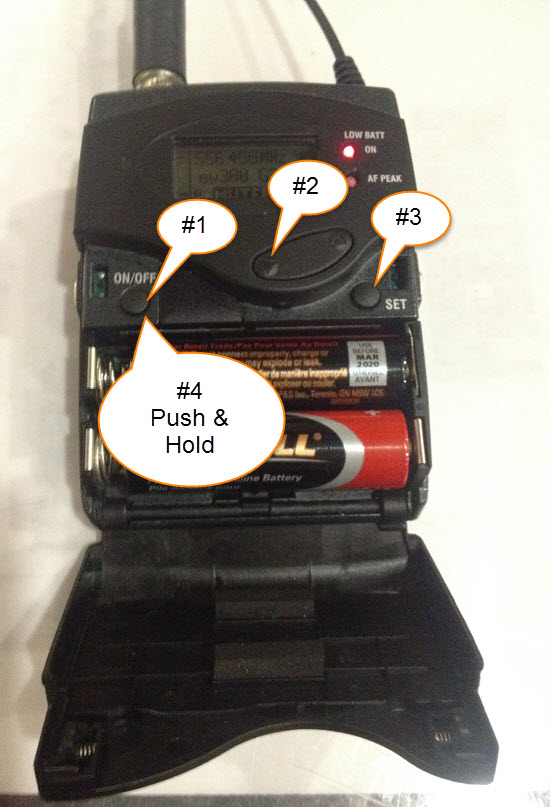
I'm pretty sure this instructor is talking about a Sennheiser wireless microphone pictured above – it's what we have at our club and I found it as confusing to turn off, even after re-reading the email instructions multiple times.
After Amy was able to educate me, rather than try to explain the process in just words, I felt it might be easier to follow with a picture like this.
The steps to turn this off are:
Press the on/off button
Press the button shown
Press the Set button
Press and hold the on/off button until it turns off






 Our family has nick-names for just about everything; Ruby, Jade, Baby Rocket and Scootie are in actuality; my red Mazda 3, Abby's green Mazda 3, Amy's black Acura TL and Carly's Honda Scooter. No, you don't want my car insurance bill 🙁