RACE DAY was another winner of our Ultimate Instructor Class Profile contest from Instructor Mark Peterson!
For the love of the Road Race! The inspiration for this ride was the recent Pro Cycling Challenge in Colorado but the ride is generic in the sense that you could do this ride as a stage of any Cycling Race. The objective of the ride is to educate my students on the sport of Bike Racing, entertain and to provide some of those moments of lung splitting, leg busting intensity that is Road Racing!
Mark is a detail guy and what made his contest submission unique is that he created it using the ClassBuilder iPad/iPhone App from Cycling Fusion.
The graphic at the top displays during the entire class. A marker moves along on the screen, helping everyone understand where they are and more importantly, what's coming next.
This was Mark's second visit to the Podcast. You can listen to ICI Podcast #190 — Virtual Class Ride Prep to learn his tips and trick to effectively using video in your class.
ICI/PRO member Dr. Marc Schlosberg is one of those Early Adopters you've no doubt heard discussed in the media. This group is quick to experiment with and embrace new technology. Marc was one of the first Instructors to use Spotify in his classes and he joined me on the podcast to discuss this (at the time) exciting new option for delivering music to our classes. Marc sent me this email yesterday, providing his comments related to my conversation with Chris Hawthorne on Podcast #303
Hi John,
I was listening to the latest podcast and heard about the Spotify syncing issues. I have a couple of suggestions/solutions. I think the reason rebooting all units works to fix syncing is that the newest versions are then installed on all devices. I believe syncing problems develop when Spotify updates and there is a version mismatch. You don’t always know this is the case or sometimes it’s difficult to track that one device has updated, but you haven’t checked the others. Simply shutting Spotify down, checking for updates and updating it, then restarting the program should solve the problem. You have to do this with all the devices you use.
Another roadblock to syncing is lack of space on a device. It won’t tell you you’re out of space, but won’t take individual tracks offline — they stay grey rather than green. It’s a good idea to switch playlists to online only after you’ve used them to preserve space (except for those you always like to have in your back pocket). You could also delete unused apps to make room. My iPhone is 16gb and I’ve run into this problems (and 16gb used to be an unimaginable amount of space). It’s probably less of an issue for those with 32gb and up or Android devices with huge plugin memory — unless the memory is full.
Whoa — it looks like Spotify updated their iPhone interface yet again while I was writing this.
Hope this helps.
Take care,
Marc
Thanks for this Marc! Your suggestion that available storage maybe limiting the number of “off line” playlists is a good one and begs the question; “how can I tell how full is the memory on my iPhone?”
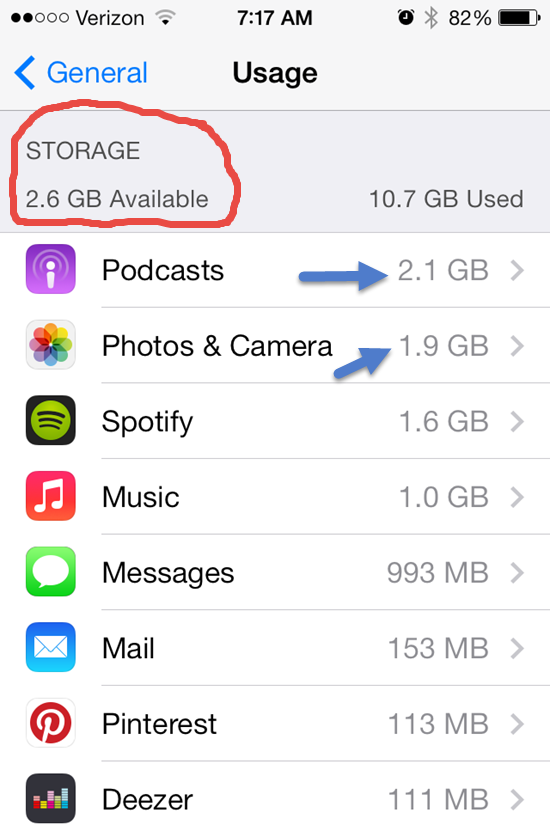
There are a couple of places that will show you how much space/memory you've got left. My preference is to go to: Settings > General > Usage… where at the top you'll see how much room there is for a few more playlists.
This also shows you all the other memory hungry Apps on your phone. One common culprit is your camera's memory and all those pictures and HD videos. Downloading them to your computer and then deleting can free up some space.
Depending on your settings, Podcasts download automatically and can quickly crowd out your favorite playlists. Open your Podcast App select a specific Podcast > Settings > Episodes to keep and select a number to save (Last 2 / Last 5 / ect…) instead of All.
Both of these questions have pretty much the same solution…
Spotify is jumping in Apple's face with this and I find it kind of funny 🙂 Turns out that if you're paying your monthly Spotify subscription through iTunes, you are paying an extra $3.00 a month. Why? Because iTunes charges an extra 30% on top of recurrent subscriptions.
Spotify is trying to raise awareness around the fact that it's cheaper to subscribe on the web instead of through Apple's App Store. The leading subscription music service plans to email iPhone customers the below note encouraging them, if they haven't already, to start paying at Spotify.com and save a few dollars. “In case you didn’t know, the normal Premium price is only $9.99, but Apple charges 30 percent on all payments made through iTunes,” the email blast reads. “You can get the exact same Spotify for only $9.99/month, and it’s super simple.”
The message is followed with a step-by-step tutorial that explains how to shut off auto-renew through iTunes (so Apple won't keep charging you the higher $12.99-per-month rate) and transfer your account to the web – something that can only be done once your current subscription lapses. “Pardon us if you can't do this immediately. Your current plan needs to end first,” Spotify says.
This will only apply if you downloaded and subscribed to Spotify using your iDevice. Most of us (me included) used our computers and subscribed directly with Spotify.
But this got me thinking; how do I cancel my free trial to Apple Music?
Turns out it's easy to cancel any monthly subscriptions.[wlm_private ‘PRO-Platinum|PRO-Monthly|PRO-Gratis|PRO-Seasonal|Platinum-trial|Monthly-trial|PRO-Military|30-Days-of-PRO|90 Day PRO|Stages-Instructor|Schwinn-Instructor|Instructor-Bonus|28 Day Challenge']
Open the Music App on your phone and click the silhouette icon in the top-left corner.
Next choose View Apple ID and Log In.
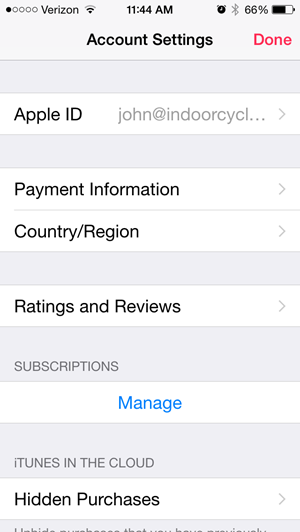
Then under Subscriptions > Manage
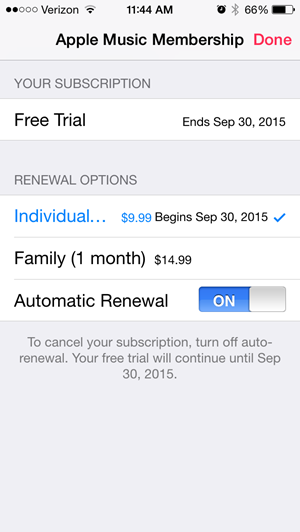
This screen will show your Apple Music and other auto-pay subscriptions, including Spotify if that's how you're subscribed.
NOTE: cancelling won't end your trial early.
Please let me know if you have additional questions. [/wlm_private]
I'll bet somebody at Apple/iTunes is getting an ear-full this morning…
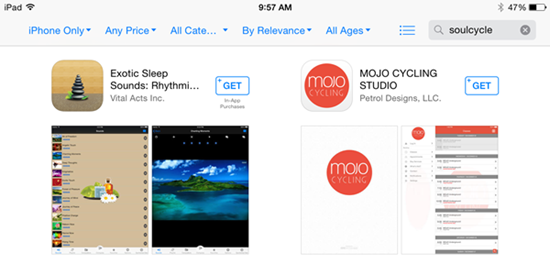
SoulCycle sent out an email this morning, announcing their new iPhone App. The email included this link to their App in the iTunes store… which of course opens in iTunes so you can download the software.
Except most people (like me) don't use iTunes to install an App. We download and install Apps directly from our phones.
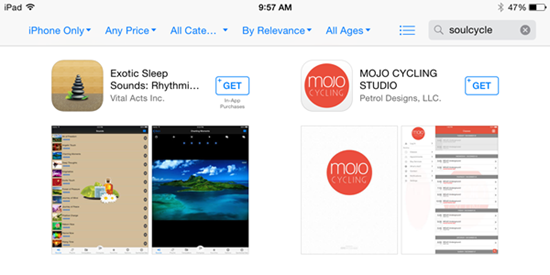
Which is great as long as the App Store can find SoulCycle's App when a user (in this case me) searches for SoulCycle… which returns two available Apps, neither is the SoulCycle App 🙁
So I guess I'll have to go old-school and transfer it from my computer, before I can review it!
413 Update – I'm now seeing you can search and find this now in the App Store using your iPhone.
Merrill Richmond with StairMaster | Schwinn send me a press release about how the Schwinn Class Tamer iPhone App had won an Outstanding Achievement Award. Pretty cool:)
Schwinn developed this as their gift to Instructors – and an expensive gift at that. I don't know exactly what they've spent on the design and ongoing maintenance of the Class Tamer App. I have looked into contracting with an App development company, to build something similar and was quoted “around” $40,000.
STAIRMASTER AND PINCKNEY HUGO GROUP WIN INTERACTIVE MEDIA AWARD
SYRACUSE, N.Y. — Pinckney Hugo Group, a full-service marketing communications firm, and StairMaster, which markets and distributes Schwinn indoor group cycling bikes to commercial health clubs, were awarded an Outstanding Achievement Award by the Interactive Media
Awardsâ„¢ for the Schwinn Class Tamerâ„¢ App.
The Outstanding Achievement Award recognizes that the app surpassed the basic standards of excellence that comprise the web’s most professional work. The app was honored for excellence in the sports category. “It was truly a collaborative effort that led to the Schwinn Class Tamer App,” said Merrill Richmond, vice president of sales and marketing, StairMaster. “Together, with Pinckney Hugo Group, we were able to develop the premier music player for group exercise professionals. It is a tool organized intuitively with large, easy-to-read fonts and controls to help them stay organized while they energize their classes.”
Designed with input and insight from Schwinn’s global team of Master Instructors, Pinckney Hugo Group created the app to serve as the premier music player for group exercise professionals. The app is a one-of-a-kind music player that enables instructors to create and save ride playlists by accessing songs, playlists, albums and artists directly from iTunes. After a playlist is created, the instructor can input a set of commands, cueing notes, music tags and beats per minute (BPM) for each song within the playlist. Playlists can then be saved for future use in class.
The judging consisted of various criteria, including design, usability, innovation in technical features, standards compliance and content. To win, the app had to meet strict guidelines in each area. Other entries in the sports category that received an Outstanding Achievement Award include the NCAA website and the World Anti-Doping Agency — Play True Quiz. Best In Class, the highest honor of the competition, went to ESPN World Cup Essentials, Everton Football Club and Warrior Dash websites.
The Interactive Media Awards is an international awards competition that was started in 2006. Each year the awards honor the best website designs in a multitude of categories throughout the year and are designed to elevate the standards of excellence on the Internet.