
by Jennifer Lintz | Jun 11, 2013 | Instructor Training
By Jennifer Lintz, Registered Dietitian and ICI/PRO Member Soigneur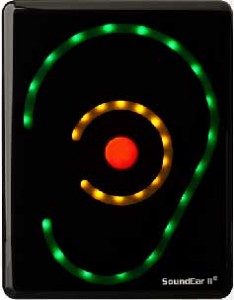
There is no question that in the group fitness studio – whether it be cycle, strength, yoga or some other modality – music matters. The right song placed at the perfect spot in a class can heighten the overall experience for participants.
Unless that song is too loud.
Or not loud enough.
That brings me to my question.
How do you as an instructor determine a volume that is “just right?”
From the time I began teaching in 2008, I can recall several ways music volume was addressed by management.
- In a couple of facilities, I remember being asked to use my “best judgement.”
- In other places, there was a “do not cross line” next to the volume knob.
- And, in one location, music was never really mentioned … at all.
It was not until I started my current teaching position that I was exposed to a more objective method for monitoring music volume:
drum roll …
the SoundEar (pictured).
As you can see, there are three rings of color on the SoundEar. The outside edge of the ear is green and – when lit – indicates music volume is in a safe range. The middle ring lights up in yellow when volume starts to approach the maximum, and a red dot in the center becomes bright when volumes have exceeded the limit. In our situation, the SoundEar is set to recognize maximum volume as 85 decibels. This limit was set to promote both the safety of instructors and members. And, yes, I do feel that 85 decibels is loud enough and conducive to exercising in the “zone.”
In our facility, the Sound Ear is located on the back wall of each studio so that the instructor can easily see it while teaching. While I can't speak for other instructors, I really appreciate the tool. The SoundEar helps me keep my music within ranges that I know are safe for anyone in the room. Disclaimer: Ear plugs are always available in the studio for participants who prefer a little lower decibel level, but I don't see them being used very often.
The SoundEar has truly cleared up the gray area for me and quickly lets me know when my music is too loud AND when I have wiggle room to crank things up, if I feel the urge.
I rarely hear comments from participants about music volume, and a member has yet to say anything to me about the device mounted on the wall. In fact, I have a hunch a majority of folks don't even know it is there. Quality assurance measures are in place, too. Our supervisors regularly drop in on classes throughout the year to make sure we are abiding by volume policies and respecting members' safety.
I know it is impossible to please everyone with regard to sound levels, but I appreciate the SoundEar and have noticed that comments about music volume have been few and far between over the past year.
What are your thoughts on monitoring music volume? Do any of you use a similar device? Would you find it helpful to use/have something similar?
by Jennifer Lintz | May 15, 2013 | Instructor Training
By Jennifer Lintz, Registered Dietitian and ICI/PRO Member Soigneur
Recently I received a message from one of our members in need of a little assistance:
“I'm pretty new to this spin instruction thing and I'm looking for new class ideas and routines that aren't based too much on certain songs but on technique and fun challenging routines. Is there a spot on your site to help with this?”
Because I am sure there are others who have had this same question, I am sharing my response, just in case others find it helpful. Getting started as an indoor cycle instructor can be very overwhelming, and a lot of times, new teachers are simply looking for ideas.
Here is my take …
“Yes, we do have a section with some class ideas. Once you get logged in, if you click on the “Instructor Training” tab at the top, and then “Class Profiles,” we have over 50 different examples of classes that Instructors and Master Instructors have led that were well-received. Each instructor explains their class plan in an audio podcast, but there is also a corresponding PDF to go along with it. Here is a good example from Julz Arney.
Many of the instructors do list recommended songs, but by no means would you have to use them. If you glance through the various profiles we have on the site (and we add new ones a couple times each month), you will get a lot of ideas for how to structure your classes and can tweak them to fit your teaching style.
I always like to start my class planning with some kind of objective that answers the question “What are we going to do today?”
When I taught this morning, we did an “Out and Back Ride.” Therefore, all of the terrain we conquered in the first half of class we saw in reverse order in the second half, as if we had turned around. You can apply so many different types of terrain to that format … it could be rolling hills first, followed by flat roads focusing on consistency in pace and gear, then a gradual climb, some speed work, and turn around to do it all over with new tunes and slight variations in the way the drills are executed.
Some days, my classes are entirely drill-based (i.e. “We are doing interval ladders today.” An example of this might be: 30 seconds on and 30 seconds off, followed by 60 seconds on and 30 seconds off, 2 minutes on and 30 seconds off, 4 minutes on and 1 minute off, etc. and then go back down.)
Other times, I will describe the terrain right out of the gate. (i.e. “Today's ride is pretty flat, but we will have 3 hills to deal with, each a little steeper than the previous. The first one will be a 3 minute climb, followed by a 5 minute climb, and finishing with a 7 minute climb.”)
When I go to class as a participant, I like to know a bit about what we are doing (“The Plan”), so I try to give that to my riders as we start the warm up. Today we are doing “____________.” It can help when music correlates with the terrain/drill, (i.e. slow, steady beat for inclines vs quick, driving beat for endurance/flat terrain).
I could go on and on and on! I don't think there is a right or wrong as far as the way you set up your class, just as long as you have a plan, explain it to your students, and stick to it. Hopefully scanning the Audio PROfiles will give you some good inspiration. I also find it helpful to listen to the podcasts when I am driving to work to help improve my cueing/coaching/organization/motivational technique.
I am copying John on this in case he has anything to add. It can be very overwhelming when you get started as an instructor, but each class is an opportunity to improve.”
I would love to hear what the rest of you have to say about this topic!
by Jennifer Lintz | Apr 25, 2013 | Instructor Training, Music, Spotify
 By Jennifer Lintz, Registered Dietitian and ICI/PRO Member Soigneur
Now that I'm finally on Spotify, there is one feature that I particularly appreciate:
Spotify Radio.
Pre-Spotify, this was my process for finding new music and creating playlists:
- Listen to Pandora.
- Make a note of songs that would work well in class.
- Download new tunes from eMusic.
- Create playlist in iTunes.
Not anymore!
Spotify has become my one-stop shop for creating class profiles. Instead of going from Pandora to eMusic to iTunes, I now do every single bit of my playlist prep in Spotify. This is my current routine:
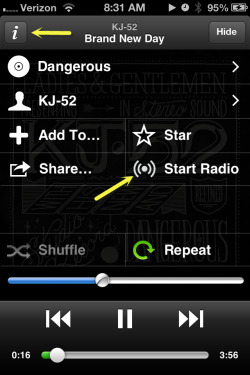
Click the “i” for any track and then click Start Radio for a playlist of similar music.
- Listen to Spotify Radio. I also enjoy looking at my friends' and colleagues' Spotify playlists for ideas.
- Add songs I like directly to my class playlist.
The “directly” part was a huge selling piece for me. In addition to hitting the “Thumbs Up” button, which immediately saves songs to the “Liked from Radio” playlist, you can add radio songs directly to your class playlist by:
- dragging them to a playlist on your computer OR
- clicking “Add to _______” and selecting the appropriate playlist
Talk about a time saver!
On top of this feature, Spotify has unlimited skips, meaning we can hit the “Thumbs Down” button as many times as we would like. The number of stations is unlimited, too. You can create radio stations based on a specific artist, song, genre, or even a playlist you already made.
My love of Spotify caused me to cancel my $16.99/month eMusic membership and sign up for Spotify Premium ($9.99/month) so that I can use my music “offline” when I am teaching classes. So far, I am not looking back!
by Jennifer Lintz | Jan 23, 2013 | Latest News
 As PRO Member Soigneur, one of my responsibilities is the care and feeding of our members. I assumed any “feeding” that took place would be strictly informational, but I’ve actually got something edible (and free) for you to try. A company called Good Greens has a variety of superfood-rich bars — made with the health-conscious consumer in mind — and is offering you a free sample.
The short, fast way to understanding the company and its products is to watch this 30-second clip. And, just because it's neat, be sure to do some clicking and scrolling through the rest of their site.
Even though the founder created Good Greens with his daughter in mind, the bars make a great option for anyone in need of a quick, healthy snack. In my opinion, nothing will ever replace the simple goodness of fresh fruit and vegetables, but for folks who are running short on time — or maybe just don’t care much for the real stuff — Good Greens provides a nice solution in a wide array of tasty flavors.
Interested? Request a sample at this link. Just click on “Free Sample Sign Up,” select the flavor you'd like, enter your shipping information, and you're set!
If, after enjoying a free sample, you decide you want more, use their store locator to see if the bars are sold anywhere near you. Boxes can also be purchased in their online store and shipped directly to your door.
