As an indoor cycling instructor, you already know that music plays an important part in creating an exceptionally motivating class.
But sometimes, searching for new music and developing playlists can be time consuming and costly. Since iTunes came out with its social network, Ping in 2010, I’ve had great success finding music and sharing songs and playlists there with other instructors. In fact, I may have been happy to stay with Ping forever. Then I heard a rumor that with its new upgrade this fall, iTunes will be dropping Ping. I can neither confirm nor deny that rumor, but it did scare me enough into looking at other music options.
That’s when my search began for a new music-sharing site that would offer me the ease of finding new music, putting my playlists together and sharing them with other instructors. I knew about other social music sites such as MeeMix, , Maestro.fm, and Last.fm, and I had dabbled in Spotify before, even recreating some of my iTunes playlists and publishing them there. I had never really explored Spotify enough to see all that it had to offer though.
With the possibility of Ping not being available to me any more, I knew that it was time to jump in and give Spotify another try. This was around the same time that John contacted me to write some blog posts here at ICI/ PRO. I mentioned to him that I was dabbling in Spotify, and he said it would ‘change the way I use music in my indoor cycling classes.’ As music ‘junkie’ and someone that had become pretty adept at creating playlists, sharing them and using them in my classes, I was sure that he was exaggerating.
As the next few weeks went by, I continued to explore Spotify, upgraded to ‘premium’ membership status and gained more confidence using it. I also installed the Spotify app on my new iPhone. In that short time, I have almost completely stopped purchasing new music in iTunes and cancelled my $12.99/month eMusic account. I’ve also begun to stream my playlists in my indoor cycling classes through my phone. Amazing, really, if you stop to think about it. I’m still working out the kinks in this area, but overall I’d say it’s going quite well.
To say that this was a challenge for me would be an understatement, because I consider myself just a bit technologically challenged, and I will admit that I found Spotify difficult to navigate at first. I am not someone that picks things like this up easily. I’m guessing that a lot of you reading this are in the same boat. I’m still working on learning how to use Spotify to it’s fullest potential. While I know that I am only using a small part of what’s available to me as a premium member, I’ve already decided that John was right. It already has started to change the way I’m using music in my classes.
Let me begin by telling you a few of the things that I already love about Spotify:
It’s inexpensive. I know what you’re thinking. How is $9.99 a month for a premium membership inexpensive? Here’s how: You don’t have to purchase music anymore. You have thousands of songs available for you to use. Between my monthly eMusic payment and my iTunes purchases, I was spending well over the $9.99 that I am paying per month for Spotify.
It’s simple to create playlists. This part of the process is actually very similar to iTunes, only much simpler. You can browse new music, see what others are listening to and create your own playlists in less time than if you had to download them and drag them into your playlists. In just a few clicks, you have everything you need at your fingertips.
You can share your playlists: Kind of like sharing playlists on iTunes only you can actually sync an entire playlist to your device and use it in your own cycling class. Sure, on iTunes you could purchase entire playlists easily, but it would cost you anywhere from fifteen to twenty dollars or more. With Spotify, you have access to thousands of songs and playlists and you can use as many as you’d like.
While I’ve learned a lot about Spotify in the few short weeks that I’ve been exploring it, I still have so many questions about it. I’m quite certain that I have not even scratched the surface of all that it has to offer me as a cycling instructor.
For example, here are few things that I’ve struggled with continued to struggle with:
I’m finding it hard to find other people to ‘follow’. One way to find people is to log in through your Facebook account and follow your Facebook friends that are on Spotify, but I am specifically looking for other instructors and people with good musical taste. No offense to my Facebook friends, but most of them don’t fit into either category. It’s not as simple as ‘searching’ for people by name.
I’m still learning the whole ‘online’/’offline’ thing. Do I want to stream my music via the Internet, or take it ‘offline’, which is a feature of the premium membership? One lesson I learned: when you are ‘online’ and your iPhone rings during class, your music will pause until you dismiss the call, unless you switch your phone to ‘airplane’ mode.
My goal until my next post is work out some of these kinks and share more of my Spotify experience with you. I would love it if I didn’t have to take this journey into the great unknow alone, so In the meantime, I will put this challenge out to those of you not yet using Spotify premium:
At the very least, try the free membership to see how you like it. If you ‘re ready to make the jump, I promise you that the premium membership will be worth every penny. I would be more than happy to entertain any questions that you may have about starting up with Spotify. If I don’t know the answer, I’ll try to find it for you.
Until then, keep the music flowing!
If you have teenage boys at home like I do, you may have already heard the tracks I'm sharing today. My guys love both soccer and basketball and when they aren't playing on the field and the court, they are often found in the basement with their friends playing FIFA or NBA on the Playstation. FIFA 2016 came out earlier in the week and I get just as excited as they do because I love to check out the track lists when the new games come out. I almost always find at least a few good songs to use in my classes. (NBA 2K 2016 is coming out Friday.)
Here is a list of the entire track list for FIFA. You're sure to find something you like. One of the better known tracks on the list is New Rush by Gin Wigmore which has been appearing on my playlists for a while now.
Try this one for a flat road at around 100 rpm's. It was just released in August 2015 and it has a great sound:
Have you ever met someone and liked them instantly? You can't explain why but you immediately felt an emotional bond. I'm not talking about sexual attraction, but rather a genuine and wholesome feeling of fondness and respect towards this person.
In a job interview, you are more likely to be hired if the interviewer connects with you as a person. In a business situation, you are more likely to get your foot in the door and seal the deal if the client connects with you as a person. As a cycling instructor, you are more likely to have students follow you to the ends of the earth and never dream of skipping a class if they connect with you on this personal level!
Although your technical skills may be outstanding, if class size has dwindled it may be time to develop some love-ability skills! The qualities of a lovable instructor can actually be cultivated with these simple tips. (more…)
DJ Scott Melker playing the Red Rocks Amphitheatre in Golden, CO
As many of you know I've worn many hats in the fitness industry, I've been an Assistant General Manager, Operations Manager, Fitness Director, Triathlon Coach, Master Swim Team Coach, Master Educator, Personal Trainer, Group Exercise and Indoor Cycling Instructor. Throughout my almost 25 years in this customer service industry I have heard many member comments, complaints and compliments. Through these years I have grown a thick skin but the one comment that still cuts the deepest is when I hear that someone complains about my music. Being an indoor cycling instructor has, forever, changed the way I listen to all music. Music is now put into two categories; will this song work in class or not. I'm on a never ending search for the perfect indoor cycling song. This search reminds me of the story of Sisyphus from Greek mythology. He was punished for chronic deceitfulness by being compelled to roll an immense boulder up a hill, only to watch it roll back down, and to repeat this action forever. After I find the “perfect” indoor cycling song I feel I'm on the same journey at Sisyphus. I find the song, listen to it, probably 20 times, find all the beat and energy changes, figure out a profile for it, listen to it another 20 times imagining my profile being used with the song, use it in a class, make changes, use it again in a class, perfect it, then when I finally push this boulder to the top of the hill and have produced the perfect mix of music, movement, rhythm and riding it's time to start this process all over again because riders are getting tired of this “perfect” song.
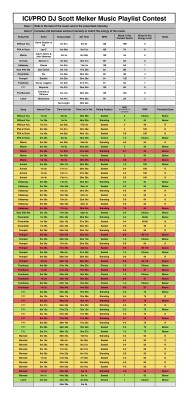
Around the same time John and Scott announced their “ICI/Pro DJ Scott Melker Music Playlist Contest” I was in a state of the dreaded “profile writers block” and I was told that a club member had commented about the lack of variety in my music. Yes, at first I was offended, but then I thought maybe the announcement of this contest and these negative comments were a sign. I decided to take on the challenge of using Scott's playlist and building the best profile I could. This project was extremely challenging for me, I'm usually a profile first music second type of class builder, this forced me to swap my way of thinking. Scott's playlist included some songs that I never imagined playing in an indoor cycling class, when I first heard them I immediately put them in the song category of “will not work in a class”, but I was being forced to use them so I had to figure out how to make them work. After countless hours of listening to Scott's playlist and tweaking my profile, I believe I have come up with a class that uses the artistry and energy of a playlist put together by one of the world's top DJs, while staying true to my scientifically proven teaching methods.
I hope you find this class profile both fun and effective, my class sure did.
I challenge you to step out of your comfort zone and create your own profile for this contest.
Scott Melker's Playlist, to download Right Click > Save As / Save Target As to download. Open in iTunes and then you'll see this in your Spotify Local File folder.
I'm still getting asked (and see questions on Facebook) about integrating music MP3's from multiple sources (Soundcloud's the most popular) into a Spotify or Deezer playlist.
We'll use Spotify for this tutorial as Deezer is nearly identical and Spotify is more popular right now. I'm using a PC, but the solution is the same on a MAC if you're having this problem that goes something like this:
Hi John,
I downloaded a Free Music Friday track from Soundcloud (or one of Dennis Mellon's fabulous 3 song mixes) and want to include it in a Spotify playlist. I'm pretty sure I downloaded the track and it opened and played in iTunes – but I can't find it anywhere in Spotify.
Can you help me?
Frustrated Instructor 🙁
Hidden settings in iTunes and Spotify and your Internet Browser
We'll actually they're not hidden, just hard to find without knowing where to look. There are two places that will decide what local files (music that you have in iTunes) will be displayed in Spotify's Local File Library.
iTunes settings
When you download a MP3 from any website, it will typically end up in your Download Folder. I say typically because the default location on every browser (Chrome, FireFox, Safari – please don't use IE) is your computer's Download Folder. If your downloaded MP3s don't end up in your Download Folder you can change the location in the browser's settings. Leave a comment below if you need help.
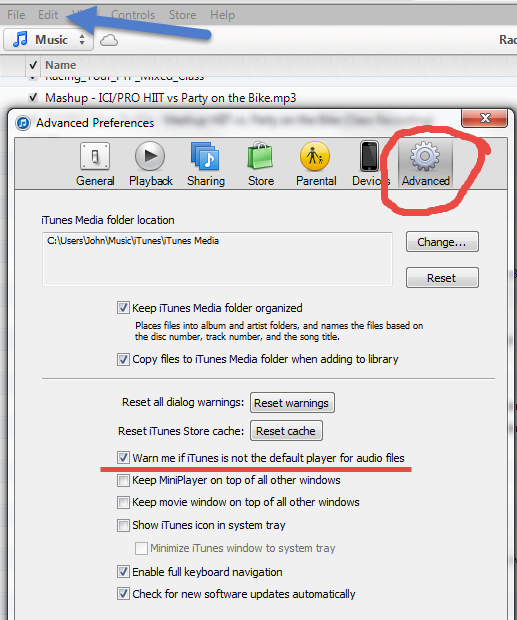
To get your new remix into iTunes you just need to click the file and it should open in iTunes. If it doesn't open iTunes and go to Edit > Preferences > Advanced and tic the box shown below and then close the Edit window. Click another MP3 in your Download Folder and you'll get a message, something like; iTunes is not the default music player… would you like it to be? You do. Select yes and that part's done.
Now just because a MP3 opens and plays in iTunes, doesn't mean it's actually in iTunes.
Go back to the Advanced settings in iTunes. Tic the two boxes shown below so when you open a track iTunes will make a copy and add it to your My iTunes Music Folder. That will solve 99% of the problems I hear 🙂
Spotify settings
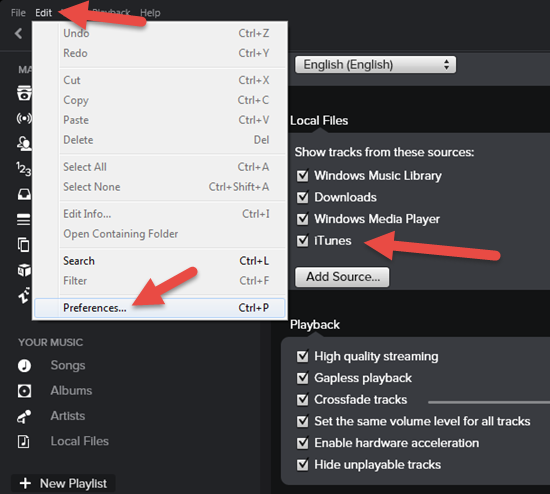
The defaults settings in Spotify should be set correctly. So once you've downloaded a track, clicked it and it opened in iTunes, it will show as a local file in Spotify. Here's where you check if it doesn't.
Yes I know Spotify is supposed to also include files from your Download Folder – I'm not sure it works for everyone. So Tic everything you see here.
Did this solve a big problem for you?Here's how you can reciprocate value with me and have access to dozens of similar tricks combined with over 1300 articles and 60+ class profiles.